Ban, block, or remove: three different WhatsApp actions
"Ban someone on WhatsApp" sounds like one action. It's three, and picking the wrong one is why people spend a week reporting a contact while nothing changes. You can remove someone from a group you run, which takes effect the instant you tap it. You can block a contact, which stops their messages reaching you but does nothing to their account. Or you can report an account for a violation so Meta reviews it and decides whether to ban it. That last one is the only route that reaches the account itself, and the only one whose outcome you don't control.
Which action you need depends entirely on what's happening to you. Sort that out first.
| Action | What it does | Who's notified | Reversible? | Who can do it |
|---|---|---|---|---|
| Remove from group | Ejects them from one group you admin | No | Yes — you can re-add | Group admins only |
| Block | Stops their calls and messages to you | No | Yes, unblock anytime | Anyone |
| Report for a ban | Sends the evidence to Meta to review | No | Ban can be appealed | Anyone; Meta decides |
If your real goal is the whole account taken down, that's the reporting route, and we cover it in depth in the companion guide on how to get someone's WhatsApp banned. It's also worth knowing what a report can and can't achieve before you file one: WhatsApp acts on verified policy breaches judged independently by Meta, so a report is a request, never a switch you flip.
How to ban someone from a WhatsApp group you run
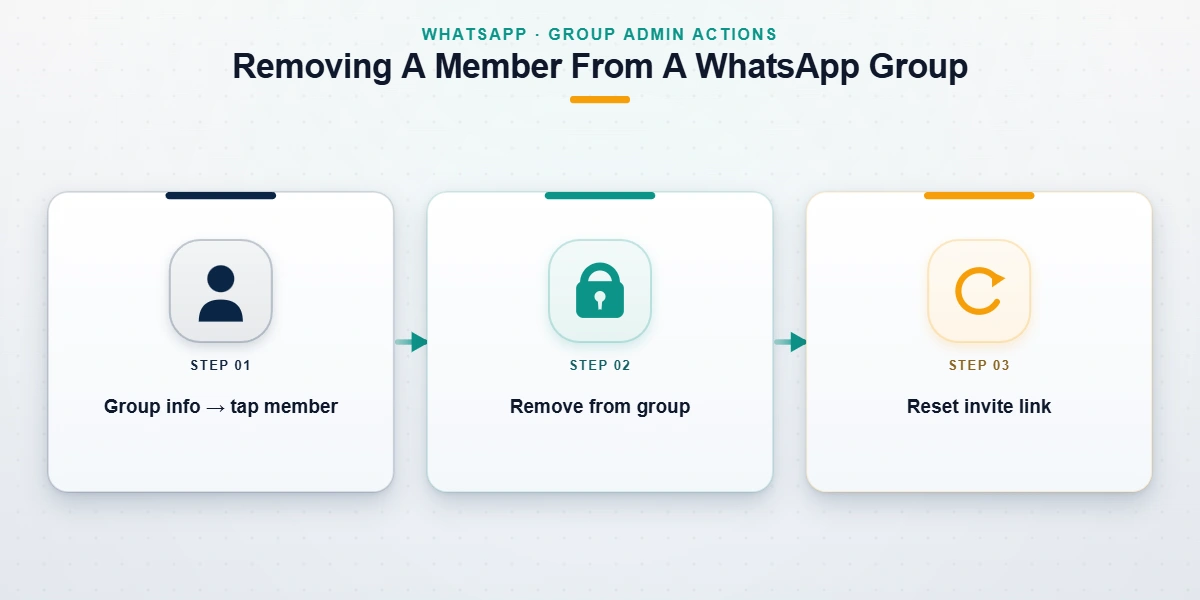
If you administer the group, this is the fastest, cleanest version of "how to ban someone from WhatsApp": no Meta, no review queue, no waiting. On Android or iPhone, open the group, tap the group name to open Group info, scroll to the participant list, tap the person's name, and choose Remove from group. They're gone at once, and WhatsApp sends them no notice — the group just disappears from their chat list.
Here's the accuracy point almost every other guide skips. WhatsApp groups have no per-member ban list. Removing someone doesn't permanently bar them, so if your invite link is public or they know another member, they can walk back in. The real "ban" is therefore two moves: remove the person, then open Invite via link and tap Reset link so the old link dies. For recurring trouble, make yourself the only admin and switch on admin approval for new members. That combination is as close to banning someone from a WhatsApp group as the app allows, and all of it sits in your hands.
How to block someone on WhatsApp, and why a block is not a ban
Blocking is the action most people actually mean when they type "how to ban someone on WhatsApp," so it pays to be precise about what it does. Open the chat, tap the contact's name, scroll down, and tap Block; you can add a report in the same step. After that, their calls and messages no longer reach you, they can't see your last-seen, online status, profile photo, or status updates, and anything they send sits on their phone with a single tick, undelivered. They aren't told they've been blocked.
But a block is a wall around you, not a penalty on them. Their account keeps working normally with everyone else. This is the biggest misconception in the whole topic: a block is unilateral and does nothing to their account, while a ban is Meta acting on the account itself.
Can you ban someone on WhatsApp without being an admin?
Not the group kind. Without admin rights you can't remove or ban anyone from a group, and as an ordinary user you can never ban another person's account yourself — you can only block them and report the account for Meta to judge. People also search "how to ban someone whatsapp number" and, in broken form, "how to banned someone whatsapp number." Both usually mean blocking a number, and a block is tied to that number, so if the person switches SIM the block doesn't follow them. To stop an account rather than a number, you're back to reporting.
How to get someone's WhatsApp banned by reporting a violation
When people ask how to get someone's WhatsApp banned, this is the route that reaches the account: you report it, and Meta decides. Open the chat, tap the contact's name, scroll to the bottom, and tap Report. WhatsApp lets you report and block in one step and forwards the last five messages that contact sent you, plus the account ID, to its review team. To flag a whole group, use Report group on the group-info screen. If someone is pretending to be you or your business, use the dedicated impersonation report; the fake account doesn't even need to be in your contacts for you to file it.
Two things decide whether this works, and report count isn't either of them. The first is evidence: capture timestamped screenshots of the messages, the profile, and any scam links or payment demands before you block, because blocking can hide the chat. The second is the category: the violation has to be genuine. In other words, you don't get someone banned from WhatsApp by force of numbers; you do it by handing reviewers a clear, evidenced breach. That evidence-first method is the same one we walk through in detail for getting someone banned from WhatsApp, and it mirrors how you'd get someone banned from Facebook, since both run on Meta's review machinery. Piling on extra reports does nothing; we put that claim to the test in our breakdown of whether WhatsApp mass-report bots work.
What actually gets a WhatsApp number or account banned
WhatsApp bans accounts for breaking its Terms of Service, not for being annoying or ending things badly with you. Getting the category right is the biggest single factor in whether a report goes anywhere. Its account-ban policy covers a defined set of behaviours, and as of July 2026 the ones reviewers act on include:
- Scams and financial fraud: investment cons, "wrong number" openers, fake sellers, and phishing links.
- Impersonation: pretending to be you, your business, or a public figure to deceive people.
- Sustained targeted harassment: repeated unwanted contact, threats, or coordinated abuse.
- Illegal content: child sexual abuse material, terrorism, or the sale of regulated goods, which draw the fastest and hardest permanent bans.
- Spam and malware: bulk unsolicited messaging, automated blasting, and malicious links.
- Unofficial apps: GB WhatsApp, WhatsApp Plus, and similar modified clients, which are a bannable breach on their own.
What is not bannable matters just as much. Someone disagreeing with you, leaving a group, ghosting you, blocking you, or being on the wrong side of an old argument breaks no rule, and reporting it as one wastes time and reads as abuse of the tool. Searches like "how to ban someone whatsapp account" tend to spike right after a personal fallout. If there's no real violation behind the anger, there's no honest way to force a ban, and anyone selling one is selling nothing. Bans also arrive in tiers: a temporary ban, often a first warning or tied to an unofficial app; a permanent ban for serious or repeated abuse; and a number- or device-level ban for persistent repeat offenders.
Paid ban panels and automated reporting scripts advertise heavily against every search on this topic, and neither reaches the step that actually decides the case: a reviewer reading what the reported account itself sent. What those downloads and rented dashboards really contain, and what they take from whoever installs them, is examined in our teardown of the WhatsApp mass report bot. If your question is about the sellers rather than the tooling, meaning the pricing, the guarantees and the refund promises, that side of it is mapped in how the paid WhatsApp ban-service market works.
When the problem spans other platforms, or needs a takedown
Harassers and scammers rarely stay on one app. If the same person is running a fake profile or posting abusive content elsewhere, the evidence-first approach carries straight across. We keep platform-specific takedown guides for exactly that: taking down a Facebook account, removing a Telegram channel, a Snapchat account, and an X/Twitter account. When it's a piece of content rather than an account, see getting a YouTube video taken down, removing an Instagram account, and the quicker route for getting a TikTok taken down.
Reported a genuine violation and seen nothing change after 72 hours? The fix is better evidence and the right escalation, not another round of reports.
Being harassed, scammed, or impersonated on WhatsApp and the reports aren't sticking? Talk to a specialist about your case for a free, no-obligation review. We'll tell you honestly whether it's actionable, and we never charge to "guarantee" a ban.
What our team will and won't do
This category runs on scams, so the boundaries are worth stating plainly. We do not mass-report innocent accounts, and we won't help anyone who wants to: coordinated false reporting is abuse of the platform, it generally fails, and it can flag the reporter's own account. We never guarantee a ban, a takedown, or a timeline, because WhatsApp bans only on verified violations judged independently by Meta. We never ask for your password or anyone else's, never charge a "pay-to-remove" fee, and never file fabricated reports or fake legal claims. If a service promises an instant, guaranteed ban for money, it's a scam, full stop. The full scope of what we take on sits in our reporting and recovery limits.
Where a real case is genuinely stuck — ongoing harassment, an organised scam, or business impersonation that self-reporting hasn't resolved — a professional team helps by structuring the evidence and filing it through the correct official channels. That work is led by our former Meta and TikTok Trust & Safety specialists, who have watched these reviews get triaged from the inside. The aim is never to weaponise reporting. It's to present a real, provable violation in the form Meta's reviewers can actually act on.