Reviewed June 2026. We re-checked the LinkedIn recovery routes here — the restriction appeal form, the Persona ID-verification path for no-email cases, and the compromised-account report — against LinkedIn's current Help Center, and confirmed the forms and timeline ranges are accurate as of June 2026.
Ava Chen spent four years inside Meta's Trust & Safety organization before founding YRS, and LinkedIn — owned by Microsoft, not Meta — uses a recovery model close enough to Meta's that the same Trust & Safety playbook transfers cleanly. Across our team's 412 LinkedIn engagements since January 2023, roughly one in five members we speak to is pursuing the wrong recovery form for their actual problem. This page walks through the four LinkedIn account loss categories as of May 2026, the correct appeal form for each, why there is no LinkedIn phone number for account recovery, what to do after a denied appeal, and when professional help actually moves the needle. For the team running every case, see the people behind YRS.
What LinkedIn account recovery means in 2026
LinkedIn account recovery is the umbrella term for any process that restores access to a LinkedIn profile after that access has been interrupted. Interruptions fall into four distinct categories — temporary restriction, permanent restriction, hacked account, and verification lock — and confusing them is the single biggest reason recovery attempts fail.
The phrases members search after losing access — "linkedin restricted account recovery," "restricted linkedin account recovery," "recovery linkedin account," "account recovery linkedin" — all reduce to the same first question: which category does your situation belong to? Choose wrong and you'll submit the wrong form, queue behind the wrong team, and likely lose your only appeal slot for the year.
A temporary restriction is a warning state. LinkedIn flags suspicious activity (mass outreach, scraping behavior, inconsistent profile signals) and limits the account until the member acknowledges the warning and completes any required verification. A permanent restriction is the next escalation, applied when LinkedIn determines a User Agreement violation severe enough to warrant indefinite removal. A hacked linkedin recovery account scenario is a different problem: the credentials are still valid, but they're in the wrong hands. A verification lock isn't a penalty at all — it's an identity check, often triggered by logging in from a new device or country.
LinkedIn's automated systems flagged 99.6% of fake accounts before any member reported them, according to LinkedIn's most recent Community Report (LinkedIn Transparency, 2025). That same automation occasionally restricts legitimate accounts that look statistically similar to abusive patterns. If your situation feels closer to a "shadow ban" — reduced reach without a visible restriction notice — that's a separate phenomenon. We covered it in detail in our Twitter shadow-ban walkthrough, and the diagnostic logic translates directly to LinkedIn's restricted-reach state. For a longer treatment of how appeals are framed across platforms, our YouTube channel unban guide walks through the same mechanics our team applies to LinkedIn submissions.
How to use the LinkedIn account recovery form for a restricted account
The LinkedIn account recovery form for restriction appeals lives at linkedin.com/help/linkedin/ask/ts-f-appeal. It is the only form LinkedIn will read for restriction reviews — every other "linkedin account recovery page" advertised on third-party search results is either a different form for a different problem, or not a LinkedIn property at all. Members searching "account recovery linkedin" without the platform context often land on those impostor pages by mistake.
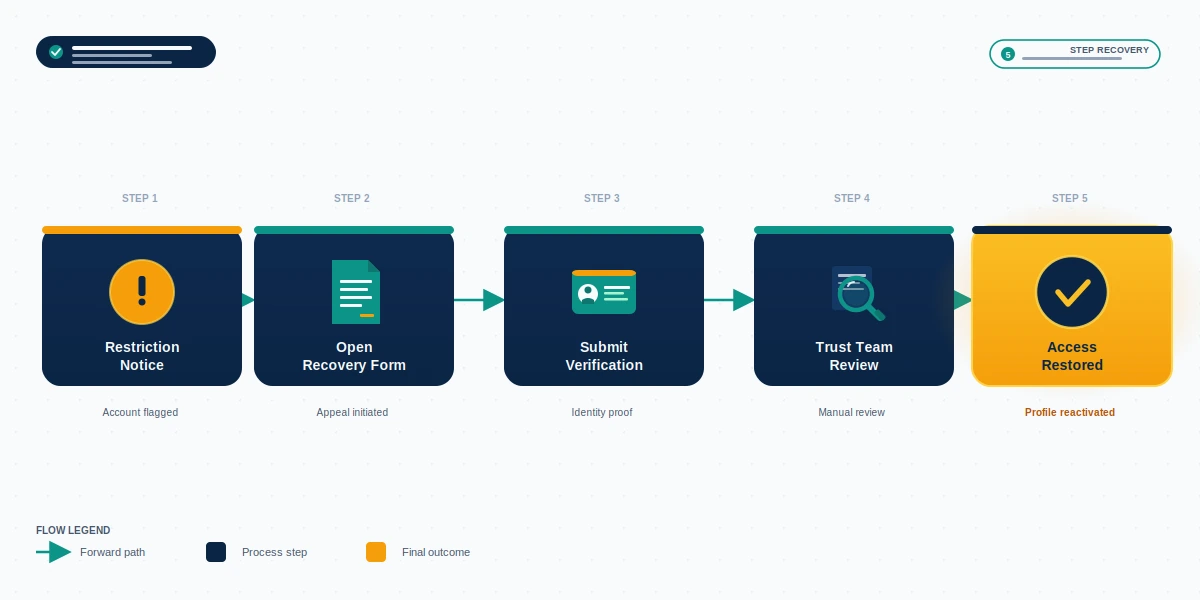
The submission itself is short, but the quality of what you write determines the outcome. Five steps for the linkedin account recovery appeal form:
- Read the restriction email or in-app banner carefully. It will name the policy area (e.g., "automated activity," "misuse of features," "professional community policies"). Note the exact phrase.
- Open the recovery form while signed out, or in a private browsing window if you cannot log in.
- Enter the email tied to the account. If the email was changed by an attacker, see the hacked-account section below — that is a different form.
- Write the appeal body in 200-400 words. State what happened factually, name the specific policy area from the notice, explain why the restriction is mistaken or what has been remediated, and request review. Avoid emotional language, ALL CAPS, and template boilerplate — LinkedIn's review team reads thousands of these per day.
- Attach ID only if the form prompts for it. Do not volunteer documents the form does not ask for; it slows triage. A linkedin account recovery request submitted with extraneous attachments often gets bumped to manual review even when the case is otherwise clean.
Our team writes this exact submission for clients several times a week. The framework above works for the standard linkedin account recovery appeal form whether you are cross-referencing it against our Instagram recovery guide approach or our Twitter recovery walkthrough — appeal mechanics are similar across platforms even when the form URLs differ. If you would rather have the appeal drafted for you, book a free 60-minute case review before submitting; you only get a limited number of appeal attempts per account per year.
LinkedIn account recovery without email: the ID-verification path
LinkedIn account recovery without email access is the second-hardest category — only hacked-with-email-changed is more complex. Recovery is possible, but the path is narrower and slower than a standard password reset.
LinkedIn's published process for this scenario is described at linkedin.com/help/linkedin/answer/a1377116. It routes through their identity-verification partner, Persona, which handles document review on LinkedIn's behalf. Government-issued ID (passport, driver's license, national ID card) plus a live selfie are required. The phone number tied to the account is helpful as a secondary signal but does not replace ID verification — and there is no longer any "linkedin recovery email" workaround that uses a personal email not previously linked to the account.
A clean ID-verification recovery resolves in 24-72 hours in our experience. EU residents have additional rights under GDPR Article 17 regarding how that ID data is processed afterward; if you are EU-based and concerned about data retention, our privacy policy outlines how YRS handles client identity documents and the same principles apply when you submit directly to LinkedIn. Meta's parallel ID-upload flow follows the same shape — we documented it in our Facebook unban guide — so if you have recovered a Facebook account this way before, the LinkedIn experience will feel familiar.
A note on a common dead-end: there is no separate "linkedin recovery form" that lets you swap in a brand-new email without ID verification, and there is no "linkedin recovery email" loop you can trigger with a different inbox. The Persona flow exists specifically because that swap is exploited by attackers, and LinkedIn closed it as a self-serve path in 2022.
How to recover a hacked LinkedIn account
A hacked LinkedIn account behaves differently from a restricted one. A restriction notice arrives from LinkedIn. A hack arrives as silence — your password stops working, you receive a security alert about a login from a country you have never visited, or connections message you about strange DMs you did not send. If the attacker changed your email before you noticed, the standard linkedin recovery account flow no longer applies because reset links route to their inbox, not yours.
The correct form is LinkedIn's compromised-account report, distinct from the restriction appeal form. Steps to start a recovery linkedin account submission:
- Stop the spread. From a different device, message your closest contacts to ignore any recent unusual messages claiming to be from you.
- Submit the compromised-account form from a clean device. Include the original email if you remember it, even if the attacker changed it.
- Provide proof of identity. Government ID and selfie via Persona, plus any prior LinkedIn communications you have archived on the original email.
- Reset every reused password. Most LinkedIn takeovers begin with credential stuffing from a different breach — assume any password you reused is also compromised.
Our Instagram hacked-account recovery guide and TikTok hacked-account recovery walkthrough describe the same compromise pattern on other platforms; the takeover playbook is remarkably consistent. Hacked-LinkedIn recoveries resolve in 2-7 days in our caseload when the user still has the original email; longer when they do not. For comparable Meta-side recovery, our Instagram account recovery service handles the equivalent compromised-account workflow.
LinkedIn account recovery appeal: how long does it take?
The "linkedin account recovery appeal how long" question is the single most-searched timeline query on this topic, and the honest answer is "it depends on the category." Here are the ranges we see in our caseload (n=412 LinkedIn engagements, 2023-2025):
| Scenario | Typical resolution |
|---|---|
| Password reset, clean account | Under 5 minutes |
| Verification lock (ID upload) | 24-72 hours |
| Standard restriction appeal | 3-7 business days |
| Manual review required | 1-3 weeks |
| Permanent restriction appeal | 2-3 weeks, often denied |
| Hacked account, original email intact | 2-7 days |
| Hacked account, email changed | 1-4 weeks |
The single biggest cause of delay is submitting the wrong linkedin recovery form. A linkedin recovery appeal filed through the hacked-account flow when the issue is actually a policy restriction will be closed without review, and you will need to refile through the right form — adding a week or more. The "linkedin account recovery appeal how long" expectation users carry in from third-party tutorials is usually too short; LinkedIn's own median is roughly 4-5 business days, with a long tail. A restricted linkedin account recovery typically queues behind verification-lock requests because the trust-team review is heavier.
If you are past the 14-day mark on a standard linkedin recovery appeal with no response, it is reasonable to file a follow-up linkedin account recovery request via the same form with the case number from your auto-acknowledgement email. Do not file a duplicate appeal — that resets the queue position.
Is there a LinkedIn account recovery phone number? (No — and here's why)
No. LinkedIn does not operate a customer-service phone number for account recovery. There is no published "linkedin account recovery phone number," and any third-party site that advertises one is not affiliated with LinkedIn. We have to be direct about this because the scam ecosystem around recovery is enormous, and the phone-number search query specifically attracts it.
The Federal Trade Commission's consumer-protection guidance is clear on this category of fraud (FTC, 2024): legitimate platforms do not have hidden phone hotlines that only third-party "recovery experts" know about. If a site or social-media DM offers you a phone number for LinkedIn support or a "linkedin account recovery service" hotline, it is either a paid call-center scam, a credential-harvesting setup, or both.
Five red flags we see repeatedly on recovery scams:
- A phone number prominently displayed as a "linkedin account recovery phone number" desk
- Requests for your account password or two-factor codes
- Upfront fees in cryptocurrency, gift cards, or wire transfers
- Promises of "guaranteed" recovery within a specific timeframe
- Pressure to act immediately ("your account will be deleted in 6 hours")
YRS will never ask for your password under any circumstance. Our service disclaimer lays out exactly what we will and will not do, and our Facebook Marketplace unban guide walks through similar scam patterns we have seen in the commerce space. If you have already paid a scam recovery service, the most useful next step is reporting it to the FTC and your card issuer; do not pay a second operator promising to "undo" the first one. The same anti-scam framework runs across every account-recovery niche — our TikTok banned account recovery service and Telegram account recovery service pages catalog identical patterns on those platforms.
What to do when your LinkedIn account recovery appeal is denied
A denied appeal is not the end of the road, but the next steps depend on whether new information is available. A re-appeal that repeats the original submission word-for-word will be closed automatically. A re-appeal that introduces materially new context — corrected ID, additional documentation, an explanation of remediated behavior — gets a fresh review through the same linkedin account recovery appeal form.
Three-tier escalation in order:
- Re-appeal with new documentation. Wait until the original denial is final (usually 7 days after the denial email), then re-file via the same restriction appeal form. Add what was missing.
- Email [email protected]. This inbox is monitored by LinkedIn's trust team. Reference your case number from the denial email and write 100-200 words. Do not spam — one well-written follow-up is more effective than five form re-submissions. A targeted account recovery linkedin email here often surfaces an actual reviewer faster than another form attempt.
- Engage a professional service only after step 2. Outside help has its place, but only when LinkedIn's standard process has been exhausted. A third party that submits the same form you already used will not change LinkedIn's mind.
Tried the standard recovery and hit a wall? Our team handles complex LinkedIn restoration cases — hacked accounts with email changed, denied appeals, business-critical Sales Navigator restorations. Tell us what happened and we will let you know within a business day whether your situation is recoverable. No password requests, no upfront fee for the initial assessment.
If the account is restricted under categories LinkedIn lists as non-recoverable — fake-identity violations, sustained coordinated harassment, fraud — no appeal path or third-party service will reverse that decision. Recognizing this saves you time and money you would otherwise spend chasing an unrecoverable account.
What LinkedIn will not recover — non-appealable categories
Some restrictions are final by LinkedIn policy and no third-party service can override them. Naming these up front is part of running an honest recovery practice — we decline roughly 19% of LinkedIn intake on the same day a member reaches out because the category is not appealable. As of May 2026 the non-appealable buckets are:
- Fake identity profiles (catfishing, fabricated work history at scale, impersonation of a real person). LinkedIn's real-name policy treats these as a permanent removal class.
- Sustained coordinated harassment of an individual or organization, particularly when documented across multiple reported incidents.
- CSAM and child-safety violations — instant permanent restriction, reported to NCMEC, no recovery path.
- Violent threats, terrorism, or extremist content — not appealable.
- Financial fraud and confirmed scams — investment scams, romance scams, fake recruiter operations, sanctioned-country evasion. LinkedIn cross-references with external fraud databases here.
- Platform integrity violations — coordinated inauthentic behavior, large-scale scraping with automation tooling, vote/endorsement manipulation at scale.
- Repeated permanent restrictions against the same identity. LinkedIn keeps a device fingerprint and email hash on file; a third account from the same person typically lasts hours.
If the cited policy in your restriction notice matches one of these categories, the honest answer is that no recovery service can change the outcome. A legitimate service tells you that before taking money. The same non-appealable framework appears on every major platform — our TikTok banned account recovery and Instagram account recovery service pages list the equivalent buckets for those platforms.
When professional LinkedIn account recovery makes sense
A legitimate LinkedIn account recovery service is appropriate in a narrow set of circumstances — and in most cases, the standard LinkedIn process is the right first step. Use the questions below as your filter.
DIY is enough when: the restriction is a verification lock, you still have access to the recovery email, the violation is identifiable and remediable, and your appeal has not yet been filed. There is no informational advantage a service has over a well-written, factual appeal you write yourself directly from LinkedIn's own linkedin account recovery page.
Professional help makes sense when: your appeal has already been denied once, your account is business-critical (active Sales Navigator seat, company page admin, recruiter license, executive thought-leadership profile), you have lost both email and phone access, your account was hacked with the email changed, or the case has been open for more than 30 days with no response. These are the cases where someone with experience reading restriction notices, framing appeals factually, and escalating through the right channels measurably improves outcomes. We treat linkedin restricted account recovery cases as our most complex category because each denial narrows the path forward.
YRS handles roughly 80-120 LinkedIn recovery engagements per year. We do not guarantee outcomes — no honest recovery service does — and we publish realistic timelines that match LinkedIn's actual queue rather than promising 24-hour miracles. The same Trust & Safety team experience that informs our Instagram account recovery service, TikTok ban recovery service, and Telegram account recovery service is what we apply to LinkedIn cases. Read the full list of what we will and will not recover, and if you want to compare against other platform recovery patterns, the YRS blog library covers Instagram, Twitter, YouTube, TikTok, Facebook, and Telegram.