Can you actually get someone's WhatsApp banned?
Yes — but only by reporting an account for a genuine violation of WhatsApp's rules, and only WhatsApp itself (owned by Meta) can carry out the ban. You cannot delete or ban another person's account directly, and no amount of reporting forces a removal on its own. When you report a contact, WhatsApp receives the most recent messages that account sent you and checks them against its account-ban policies. The decision is the platform's, not yours. As of July 2026, WhatsApp enforcement takes several distinct forms: a temporary ban (often tied to unofficial apps like GB WhatsApp or a first warning), a permanent ban for serious or repeated abuse, and a phone-number or device-level ban for persistent repeat offenders. Knowing which outcome a report can realistically produce is what stops you being scammed by anyone selling an "instant ban" button.
So the honest version of how to get someone's WhatsApp banned is this: document a real violation, report it through the official tools, and let Meta's reviewers decide. If your worry is the opposite — that the other person will retaliate and get your number banned — our guide to recovering a banned WhatsApp account covers the appeal path. The mechanics mirror takedowns on other Meta platforms, so if you are also dealing with a fake profile elsewhere, the same evidence-first method appears in our Instagram account takedown guide.
Before reporting anyone, it is worth reading our reporting and recovery limits: WhatsApp acts on verified policy breaches reviewed independently by Meta, and a report is always a request, never a guarantee.
What actually gets a WhatsApp account banned?
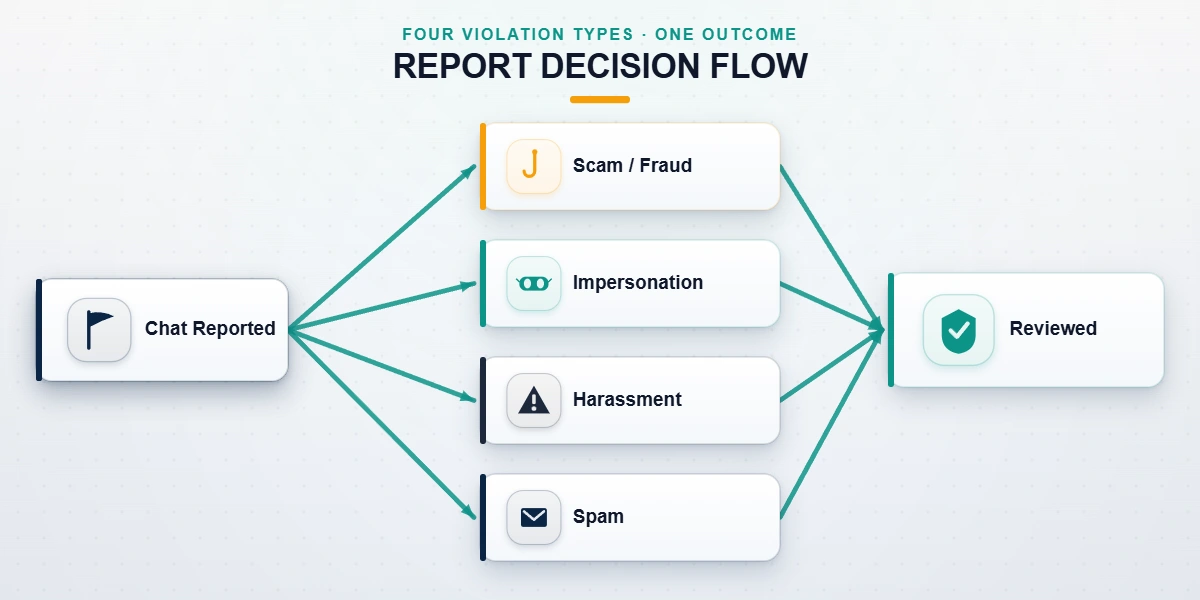
WhatsApp bans accounts for behaviour that breaks its Terms of Service — not for being annoying, ending a relationship, or blocking you. Getting the category right is the single biggest factor in whether a report succeeds. As of July 2026, the violations WhatsApp actually acts on include:
- Scams and financial fraud — investment and "wrong number" scams, fake sellers, and phishing links. WhatsApp treats suspicious-message and merchant-fraud reports as high priority.
- Impersonation — someone pretending to be you, your business, or a public figure to deceive contacts.
- Sustained targeted harassment — repeated unwanted contact, threats, or coordinated abuse.
- Illegal content — child sexual abuse material, terrorism or violent extremism, and the sale of regulated goods. These trigger the fastest, hardest permanent bans.
- Spam and malware — bulk unsolicited messaging, automated blasting, and malicious links.
- Unofficial apps — using modified clients such as GB WhatsApp or WhatsApp Plus, which is itself a bannable breach.
What is not bannable matters just as much. Someone disagreeing with you, leaving a group, ghosting you, blocking you, or being on the other side of an old personal dispute is not a policy violation — and reporting it as one wastes everyone's time and looks like abuse of the tool. Of the WhatsApp abuse cases our team reviewed since January 2024, a large share described exactly these non-violations (our internal records as of July 2026). To keep your own account clean while you report others, our notes on avoiding a platform ban apply across Meta apps.
How to get someone banned from WhatsApp, step by step
Here is how to get someone banned from WhatsApp the legitimate way, using the in-app tools Meta actually reviews. The flow is nearly identical on Android and iPhone:
- Open the chat with the account you need to report.
- Tap the contact's name at the top to open their profile.
- Scroll to the bottom and tap Report (or Report contact).
- Choose whether to block and to delete the chat when prompted — you can report and block in one step.
- Confirm. WhatsApp forwards the last five messages that contact sent you, plus the account ID, to its review team.
To report a group, open the group info screen, scroll down, and tap Report group. To report a business or merchant for fraud, use the report option inside the business chat so the complaint is routed to WhatsApp's commerce-policy reviewers.
Gather evidence before you block. Blocking can hide the chat, so first capture timestamped screenshots of the messages, the profile, and any scam links or payment requests, and note the dates and what happened. This record is what turns a vague complaint into an actionable report — and it is exactly what a professional team would ask you for later. Strong, specific evidence is the closest thing there is to making a report "work," because reviewers act on demonstrable violations, not on emotion or volume.
How many reports does it take to get someone banned on WhatsApp?
There is no magic number. WhatsApp does not ban an account simply because it crosses some threshold of reports, and the widely shared claim that "three reports equals an automatic ban" is a myth. When an account is reported, WhatsApp's systems review the most recent messages it sent and look for patterns that match known abuse — spam signatures, scam scripts, mass-messaging behaviour, or prohibited content. One well-evidenced report of a clear violation can lead to action, while a hundred coordinated reports over a personal grudge can lead to none. Volume is not the lever; verified violation is. In short, how to get someone's WhatsApp banned comes down to evidence quality, not report count.
This is also why buying "mass report" services is a waste of money and a risk to you. Coordinated fake reporting is itself a misuse of WhatsApp's tools, it rarely changes the outcome, and it can draw scrutiny to the reporting accounts. If a single honest report does not resolve a serious, ongoing problem, the answer is better evidence and the right escalation path — not more reports. Anyone still weighing a purchase should first read what a WhatsApp mass report service hands over at login. And if your own access gets caught up in the fallout, our WhatsApp account recovery steps explain the official routes back in.
How to get someone banned on WhatsApp for impersonation or scams
Impersonation and scams are the two strongest, cleanest cases for a ban — and the two that competing guides rarely cover properly. If someone is pretending to be you, WhatsApp has a dedicated process for reporting an account that is impersonating you; you do not even need the impersonator in your contacts to file it. For a scam or fake seller, report the specific messages and, where money changed hands, the merchant-fraud option.
If it is your business or brand being impersonated — a fake support line, a cloned catalogue, or a phishing account using your logo — treat it as a brand-protection matter, not a personal spat. Build an evidence pack: screenshots of the fake profile, the number in use, examples of the deception, proof you own the real brand, and a short timeline. That package is what makes "how to get someone banned on WhatsApp" achievable in practice, because it gives reviewers everything they need in one place. Business impersonation often spans platforms, so if the same actor is cloning you elsewhere, our professional account recovery service and Telegram account recovery team handle cross-app takedown and recovery together.
What happens after you report someone on WhatsApp?
After you submit a report, WhatsApp reviews it confidentially — the person you reported is not told who reported them, and they are not notified at the moment of reporting. Reviewers assess the forwarded messages against policy and decide whether to warn, temporarily ban, or permanently ban the account. Clean, well-evidenced reports of clear violations are typically reviewed within about 24–72 hours, though complex or borderline cases take longer, and many reports result in no visible action because the behaviour did not meet the violation bar. You will not usually receive a case-by-case outcome notice, so judge success by the behaviour stopping rather than by a confirmation message.
If the account keeps operating after a legitimate report, escalation — not repetition — is the next move. Preserve your evidence, report each new violation as it happens, and for serious harassment or fraud consider involving the relevant authorities, such as your national consumer-protection or cybercrime body. If access to your own number is ever caught up in the fallout, recovery is still possible even without the original SIM — our guide to recovering WhatsApp without your SIM covers that path.
Being harassed, scammed, or impersonated and the reports aren't working? Speak with a specialist about your case for a free, no-obligation review. We'll tell you honestly whether it's actionable — and we never charge to "guarantee" a ban.
Reporting the right way: what our team will and won't do
This is a category crowded with scams, so our boundaries are worth stating plainly. We do not mass-report innocent accounts, and we won't help anyone do it — false or coordinated reporting is abuse of the platform, it usually fails, and it can flag the reporter's own account for review. We never guarantee a ban, takedown, or timeline, because WhatsApp bans only on verified violations judged independently by Meta. And we never ask for your password or the other person's, never charge a "pay-to-remove" fee, and never file fabricated reports or fraudulent legal claims. If a service promises an instant, guaranteed WhatsApp ban for a fee, it is a scam — full stop. The full scope of what we will and won't take on is spelled out in our disclaimer and reporting limits.
Where a legitimate case is genuinely stuck — ongoing harassment, an organised scam ring, or business impersonation that self-reporting hasn't resolved — a professional team helps by structuring the evidence, filing through the correct official channels, and coordinating recovery of anything you've lost in the process. The work is led by our former Meta and TikTok Trust & Safety specialists, who have seen how these reviews are triaged from the inside. The goal is never to weaponise reporting; it is to make sure a real, provable violation is presented in the way Meta's reviewers can actually act on.