What blocking on YouTube actually controls
YouTube splits what everyone calls blocking into three separate controls, and choosing the wrong one is why the comment is still sitting there an hour later.
Hide user from channel is the channel owner's tool: it stops that account's contributions appearing on your channel. Block is a filter on your own view, not on your channel. Removing a comment is a single-comment action available only on videos you own. Three menus, three scopes, three different outcomes.
Your Reputation Solution is an account-recovery and reputation practice staffed by former platform trust-and-safety reviewers, and this three-way split is the correction it makes most often on channel-moderation calls. People arrive having used the control that felt obvious rather than the one that reaches the surface they care about.
Start with what the documentation actually commits to. Hiding a user hides their comments, live chats and community posts from your channel, and YouTube's own help page adds a detail most guides miss: hidden users and their associated accounts also lose the ability to create clips from your videos and live streams. Past comments from a hidden user stop showing on your Studio Comments page, though YouTube promises no timeframe, and activity from that person's associated accounts is not hidden at all. Searchers reach this control as hide user from channel youtube and as youtube hide user from channel, and both phrases land on the same list in Studio. Blocking is documented far more narrowly, as a way to stop seeing someone's live chat messages and mentions. The blocking page states plainly that in YouTube Studio you will still see their comments on your channel — the sentence that explains why creators block someone and find nothing has changed in their moderation queue.
Now the myth, because it drives more of this search traffic than any feature does. Searches like how to block someone on youtube from seeing your videos and how to block someone on yt are usually asking for a wall that does not exist. A public upload is public. Neither hiding nor blocking removes someone's ability to watch, and neither survives a signed-out browser tab or a second account. What both controls do is remove that person's voice from spaces you own, which is a smaller promise and a real one.
The question people are too polite to ask has a clean answer. What does hide user from channel do to the relationship? Nothing visible: YouTube's help page says a hidden person is not notified. Hiding, blocking and reporting are all silent, though only a report reaches a reviewer. Your Reputation Solution corrects that expectation early, because a creator who believes a block ended the problem stops collecting the evidence a report would need.
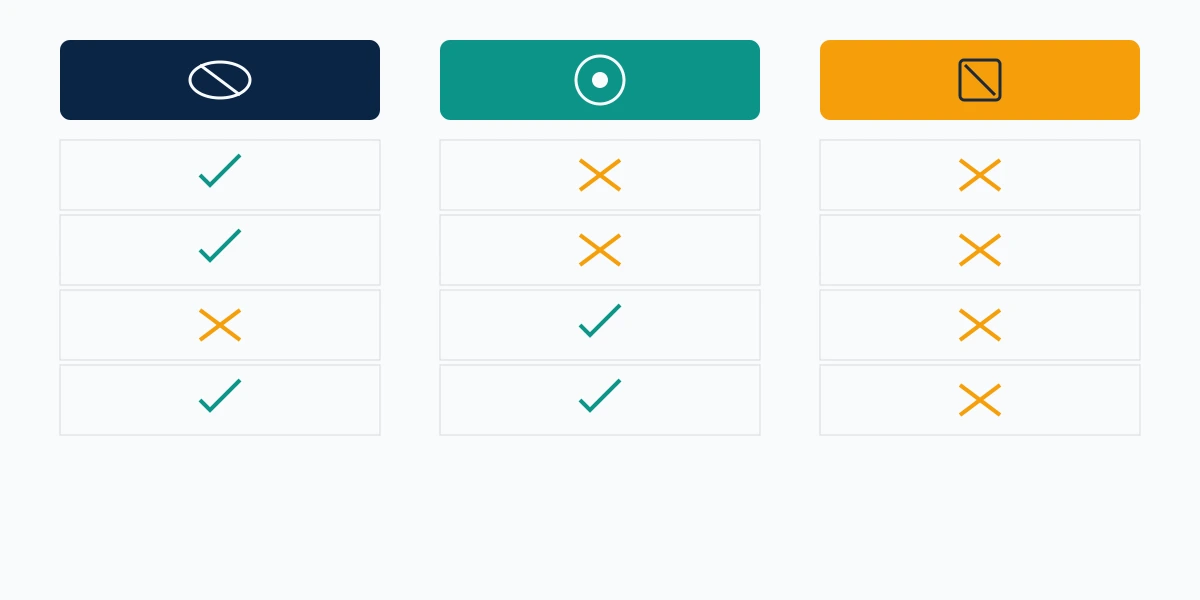
| Hide user from channel | Block | Remove comment | |
|---|---|---|---|
| Scope | Your whole channel | Your own view | One comment |
| Hides comments from viewers | Yes | No | Yes |
| Covers live chat and community posts | Yes | Live chat only | No |
| Stops them watching your videos | No | No | No |
| Person is notified | No | No | No |
| Reversible | Yes | Yes | No |
One boundary caps everything below: no setting, and no vendor, deletes another person's account. That holds on every platform, which is why the honest answer about deleting an account you do not own is the same everywhere.
How to block someone on YouTube on PC and mobile
The route depends on where you met the person: a comment, a mention, or a live chat.
How to block someone on YouTube PC
On a computer, the fastest path runs through the comment itself. Hover it, open the More menu beside it, and choose Hide user from channel — one click, applied channel-wide rather than to that single comment. That is what people mean by how to block someone on youtube comments and how to block someone on youtube channel.
The durable version lives in Studio. Open YouTube Studio → Settings → Community moderation → User management, paste the channel URL into the Hidden users box, and save. Studio matters when someone has been through your comments more than once: you add them without hunting for a comment from three weeks ago. Your Reputation Solution sets clients up in this panel first, since a tuned hidden-users list removes the need for most of what people call in about. It is also the honest answer to how to ban someone from your youtube channel and how to block someone's youtube channel: there is no ban button, there is a hidden-users list, and the list is the closest thing YouTube gives a creator.
Blocking proper has its own two routes, both narrow. In live chat, tap the message and choose Block from the pop-up. From a mention, open Notifications → Mentions, hit More beside the mention, then Block this user and confirm.
Nothing is sent to the person at the end of either route, which is the reassurance most people are really after before they click. Silence is the norm across platforms for this class of action, and the question of whether anyone is ever told who reported or blocked them has one narrow exception almost everywhere: copyright, the one route where filing costs you your anonymity.
How to block someone on YouTube mobile
The mobile app carries the comment-level route and not much else. Tap the three-dot menu beside the comment, then Hide user from my channel. Anyone searching how to block someone on youtube mobile has found the whole app-side feature set: user management, the blocked-words list and the held-for-review queue are Studio functions, and the mobile browser pushes you to the app rather than the Studio settings page. That asymmetry is a YouTube pattern rather than a moderation quirk — channel-level reporting is documented for desktop only too.
Two things to check before you decide the tool is broken. First, hiding is account-based, so a determined commenter with a second channel walks straight back in, and YouTube's own wording confirms it does not hide the past activity of associated accounts. Second, the effect on existing comments is not instant and is not promised to be; if a comment is still visible ten minutes later, that is documented behaviour rather than a failed click. Your Reputation Solution checks both before escalating anything, because a tool that looks broken and a tool that is working slowly need different responses. Where a pattern is genuinely coordinated, the category you file under decides the outcome far more than the number of clicks, and the way report categories route to different queues works the same way across every major platform.
Deleting comments on your own videos, and on everyone else's
You can delete any comment on a video you own. You cannot delete a comment on a video you do not own, and no setting, service or payment changes that.
That sentence answers the second half of this topic, and it is worth being blunt about because the search volume behind how to delete someone else's comment on youtube and how to delete other people's comments on youtube is largely people hoping the answer is different. It is not. On someone else's upload the comment belongs to its author and the thread belongs to the uploader, so your options are to reply, to report it, or to leave it. Even a reply to your own comment sitting under a stranger's video is not yours to remove — the video owner controls that thread. Your Reputation Solution turns away the requests that depend on this being untrue, and the vendors who accept them are selling a report they will file and you could have filed.
On your own channel the tooling is generous. Open YouTube Studio → Content → Comments to see everything in one queue, where each comment carries Remove and Report actions plus the option to hide the author. Anyone searching how to remove comments on youtube in bulk is looking for this page rather than the watch page. Removal is permanent and one-directional: there is no undo, and no archive, so screenshot before you delete, because the evidence people most regret losing is the comment they removed in the first ten angry minutes.
The prevention layer is the part creators skip. Under Settings → Community moderation you can hold potentially inappropriate comments for review, hold all comments for review, add blocked words, and approve a list of trusted users. Blocked words are the tool that quietly answers how to block someone on youtube from replying to your comments: you cannot bar one named account from a reply thread, but you can hold anything containing the phrases that person reliably uses, and a held comment never reaches your audience.
One consequence of deletion is worth planning for. Removing a comment takes it off YouTube, and it does not take it out of Google. Quoted, screenshotted or syndicated text can outlive the comment itself, which is the point at which Your Reputation Solution stops working inside Studio and starts working on search results, and clearing your name out of search results is a separate process with its own four routes. Where a page has genuinely gone but the snippet lingers, Google's outdated-content tool is the mechanism that flushes the cache rather than anything you can do inside Studio.
And where the real grievance is your footage rather than someone's words, moderation is the wrong instrument entirely. A blocked commenter keeps the video they made from your material, which is why the question of who may legally file a copyright strike on a YouTube video sits in a different part of the toolkit.
Shorts comments and live chat need their own tools
Shorts and live chat run on the same comment system as long-form uploads, and both add a wrinkle that catches people out.
How to remove comments on YouTube Shorts
Removal itself is identical: open the comment, use the three-dot menu, choose Remove, or work through the Studio comments queue where Shorts comments sit alongside everything else. The wrinkle is switching comments off. Doing that for a Short needs the YouTube Studio app rather than the main YouTube app, which is why how to remove comments on youtube shorts returns a wall of video tutorials and very little clean text.
Volume is the second wrinkle. Shorts pull far more drive-by and automated commenting than long-form does, so a blocked-words list tuned for a normal upload will let through most of what arrives on a Short. Scam and impersonation comments are the ones to watch: a comment posing as your channel, pointing viewers to a Telegram account or a WhatsApp number, is a routine pattern, and hiding the account does nothing to the destination it advertises. Your Reputation Solution treats those as two jobs rather than one, because the YouTube half takes a click and the other half takes a report on a different service. Reporting the impersonating account on the platform it actually lives on is the half people forget.
How to block someone on YouTube Live
Live chat has its own moderation layer, and the important distinction is duration. Tapping a message and choosing Block deals with the stream in front of you; adding that channel to your hidden users list in Studio is what carries across every future stream. Anyone searching how to block someone on youtube live mid-broadcast wants the first, and almost always wants the second afterwards.
Delegating helps more than tooling does. Moderators can act on chat while you present, which is the single highest-return change a creator can make to a hostile stream, though owner-level settings stay with the owner. Hosts on other platforms hit the same division of labour: TikTok's live host controls separate banning a viewer from reporting them in exactly the same way, with the ban visible and the report anonymous.
When negative comments stop being criticism
Criticism you dislike is not a policy violation, and treating it as one costs you the tools you will need when something genuinely crosses the line.
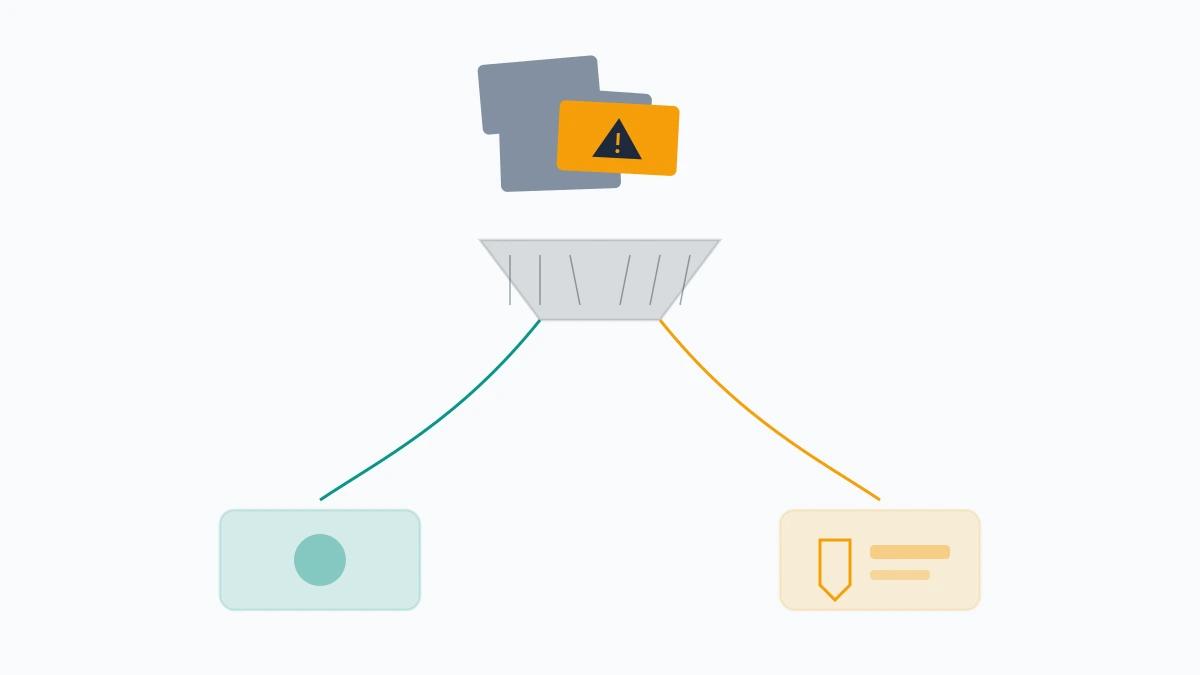
The practical test Your Reputation Solution uses has three questions. Is it about the work or about the person? Is it one account or a pattern of accounts arriving together? Does it contain something a reviewer can verify without your interpretation — a slur, a threat, a phone number, an address? A comment that fails all three is a bad review, and how to remove negative comments on youtube is the wrong question for it: hiding an ordinary critic trains you to reach for moderation when the thing you need is a reply or silence. A comment that passes any of them is evidence, and evidence deserves a report rather than a quiet deletion.
Volume is where the biggest myth lives. Rounding up friends to flag the same commenter does not remove them, because reports are routed by category and assessed against a named policy rather than counted — the same reason mass-flagging fails to get anyone suspended on X. One accurate report beats fifty vague ones, every time.
Three patterns justify escalating past your own channel. The first is a person who follows you across platforms, where a YouTube block does nothing to the Instagram DMs arriving the same evening, and the six reporting routes Instagram actually offers become the relevant half of the job. The second is the commenter who screenshots you and reposts the image somewhere you hold no moderation controls at all, which makes the route for a photo of you posted without permission more useful than anything in Studio. The third is an attack on a business rather than a person, where the comment flood usually turns out to be one part of a campaign that also reaches your listings, and removing a fraudulent business entry from Google Maps belongs in the same response as the moderation work.
If the comments have moved from criticism to a coordinated pattern, Your Reputation Solution will map the surfaces it touches and tell you which routes are worth filing. Book a free case review and bring the permalinks — the evidence you keep decides how far this goes.
What we will and won't do about a comment
Your Reputation Solution files and escalates the report; the platform makes the final decision. That boundary is the whole of the honest offer, and everything below follows from it.
We will help you triage a comment flood, tell you which policy a specific comment plausibly breaches, prepare the evidence pack, and file through the same public forms you can reach yourself. We keep that work to the routes YouTube publishes, because no faster queue exists to buy, and any vendor claiming one is describing a product that does not exist. The services we run sit on that side of the line.
We will not delete a stranger's lawful comment on a video you do not own. We will not stop someone watching a public upload. We will not file a copyright complaint over a comment that merely stings, because a DMCA notice needs a work you own and a fraudulent one is a legal exposure rather than a shortcut. We never ask for your Google account password, and no legitimate practice will — the entire job here runs through your own Studio settings and public reporting forms. Our stated limits are written down for the same reason.
Escalation has a cost worth knowing before you choose it. A block is silent and a report is anonymous, but a copyright complaint is neither: platforms forward the complaint to the person you filed against, and what X sends to the alleged infringer includes the complainant's details. Filing under your own name to remove a comment that hurt your feelings hands your address to someone already behaving badly.
The last honest note is about reach. Winning a removal on YouTube does not delete the clip from the internet, and mirrored content lands in places with no report button at all — filing a copyright notice on Telegram means an email, because no web form exists. Channel moderation is a boundary around your own space, never a delete key for the wider web. The creators who do well with it set it up early, then spend their attention on the upload.