
Two different buttons, two opposite directions
"Report" and "ban" travel opposite ways. A report goes outward to TikTok's moderation team and asks them to judge a broadcast against the Community Guidelines. A ban goes inward. It is a host shutting their own door, and no reviewer ever sees it.
Someone who wants a heckler out of their comment section does not need a report. Someone who wants a violating broadcast stopped cannot get there with a block. That is the distinction we spend the most time correcting.
There is also no button anywhere in TikTok LIVE labelled "ban" or "kick". Both words are borrowed from Twitch and Discord, and TikTok never adopted either. What the app actually gives a host is Block, Mute, and, for a guest sharing the screen, Disconnect. Three controls, three different scopes, and most guides treat them as synonyms.
Your Reputation Solution is a reputation and account-recovery firm whose team files platform reports and escalations for people being targeted online, and both halves of this page describe controls you can work yourself. The confusion runs the other way too. Viewers assume reporting a LIVE removes the streamer from their feed, when reporting does nothing to what they can see; blocking does that. Want both outcomes, and you perform both actions.
WhatsApp splits the same way, and the three-way split between removing, blocking and reporting works identically there: the admin control clears your room, the platform control is the only one that touches the account.
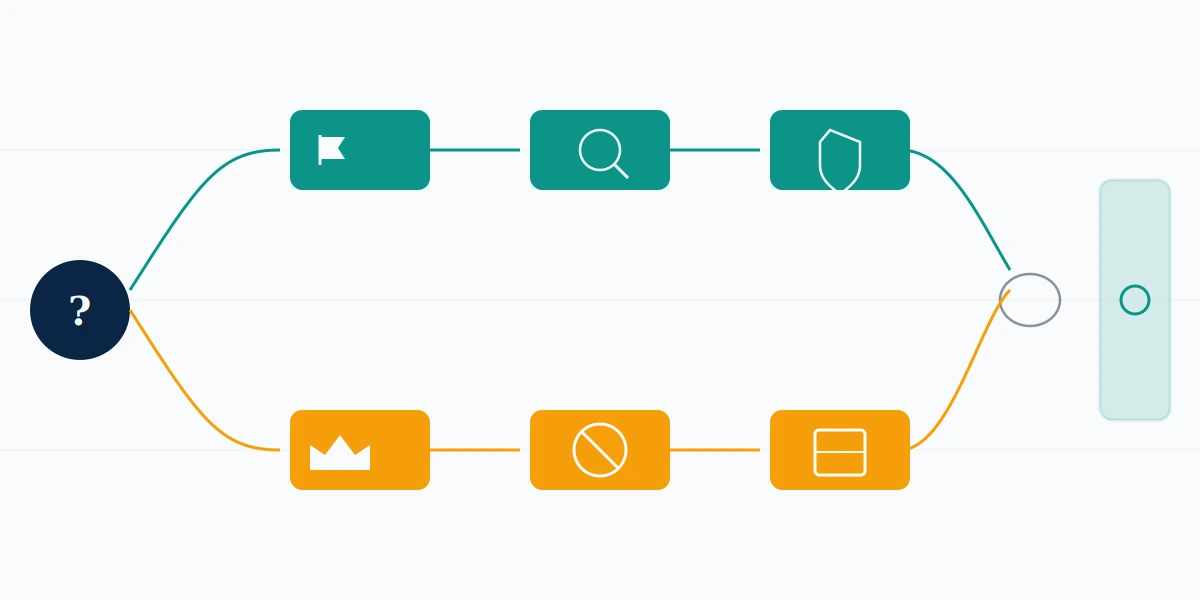
How to report a TikTok LIVE, step by step
Reporting a live broadcast takes four taps and about fifteen seconds.
- Open the LIVE. You must be inside the stream, because the flag control does not exist on the preview tile in your feed.
- Tap the flag icon, bottom-left of the screen.
- Pick the reason that matches the actual violation. That list is covered in the next section, and choosing wrong is the most common way a valid report dies.
- Add one line of context, then submit. Say which rule is being broken and when it happened. "This is disgusting" tells a reviewer nothing; "he has been reading a viewer's home address aloud for ten minutes" tells them everything.
Should the flag be hard to reach mid-stream, there is a second route: tap Share, then Report. It opens the same form.
How to report TikTok LIVE on iPhone is identical to Android: same flag, same corner, same reason list. Desktop is where they genuinely diverge. On the web player you can watch, comment and send gifts, but the in-stream reporting controls are built for the app, so reach for a phone even when you spotted the stream on a laptop. Your Reputation Solution files through this same public flow, because no professional back door exists, and a firm implying it has one is describing a door TikTok never built.
TikTok how to report live stream questions almost always turn out to be timing questions. Report while it runs. Once a broadcast ends it stops being a reportable object, and you are left with the account or a saved replay instead; reporting the account behind the stream is a separate flow with its own review window.
Selling streams route differently again. A LIVE pushing counterfeit goods belongs in the commerce queue rather than the Community Guidelines queue, and which TikTok Shop queue takes the report decides whether anyone with authority over sellers ever reads it.
TikTok LIVE report options: picking the reason that gets actioned
TikTok publishes no LIVE-specific reason list. Categories inside a broadcast are the standard Community Guidelines set: harassment and bullying, hate speech, nudity and sexual activity, dangerous acts, misinformation, spam, plus several more depending on region and app version. TikTok's own reporting guide does not enumerate the in-LIVE dropdown either, which is a genuine documentation gap rather than something competitors are hiding.
One practical consequence follows: your report is judged against the category you picked, not against the harm you felt.
A reviewer opening a harassment report looks for harassment. Where the actual violation was a minor appearing unsupervised on a monetised stream, and you filed under harassment because the chat was cruel, that report closes as unfounded and the stream keeps running. Pick the rule being broken most clearly, even when it is not the thing that upset you most.
This is also where TikTok LIVE report options end and other systems begin. Copyright is not a Community Guidelines matter on any major platform. YouTube runs a separate copyright queue from its report queue, with different reviewers and different eligibility rules, and TikTok is built the same way. Filing "spam" against someone restreaming your film wastes the one report a reviewer will read. Your Reputation Solution sorts a case by queue before filing anything, because a notice dropped into the wrong system does not get a slow decision, it gets no decision.
Not every platform even offers a form. Telegram has no copyright web form at all, just a mailbox and six statutory elements you assemble yourself. Against that, a four-tap flag is generous.
Live chat is its own object again. On YouTube, live chat messages are reported from the message itself rather than from the channel, and TikTok's LIVE comments follow the same principle: report the comment, not the broadcast, when the comment is the problem.
Is reporting a TikTok LIVE anonymous?
Yes. TikTok does not disclose reporter identity to the person reported, on LIVE or anywhere else.
What the streamer receives, if the report succeeds, is a notice naming the guideline they broke. No username, no count, no timestamp pointing back at one viewer. How to report tiktok live anonymously has no special procedure attached to it, because the ordinary flow is already anonymous, and anyone selling you an "anonymous reporting" method is selling you the free one.
Two things do leak. Neither is the report.
The first is behavioural. Report a stream and then immediately block the host, and the block is visible from their side; a host watching their viewer list during a quiet LIVE can join those dots. X has exactly this problem, where filing quietly and then blocking is a tell, because the reporting flow offers the block as a convenience and the timing gives you away. Leave a gap.
The second is legal. Copyright complaints are anonymous nowhere, by design: a DMCA notice is a sworn legal document, and X forwards the complainant's name, address, phone and email to the account holder. TikTok's copyright process carries the same exposure. So how to report a TikTok LIVE anonymously has one honest exception: when your complaint is a copyright complaint, anonymity leaves the table. Your Reputation Solution tells a client which of their complaints will carry their name, before any of it is filed.
How to ban someone on TikTok LIVE from your own stream
Tap the viewer's name or their comment, then choose from the menu that opens. That is the whole mechanic, and it works the same whether you host or moderate.
The three controls are not interchangeable:
| Control | What it does | Scope |
|---|---|---|
| Mute | Stops them commenting for a set duration and clears their existing comments | This broadcast only |
| Block | Removes them from the LIVE and cuts them off from your posts, profile and DMs | Permanent, until you unblock |
| Disconnect | Ends a guest's co-host connection | That guest slot only |
How to kick someone off TikTok LIVE is really two questions wearing one phrase. Where the person is a viewer typing in your chat, "kick" means Block, since no eject-for-this-session-only control exists for viewers. Where the person is a guest you invited onto the screen, "kick" means Disconnect, which drops the co-host connection and returns them to the audience like anyone else. Guides answering only one of these are why the question keeps getting asked.
How to ban people on TikTok LIVE before trouble starts is a different tool again: comment keyword filters. Under your LIVE settings, Comment settings → Filter keywords blocks comments containing terms you list. It matches broadly, so filtering "bad" also catches "badly", and determined users route around it with emoji and lookalike Unicode characters. Your Reputation Solution treats that filter list as evidence as well, because the terms a harasser keeps trying are the pattern a report needs to show.
None of this is an account ban. How to remove people off TikTok LIVE only ever governs your own room. The person keeps their account, keeps posting, and can watch any other stream on the platform. How to block someone on TikTok LIVE is the strongest control you hold, and it still stops at the edge of your own content.
One ordering note, because it costs people evidence. Where the viewer is threatening or extorting you, capture first and block second: capture, report, then block is the sequence our team works to, because a blocked thread can drop out of your own reach before you have saved it.
How to ban someone on TikTok LIVE as a moderator
Moderators get the host's controls, never the host's account.
A host assigns them from the viewer list or their followers, and TikTok's guidance describes up to 20 moderators on a single LIVE. Once assigned, a moderator can mute a viewer, block a viewer, filter keywords, and report a viewer on the host's behalf. What a moderator cannot do is post as the host, change stream settings, read the host's DMs, or carry any of that authority into the next broadcast without being assigned again.
That is a narrow permission set, and it is worth saying plainly to the volunteers who ask: moderating someone's LIVE gives you power over one room for a few hours, not over an account.
It remains power worth protecting. A moderator account carries standing authority over someone else's audience, which makes it a target, and a compromised one hands the attacker every control listed above. Desktop is the fastest place to respond, because killing every active session from a browser takes effect immediately, while the in-app route can send you into a video-selfie check first. Your Reputation Solution works TikTok account-takeover cases, and moderator accounts are one of the routes in.
The same night often brings the same problem elsewhere, since people reuse passwords across platforms. Should the Meta account have gone with it and the old inbox be gone too, Facebook recovery without email access starts at a different door than the one most people try.
Can you ban someone on TikTok LIVE without them knowing?
No. TikTok notifies the person for both Block and Mute.
TikTok's LIVE moderation guidance is explicit. Mute someone and "they'll be notified that they've been muted" and cannot comment until it expires or you lift it. Block someone and "they'll be notified that they've been blocked" and cannot watch your LIVEs until you unblock them. How to ban someone on TikTok LIVE without them knowing rests on a premise the platform does not support, and no menu, setting or third-party tool changes that.
The closest honest answer is the keyword filter. Filtering suppresses a comment without taking any action against the account, so no notification gets sent. It also does not remove the person, who stays in your audience and keeps trying.
Which leaves the real question underneath: why does it need to be quiet? Usually the host expects retaliation, and a silent ban feels safer than a loud one. It is not, particularly. A blocked viewer who wants back in makes a second account within minutes, and the notice is not what tells them they were blocked. Being unable to open your stream does that.
Where the honest goal is to stop being findable rather than to eject one person, that is a different decision, and TikTok's 30-day deletion hold is the mechanism to understand before making it.
What happens after you report, and where reporting stops working
Reports get reviewed. They are not guaranteed to succeed, TikTok declines plenty of them, and you will rarely be told why.
Your Reputation Solution files and escalates through the same free surfaces available to you; TikTok's reviewers make every decision, and you will hear that at the assessment rather than after an invoice. We will not request your password, promise a takedown, or file a copyright complaint over content that is not yours. Those boundaries are set out in full in our disclaimer.
Search how to report tiktok live reddit and you land in threads comparing decline notices. The pattern matches what our team sees: reports filed under a mismatched category get closed, and reports with no written context get closed more often than reports carrying a line of it. Those threads also circulate a bad idea, which is organising friends to report the same stream. Volume is not a lever. A thousand identical complaints carry the weight of one, which is why services selling coordinated reporting cannot deliver what they advertise, on any platform.
Some outcomes are not reversible, and it is fairer to say so early. Terminations for CSAM, violent extremism, sustained harassment campaigns and fraud stay terminated. A permanent suspension elsewhere behaves the same way, and what a single appeal is actually worth after one is a realistic picture of those odds.
Should it be your own account that went down after a reporting wave, the market you are about to enter is full of people quoting $50 for work that genuinely runs $300 to $2,500. The cheap quote is the tell.
Reported a LIVE, got declined, and it is still running? Tell us what happened and our team will say honestly whether it is something we can work on, including when the answer is that your report was right and TikTok simply disagreed, which no service can overturn for you.