What does "Facebook account recovery not working" usually mean?
It usually means the route Facebook chose can no longer reach you, not that the account is gone for good. Recovery on Facebook is a handful of separate routes: a reset code sent by email or text, the account search at facebook.com/login/identify, the compromised-account flow at facebook.com/hacked, and an identity check that can ask for an ID or a short selfie video. Each one breaks for its own reason. Codes fail when they go to an inbox you lost. Search fails when the details you type were never on the profile. Identity checks fail when what you submit doesn't match what the profile shows. So when people describe facebook account recovery not working, the real facebook account recovery issue is almost always one broken route being retried, and the same attempt keeps producing the same wall. Pick the row below that matches your screen and change routes.
| What you see | Likely cause | Route to try instead |
|---|---|---|
| Code never arrives | Old inbox or number, carrier filtering, too many requests | Check the masked hint, then "No longer have access to these?" |
| Search finds nothing at login/identify | Details never on the profile, missing country code | Every old email and number, your username, a familiar device |
| Email and phone changed by someone else | Account taken over | facebook.com/hacked on a device you used before |
| Identity check rejected | ID or selfie doesn't match the profile | Clearer ID, matching name, better light |
| A "try again later" style message | Rate limit after repeated attempts | Wait a full day, then one clean attempt |
| A notice that the account is disabled | Enforcement, not a lockout | The appeal, not the recovery form |
Your Reputation Solution is an account recovery and reputation management firm that helps people prepare and escalate recovery cases through Meta's own channels; it is independent of Meta and cannot unlock anything from the inside. Every official path is listed in the five official Facebook recovery paths, and the map below sorts the four most common dead ends.
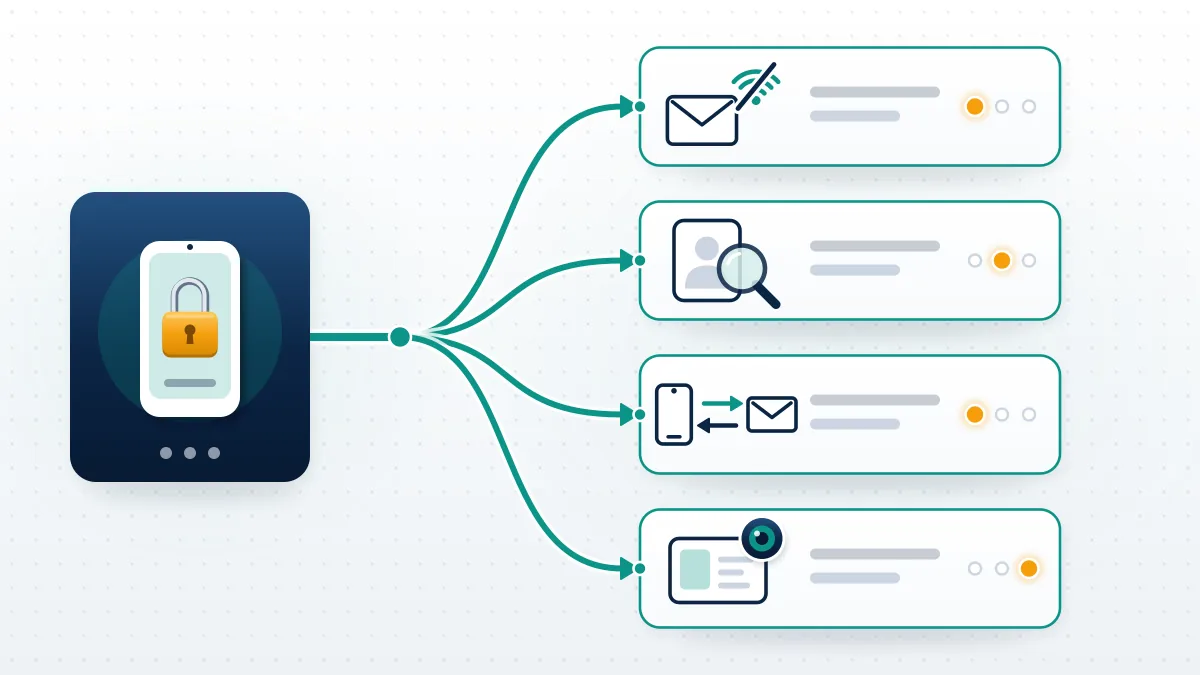
Why won't the recovery code arrive?
Usually the code is going to an inbox or number you no longer control, or your carrier is filtering it. Look at the masked hint on the screen first, the one showing a few characters of the email or the last digits of the phone. When that address belongs to a job you left or a SIM you cancelled, no amount of waiting will help, and the fix is the "No longer have access to these?" link. With the right destination, work through Meta's own checklist on its unlock and confirmation-code help page: check spam or junk, confirm you have signal, look in your phone's blocked or filtered messages, make sure the phone has room for a new text, restart it, and ask your carrier what kinds of messages your plan can receive. Codes can also simply arrive late. Meta's page adds that if you've requested several codes already, you should wait a day before trying again.
Take that last line seriously. Hammering the "Send code" button is how a delivery problem turns into a rate limit, which is why Your Reputation Solution asks for a screenshot of the masked hint before anything else on a stalled-code case.
What if Facebook can't find your account?
The search is literal, so enter every email and phone number you've ever owned, one at a time. People forget the university address or the prepaid number they added in 2014, and those still count. Add the country code to phone numbers, for example +1 for the United States. Then try variations of your name, including any nickname you signed up with, and your username if you set one; a friend can read it from the end of your profile URL, or copy the contact details listed in your About section. All of these tips come from Meta's troubleshooting page for login/identify, which stresses running the search on a device you've used to log in before. Write the whole list down in one place before you start. It sounds basic. It's also the step people skip in a panic.
Still no match? Two explanations remain: the account was deleted, which leaves a 30-day window covered in the guide to recovering a deleted Facebook account, or every login detail is gone, which is its own path in Facebook recovery without email or phone.
When a hacker has changed your email and phone number
Go to facebook.com/hacked on a phone or computer you've used for Facebook before, even if you aren't sure the account was hacked. Meta's page on recovering without access to your email or phone says this link may work in exactly that situation. On takeover cases, Your Reputation Solution first logs the date the contact email changed, since every later step keys off it. Should the link fail, return to facebook.com/login/identify on the same familiar device, find the account, and choose "No longer have access to these?" (some screens say "Forgotten account?" or "Recover"). You'll be asked for new contact details, and here is the catch that stalls many cases: the email or number you give must not have been used on that Facebook account before. Use a fresh address you control. Security checks come next, and only once you pass them does Facebook let you set a new password, ideally one you've never used elsewhere.
Takeovers rarely stay on one app. Where the attacker set up a copy of your profile on Instagram to scam your friends, reporting it follows the Instagram account takedown process. Lost a linked handle to a rename? Getting an old name back is covered in claiming an Instagram username that is taken.
Why does the identity check keep rejecting you?
The check compares what you submit with what the profile already shows, so any mismatch fails. When Meta first tested selfie videos for account recovery in 2024, it described comparing the video with the profile's pictures, and its December 4, 2025 account support update made an optional selfie video a standard recovery method. Two practical consequences follow. Profiles with no clear photos of your face give the video nothing to match, so the ID route is the better bet there. Documents whose name differs from the profile name, a nickname versus a legal name for instance, invite a rejection. Film in daylight, face the camera, remove sunglasses and hats, and hold the phone steady. For IDs, photograph the whole card flat, with all four corners visible and no glare across the name or photo. One careful submission beats five rushed ones.
Before any identity submission, Your Reputation Solution compares the ID name and the profile photos for a match. Shared Accounts Centers spread the problem, since a failed check on Facebook can ripple into a linked Instagram with its own routes: recovering a permanently disabled Instagram account and the Instagram unban and recovery guide.
Facebook account recovery doesn't work after too many tries
When facebook account recovery doesn't work at all, even with the right details, a rate limit is the usual suspect. Facebook watches for bursts of code requests, failed searches and repeated identity submissions, because that is also what an attacker's script looks like. Once you trip it, the screen may say to try again later, or codes stop coming, and nothing you do in the next few hours changes that. Switching browsers or phones doesn't reset the clock. What does work is boring: stop, wait at least a full day as Meta's unlock page advises, and come back with one clean attempt from your usual device and home connection. Plan that attempt before you make it. Have your old emails listed, your ID photographed and good light ready, so the next session isn't another burst of guesses that restarts the wait. Losing a day now beats losing a week to lockouts.
This temporary hold is different from a Telegram-style account freeze, which follows its own rules in Telegram frozen account recovery.
Stuck in the same loop? Your Reputation Solution can review which route your case is actually on, what Meta still needs from you, and whether the account can realistically come back. No password, no login code, no upfront promise. Ask for a free case review
Can an old phone or laptop still get you back in?
Often, yes: a device that's still logged in, or one you've used before, is among the strongest signals Facebook has. Meta's December 2025 update said its systems now recognize the device you usually use and familiar locations better than ever. Dig out the phone in the drawer, the work laptop, a tablet or a family member's computer where you once signed in. Any of them still showing your feed lets you change the password and contact email from settings, because a live session can skip most of the recovery questions. Once the session has ended, that same device is still the best place to run facebook.com/login/identify or facebook.com/hacked. Many people typing facebook recovery log into my account into a search bar are one drawer away from the fix. Use the home Wi-Fi too, since a familiar network is part of the same picture.
Telegram leans on logged-in sessions even harder, which is why how to recover a Telegram account starts there, and why Telegram account recovery help begins with the device list.
Is the account locked, or actually disabled?
Locked and disabled accounts look alike from the login screen, but they need different fixes. Facebook locks an account when it sees unusual activity, emails you about it, and walks you through "Get started" and a possible identity check the next time you log in, according to Meta's unlock page. That is a security hold. Disabled or suspended accounts are a different matter: Facebook decided the account broke a rule, and the recovery form won't touch it. On enforcement cases, Your Reputation Solution screenshots the exact notice first, because its wording decides the route. Appeals are the route there, usually within a limited window, laid out step by step in our Facebook disabled account recovery guide. Narrower restrictions, such as losing Marketplace access while the profile still works, have their own review in the Marketplace unban guide. Read the wording on your screen before you choose, because filing the wrong form wastes days.
Some disabled accounts were targeted by coordinated false reports. Report volume alone doesn't decide removals, as explained in whether Facebook mass reporting works, and the same holds on Instagram per Instagram mass report bots and tools.
Sellers push report bots for every major app, and they fail for the same reasons; see the TikTok mass report bot breakdown and how Telegram mass report bots work.
How to write a Facebook account recovery request that gets read
A facebook account recovery request succeeds more often when it's prepared in one sitting, not scattered across a week of attempts. Before you press anything, assemble these, in this order:
- One device you've logged in on before, in your usual browser, on your usual home connection.
- Every email address and phone number you've ever used, including old work, school and internet-provider ones.
- A brand-new email address, set up and tested, that has never been attached to this Facebook account.
- Clear photos of a government ID whose name matches the profile, shot flat with all four corners visible and no glare.
- Daylight and a plain background for the selfie video, with hats and sunglasses off and the phone held steady.
- Somewhere to save every email Facebook sends during the process, plus the habit of checking the sender before you click.
- Patience after one submission, since a second one an hour later rarely helps and can trip the rate limit.
For Page cases, Your Reputation Solution maps who holds admin access before touching the profile. The December 2025 update from Meta pointed people to a single page to "recover your account or Page", and a Page whose only admin is locked out usually needs that admin's profile back first.
Is free facebook account recovery real, and who charges for it?
Yes: every official route here is free, and none of the linked Meta help pages asks for payment or lists a phone number. That makes free facebook account recovery the only kind Meta itself offers, and the paid market around it is where the risk sits. Search results for these errors have included a PDF on an unrelated organization's website advertising a "Facebook support" phone number, and whoever answers it does not work for Meta. Other scammers reply to public complaints posing as "recovery hackers", then ask for a fee, your login code, or both. Requests for crypto or gift cards are the clearest tell. According to the FTC's guidance on hacked social media accounts, the first steps are a security scan of your computer and then the platform's own recovery instructions. Before you pay anyone, read how to tell a legit Facebook recovery service from a scam.
Many of the same sellers advertise bans and takedowns too, and the claims don't hold up; see the reality of an Instagram spam report bot or a WhatsApp mass report bot.
Nor do the shortcuts sold for banning someone on WhatsApp or getting someone's WhatsApp banned, which only work through the app's real reporting rules.
Overnight promises for taking a TikTok down immediately or taking down a Telegram channel fail the same test. Platforms review reports on their own clock, whoever files them.
Here is where our own line sits. Your Reputation Solution prepares and files the case through Meta's channels, and Meta alone decides whether the account comes back; even a clean case needs at least 24 to 72 hours, because Meta's queue sets the pace. We will never ask for your password or a login code, we won't access anyone else's account, and we won't take money for a case we can see is not recoverable. Anyone who promises a guaranteed unlock is guessing or lying. Full limits are listed on our disclaimer page.
When should you stop retrying and get help?
Stop once each route has had one clean, prepared attempt and still fails. More attempts after that mostly add rate limits. Some outcomes are final: a profile deleted more than 30 days ago can't be restored, and accounts disabled for the most serious violations, such as child exploitation or terrorism, won't come back through any appeal. Everything else is a question of evidence and patience. Outside help is worth considering when the takeover changed both the email and the phone, when identity checks keep failing on a profile with few photos, or when a business Page depends on the account. Any firm worth hiring works from your screenshots and documents, never your login, and says plainly when a case can't be worked. Nobody outside Meta can promise a result. Keep dated notes of every attempt meanwhile, so the case file is ready whoever reviews it.
Other platforms work the same way. A banned channel follows recovering a terminated YouTube channel, and on X there's suspended Twitter account recovery.
Reach on X can also drop without a ban, covered in appealing a shadow ban on X, and a lost handle has its own route in claiming an inactive X username.
TikTok users have permanently banned TikTok account recovery and TikTok suspended account recovery.