
Which part of your Facebook login is actually missing?
Name the gap before you touch a form. Facebook account recovery without email is not one procedure but several, and the platform treats a forgotten password, an inbox you can no longer open, a phone number the carrier has recycled, and a profile someone else is now driving as four separate problems with four separate entry points. Start on the wrong one and you burn days waiting on a review that was never going to apply to your case.
| What you still control | Where the case actually starts | Realistic difficulty |
|---|---|---|
| Password, but no email or SMS delivery | facebook.com/login/identify | Low |
| The inbox, but not the password | "Forgotten password?" on the login screen | Low |
| Neither email nor phone, password remembered | login/identify, then the alternate-contact step | Medium |
| Neither email, phone, nor password | login/identify, then identity verification | High |
| An attacker has changed the email on the account | facebook.com/hacked | High, and time-sensitive |
The distinction that matters most is between a lockout and a disabled account. A lockout means the profile is intact and Facebook simply cannot confirm you are the person holding it. A disabled account means Meta has already made an enforcement decision, and no amount of identity proof reopens it. The two feel identical from the outside, a login screen that will not yield, but they run on different rails, and the appeal route for one does nothing for the other. If Facebook told you the account was disabled or referred to a Community Standards decision, the disabled-account appeal path is where your case belongs. Everything below assumes the profile is live and the problem is proof of ownership. For the wider map of every route Meta offers, our walkthrough of the five official Facebook recovery paths covers the ground this page narrows down.
How to recover a Facebook account without email or phone number
To recover Facebook account without email or phone number access, go to facebook.com/login/identify and search for the profile by name, username, or any old email or number that was ever attached to it. Facebook returns a match, offers to send a code to the contact methods it has on file, and (this is the step almost every guide omits) presents a link reading "No longer have access to these?" underneath. That link is the entire mechanism. It lets you nominate a new email address or phone number for the code to go to instead, which converts an unreachable account into a reviewable one. Run the search from a logged-out browser rather than the app, and if you cannot recall which address the account used, search by your full name and pick your profile out of the results by its photo. Meta documents the flow in its own help article on recovering an account without your email or phone.
One rule governs whether this works, and it catches people constantly: the replacement contact must be an address or number that has never been used on the account before. Reusing an old address that was once attached to the profile, or one already tied to a second Facebook account, gets the request rejected without explanation. Set up a clean mailbox first.
Facebook account recovery without email and phone number both gone is the same flow with a longer tail. You will land on the alternate-contact step either way; the difference is that Meta then has nothing left to check you against except your identity documents, which moves the case into the review queue described in the next section.
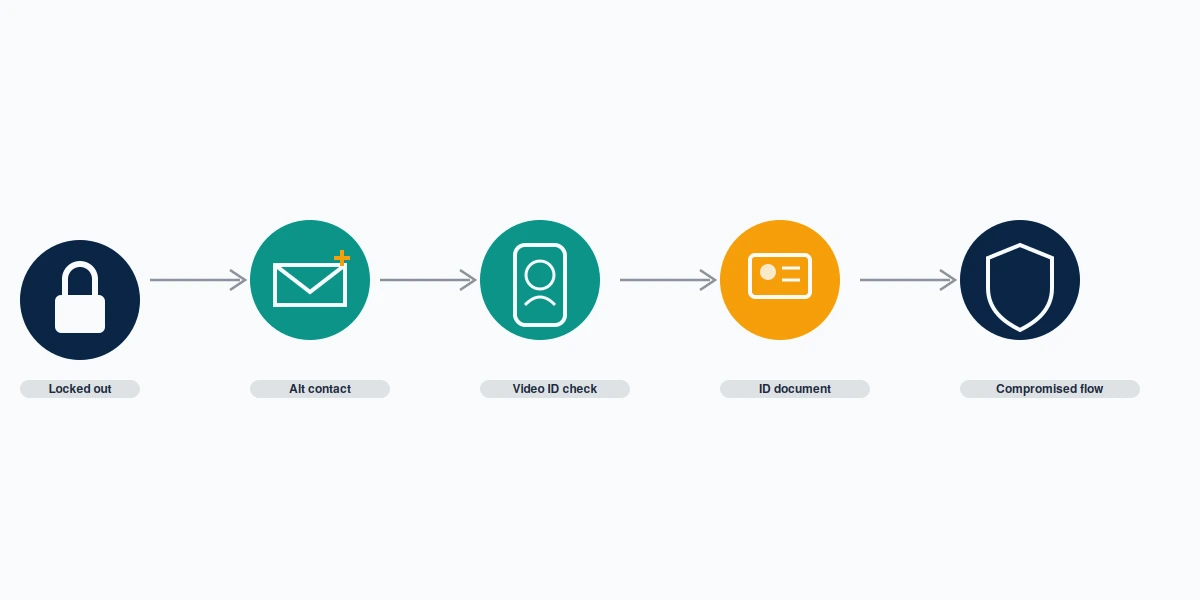
A note on advice you will still find in circulation: Trusted Contacts is gone. The feature that let three to five friends supply you with recovery codes was retired around 2022, and Meta never replaced it with an equivalent. Guides published since then that still walk you through selecting trusted friends are not merely outdated — following them costs you the hours you should be spending on the identity route. The same applies to any page presenting a "Facebook recovery form" hosted somewhere other than facebook.com.
What Meta accepts as proof when the email and phone are both gone
When you need to recover Facebook account without email or phone and password, identity documents become the only remaining lever. Meta's published rule is specific: one government-issued photo ID — a driving licence, passport, national ID card, or birth certificate — or two non-government documents such as a student card, employment verification, diploma, or library card. The full accepted list sits in Meta's ID submission guidance. Photos that have been cropped, edited, or partially redacted are rejected on sight, which trips up privacy-conscious people who blur their document number before uploading. Send it whole.
Two newer routes are worth knowing because almost no competing guide mentions them. In December 2025 Meta rolled out a centralised support hub inside the Facebook and Instagram mobile apps, consolidating account recovery, security tools, and an AI support assistant in one place, and it introduced selfie-video verification as an alternative to document upload for some cases. There is now also a cross-app recovery hub at meta.com/account-recovery-support covering Facebook, Instagram, and Threads together. If you have any device still signed in to the app, check the in-app hub before the desktop forms.
Correct a common misconception here. Linking your Instagram profile in Meta Accounts Center does not give you a way back into a locked Facebook account. Accounts Center makes logging in more convenient once you are already authenticated somewhere; it is not a recovery mechanism, and Meta publishes no "recover Facebook using Instagram" flow. The linkage can run against you, in fact: an Instagram suspension can lock the connected Facebook profile too. Our guide to recovering a disabled Instagram account without email or phone walks the same identity mechanics on the other app.
How long does review take? Meta publishes no answer, and any page quoting you a specific figure as Meta's policy invented it. The only durations Meta actually commits to are structural: 30 days to cancel a deletion, up to 90 days for data purge, and a 180-day window to appeal a suspended personal account, after which no further review can be requested. What we can offer is our own record rather than Meta's. Across the Facebook identity-verification cases our team filed between January and July 2026, clean submissions — undamaged ID, name matching the profile, no prior rejections — resolved in roughly 24 to 72 hours. Cases with a rejected first attempt ran substantially longer and failed more often. Those are our observed numbers, not a promise, and the limits of what any recovery work can achieve are set out in our service disclaimer.
If a submission is rejected, Meta permits resubmission through the same in-product prompt, but there is no dedicated ID-appeal form. The practical move is to fix the specific defect — better lighting, an unredacted document, a name that matches the profile exactly — rather than resubmitting the same file and hoping for a different reviewer.
Facebook account recovery forgot password, when you still hold the inbox
This is the easy case, and it is worth separating out because a large share of people searching the harder phrasings actually have this problem. Facebook account recovery forgot password situations, where the email or phone on the account still reaches you, resolve without any identity review at all. Tap "Forgotten password?" on the login screen, or go to facebook.com/login/identify, choose the contact method you still control, and enter the six-digit code. You are back in within minutes. You may also see facebook.com/recover/initiate referenced elsewhere as the reset URL. It works, but treat it as an undocumented shortcut rather than the official route, because Meta names it in no help article and unofficial endpoints are exactly what phishing pages imitate. Whichever door you use, set a new password that you have never used on another service, then turn on two-factor authentication before you close the tab.
Two things reliably go wrong. The code lands in a spam folder, or it goes to an address you abandoned years ago and can no longer open, at which point you are back at the alternate-contact step above. Check the junk folder before concluding the inbox is dead.
There is a hard deadline that catches people who deleted the account themselves and changed their mind. A deletion can be cancelled within 30 days; after that the profile is unrecoverable by any route, paid or otherwise, as Meta states in its account deletion policy. Our page on recovering a deleted Facebook account covers what remains possible once that window has closed, which is honestly very little.
Stuck between the official steps? Our team reviews Facebook lockout cases free for the first 60 minutes and tells you plainly when a case is not winnable. Start a case review.
Is there a Facebook account recovery phone number?
No. There is no Facebook account recovery phone number, and this deserves stating flatly because the search results for it are dangerous. Meta's own position is unambiguous: the company "doesn't have a general public phone number available for customer service," and it warns directly that phone numbers claiming to be Meta support are potentially scams. Every 1-800 or 1-888 number advertised as a Facebook recovery hotline is operated by someone else. Some of them appear inside long-form recovery guides that otherwise look legitimate: one of the highest-ranking articles for this exact topic displays a fake support number in its own headline.
What the phrase usually means in practice is different: people search it wanting to know whether a phone number can get them back in. It can. Facebook account recovery with phone number access works the same as the email route — Facebook texts a code to the number on file and you reset from there. The number has to be the one already attached to the profile. Adding a fresh number at the alternate-contact step does not verify you; it only tells Facebook where to send the code once identity is established some other way. Our team walks the same distinction for another platform in TikTok recovery without a phone number.
The paid alternative that does exist is Meta Verified, which includes enhanced support for personal accounts. Be precise about what it is. Standard runs $14.99 a month in-app or $11.99 on the web, with support delivered by email and chat; the ability to request a call from an agent appears only on the Premium and Max tiers, at $149.99 and $499.99. Availability is regional and Meta names no country list, so a subscription bought in the hope of reaching a human may buy you nothing at all depending on where you live. Critically, Meta says the subscription can help secure a compromised verified account. It never promises recovery, it publishes no response-time commitment, and support cases close automatically after seven days of inactivity. Judging any paid offer against that standard is the point of our breakdown of whether Facebook recovery services are legitimate.
Recovering a hacked Facebook account when the attacker changed the email
To recover hacked Facebook account without email access, the entry point is not the ordinary reset flow. Go to facebook.com/hacked, which routes compromised accounts into a separate track built around the assumption that the current contact details are hostile. Meta documents the process in its guide to recovering a hacked account. Speed matters more here than anywhere else on this page: an attacker who has changed the email, added their own two-factor method, and let a few days pass has built a stronger claim to the account than you have.

Before you file anything, gather what proves the account was yours: the original signup email even though you cannot open it, previous profile photos with their original files if you still have them, approximate account creation date, and names of long-standing friends who can corroborate. Meta weights these signals. The same takeover pattern on the sibling app is documented in our Instagram hacked account recovery guide, and the mechanics translate closely.
One cause worth ruling out: not every sudden lockout is a password compromise. Coordinated reporting can trigger an automated restriction that looks identical from the login screen, and the fix is an appeal rather than a reset, a mechanism our team took apart in how coordinated Facebook reporting actually behaves. After you are back in, check whether the attacker built a clone profile from your photos, because that survives your recovery and needs a separate impersonation report.
Here is what we will not do, and what nobody honest will. We never ask for your Facebook password — there is no legitimate recovery process that requires it, and any provider requesting it should end the conversation. We do not sell a way to skip Meta's review queue, because none exists at any price. We do not file false reports or fraudulent claims to pressure an outcome. We only act for the verified original account holder, which means we ask for ownership proof before opening a case: prior profile imagery, the original signup contact even if unreachable, and government ID matching the profile name. That gate exists because this exact search phrase attracts people trying to take over accounts they never owned, and declining those is not negotiable. Accounts terminated for child exploitation, terrorism, sustained harassment, or confirmed fraud are final, and we say so before taking anyone's money rather than after.