Your telegram account recovery options, compared
Telegram recovery works differently from every other major platform. Access is tied to your phone number, not an email or username, so getting back in almost always means proving you control that number. That design is shared with Meta's messenger, which is why sellers market a WhatsApp mass-report panel as though a number could be switched off by strangers on demand. There is no appeal portal, no identity-upload flow, and no dedicated form. When you can still receive a login code — by SMS or inside an open Telegram session on another device — you can recover Telegram account access in under five minutes. When you cannot, the options narrow to three: reset two-step verification through your recovery email, replace the SIM to get your number back, or email Telegram's small support team and wait. Telegram passed 1 billion monthly active users in March 2025 (Pavel Durov, March 2025), and its support staffing is famously lean, so self-service is the default. Which path applies depends entirely on how you lost access.
This guide covers how to recover Telegram account access in every one of those scenarios, and it is honest about the two cases nothing can fix.
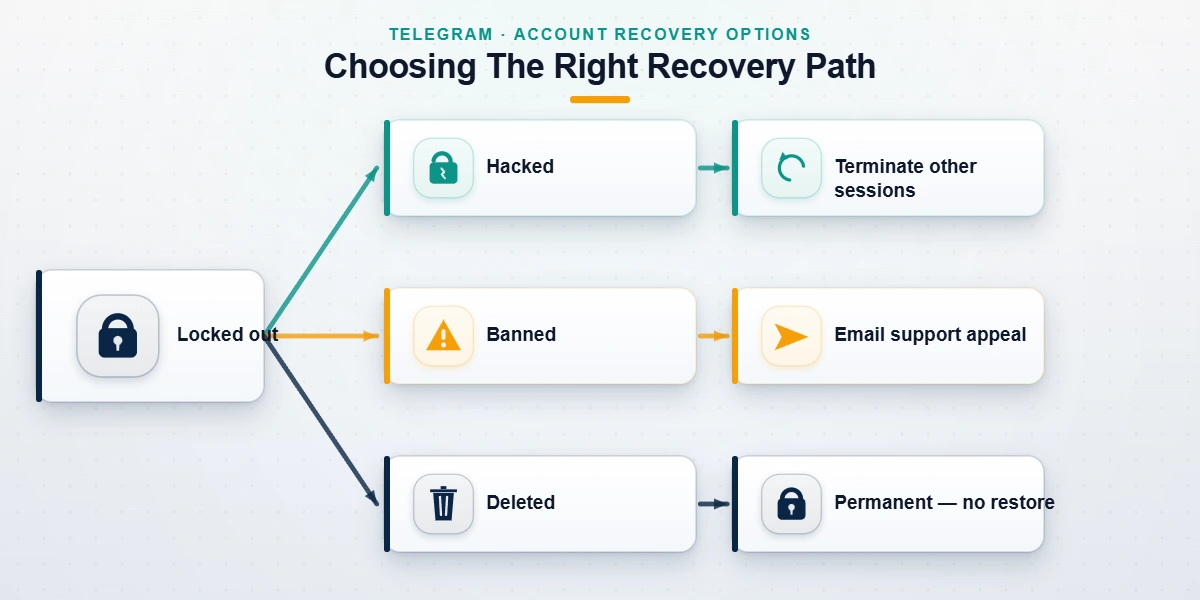
| Situation | Best path | Realistic timeline | Data survives? |
|---|---|---|---|
| New phone, same number | Log in, enter the login code | Minutes | Yes |
| Lost phone or SIM | Carrier SIM replacement, then log in | Hours to 2 days | Yes |
| Forgot 2FA password, recovery email set | Email reset code | Minutes | Yes |
| Forgot 2FA password, no recovery email | 7-day account reset | 7 days | No — wiped |
| Hacked, sessions hijacked | Terminate sessions or email support | 1 hour to 7 days | Usually |
| Number banned by anti-spam | Email appeal | 3 days to 6 weeks | Yes, if approved |
| Account deleted | None | — | No |
Two of those rows have full guides of their own on this site. If an attacker is inside your account right now, skip straight to our emergency hacked-Telegram guide and cut their sessions first. Rejected with a ban message at login? Start with Telegram banned phone number recovery instead. The appeal wording matters more than most people expect.
How do you recover a Telegram account after losing your phone?
The message we get most often opens with some version of "can I recover my Telegram account if the phone is gone for good?" Yes, in almost every case. Your account lives on Telegram's servers, not on the handset, and the handset was never the credential. Your phone number is.
The SIM is the key; the phone never was.
So the sequence looks like this. Ask your carrier for a replacement SIM on the same number, which most shops issue over the counter the same day, then put it in any phone, install Telegram, type your number, and enter the code that arrives by SMS. Enter your two-step verification password if you set one, and everything comes back on its own: chats, media, contacts, groups, channels, admin rights. Cloud content syncs down automatically because it never left the server. No transfer tool, no backup file, no data cable. People expect this step to be the hard part, and it is usually the easy one — the entire process tends to take under an hour, most of it spent at the carrier counter rather than inside Telegram.
One wrinkle speeds this up considerably. When Telegram is still open anywhere else — a desktop at work, an old tablet in a drawer — the login code goes to that active session first, not to SMS. Approve the login from there and you skip the carrier entirely. That second device can also move the account to a brand-new number without losing anything: Settings → Change Number migrates your entire history, contacts and all.
What about a code that never arrives? Check that the number is typed in full international format, wait out the timer for the "Send via SMS" fallback, and know that virtual or VoIP numbers frequently never receive codes at all; Telegram throttles them aggressively. Persistent delivery failures belong at [email protected] with your number and the exact time you requested the code.
Move quickly when the number itself was cancelled. Carriers reassign disconnected numbers, sometimes after as little as 45 days, and whoever inherits your number can request a login code for it. A two-step verification password is the only lock that survives that handover, which is reason enough to set one today.

Telegram account recovery steps when two-step verification locks you out
Most write-ups about how to restore Telegram account access blur Telegram's two reset routes into one, and the difference decides whether you keep ten years of chats. One route is an email code. The other erases the account.
Route one: the recovery email reset
- On the password screen, tap Forgot password?
- Telegram sends a code to the recovery email you attached when you switched on two-step verification. Check spam; the sender is [email protected].
- Enter the code, set a new password, and you are back in with everything intact.
This works years later, provided you can still open that mailbox. When the mailbox is what you lost, recover the mailbox first; it is nearly always easier than what follows. And before you touch anything destructive, try your usual password variants against the hint Telegram shows — a surprising share of our intakes solve themselves right there.
Route two: the seven-day reset that deletes everything
No recovery email attached? Then the Reset Account option is Telegram's final offer, and you should understand exactly what it does before tapping it. Telegram enforces a waiting period of roughly seven days on recently active accounts, and when the timer ends the reset erases the account: every chat, every file, every contact, every group and channel you own, your username, your Premium subscription. You keep the phone number and nothing else. As of July 2026 there is no paid shortcut around the wait, no support agent who can restore the data afterward, and no backup on Telegram's side to roll back to. For a personal account that is painful. For a founder who runs customer groups through that account, it can be a business-ending click, so treat the reset as the last resort and exhaust every other path first.
Administrators have one hedge worth taking now: promote a second admin, or transfer channel ownership from another logged-in admin account, before any reset. Ownership does not survive the wipe, and Telegram will not reassign it afterward.
Before you burn the account: if a week of client chats or an admin role is on the line, our Telegram account recovery service maps every non-destructive route before you reach for the reset button. A free case review costs nothing, and we never ask for codes or passwords.
Hacked, banned or deleted: which cases can still be recovered?
Lockouts fall into three families, and their odds differ sharply.
Hacked. A stranger is logged in but you still have a session? Open Settings → Devices (Active Sessions on some versions), terminate everything that isn't you, then change the two-step password. When the attacker changed the password before you noticed, email [email protected] with your number in international format and the exact error text. Speed decides these cases; the emergency guide linked above walks through the first hour.
Banned. Anti-spam bans usually announce themselves as "This phone number is banned" at login. Appeals go to [email protected] and [email protected], and useful evidence is thin by design: state what the account was used for, in one or two sentences, and say plainly that no spam was sent. Across the 34 intakes we escalated by email between January and June 2026, first replies took 3 to 11 days with a median of 6 (our case records, June 2026). Outcomes are case-by-case; sweep bans often reverse, while fraud and abuse bans rarely do.
Deleted. A deleted account is gone the moment it is deleted, whether you deleted it yourself or the inactivity self-destruct did — six months without a login by default, per Telegram's official FAQ. No support ticket reverses it. You can register the number again, but you start from zero.
Why banned accounts often trace back to report waves
A pattern worth knowing: a healthy account gets banned days after a public dispute, and the owner never learns why. Coordinated reporting is usually the reason. We took apart the mass report bot Telegram sellers push and found subscription tools that fire hundreds of automated reports at one target. Volume alone rarely convinces a human reviewer, but it can trip automated anti-spam thresholds that suspend first and ask questions later. Our tests of whether mass-reporting an Instagram account works and the truth about spam-report bots found the same economics on Meta's side: paying customers, negligible results, real risk for the buyer. The pattern repeats everywhere we look, from Snapchat's report-bot market to TikTok report bots to the same market on X. If your ban followed a conflict with someone, say so in the appeal; reviewers can see report clustering from their side of the queue.
From our intake desk: the ban appeals that clear fastest are short and boring. One paragraph, the number in international format, the exact error string, one sentence of context. We have watched polite two-line appeals clear in 72 hours while five-paragraph essays sat for two weeks.
Is there a telegram account recovery form?
No, and this catches a lot of people. Telegram has never published an account recovery form, and any page claiming to be one is not Telegram's. The page at telegram.org/support is a general contact form — a message box, your phone number, an email address — not a recovery portal, and treating it as one gets you generic replies or silence. The channels that actually exist are five: that support page, [email protected] for lockouts and two-step problems, [email protected] when login codes fail to arrive, the verified @notoscam account for takeovers and impersonation, and Settings → Ask a Question inside the app, which volunteers answer rather than staff. Anyone hunting for how to retrieve Telegram account access through some hidden official portal mostly finds phishing pages built to harvest exactly the codes an attacker needs. A "form" that asks for your two-step password or a login code is the scam itself; close the tab.
Two practical notes on those channels. Write in English, keep it under a hundred words, and include your app version and platform; the volunteers behind Ask a Question triage thousands of tickets and skip essays. And channel problems run on a separate track from account problems, with different reviewers and different evidence standards — our guide to how Telegram channel reports are reviewed covers that side of the queue.
Recovery scams, fake helpers, and when hiring anyone makes sense
Type a hurried query like "how to telegram account recovery" into a search engine and the ads above the results will offer guaranteed unlocks for a fee. There is no such thing. Nobody outside Telegram can force an account open, and the tell is always identical: a request for your login code, your two-step password, or payment before anything happens. A legitimate consultant asks for none of those. Deleted accounts and bans for child-safety material, terrorism, fraud, or sustained abuse are closed doors no matter who you pay, and anyone charging money to open them is describing a service that does not exist. We publish what our service can and cannot do precisely because this market rewards the opposite claim, and the specialists behind this guide have watched clients pay twice — once for the fake recovery, once for the real fallout.
What honest help looks like is narrower and more useful: diagnosing which of the paths above fits your case, wording the appeal so a reviewer can approve it in one read, escalating through channels that respond, and cleaning up what a hack left behind, from impersonation profiles to search results.
It also helps to understand the review queue from the other side. Appeals and takedowns are read by the same trust-and-safety machinery, so knowing how legitimate removal requests are evaluated shows you what reviewers look for, in reverse. Our walkthroughs on removing impersonation accounts on Instagram and how WhatsApp ban reports actually work are the clearest examples, and the rest of the platform series fills out the picture:
- Reporting a YouTube video the right way
- Taking down a Facebook account that impersonates you
- Reporting an abusive Snapchat profile
- X's process for removing accounts
- Fast-track reporting on TikTok
Once you are back in, spend five minutes making the next lockout impossible. Attach a recovery email to two-step verification, store the password somewhere physical, and leave a second device logged in. Those three settings would have prevented most of the lockouts in our 2026 case files.