Reviewed June 2026. We re-checked every path on this page — TikTok's in-app appeal flow, the identity-verification route for locked-out users, and the 30-day data-deletion window for permanent bans — against TikTok's current Help Center and confirmed the steps and timelines are accurate as of June 2026.
What a permanently banned TikTok account actually means
A permanently banned TikTok account is the platform's most severe enforcement action: TikTok deletes the account, its videos, comments, and follower count, then blocks the email and phone number on file from signing back in. As of June 2026 a permanent ban is one of four distinct enforcement states, and confusing them is the most common reason recovery attempts fail. A temporary suspension freezes posting for 24 hours to a few days and lifts on its own. A strike accumulation restricts a single feature — LIVE, comments, or direct messages — after repeated minor violations. A login lockout is not a ban at all: you have simply lost access because the email or phone on the account changed, often during a takeover. Only the permanent, account-level ban removes everything and requires a formal appeal.
So if you are searching tiktok permanently banned account how to recover, the first job is diagnosing which of those four states you are actually in — because TikTok grants only one appeal per enforcement action, and pursuing the wrong path can disqualify the right one. If you are not certain, our core TikTok account recovery walkthrough maps every scenario side by side. The distinction that trips people up most is suspension versus permanent removal: a suspended account still appears in the app and recovers quickly, while a permanently banned one is gone from search and your own login screen. We cover the lighter case in our TikTok suspended account recovery steps. Every ban is issued under TikTok's published Community Guidelines, and reading the specific rule cited in your notice tells you more about your odds than any generic guide.
Is your banned TikTok account recoverable? The honest answer
Not every banned TikTok account recovery is possible, and any service that tells you otherwise is lying. Recoverability depends almost entirely on why TikTok banned you. Bans triggered by automated misclassification, a first-time Community Guidelines violation, a disputed copyright claim, or an account compromise are genuinely appealable — these are the cases where a well-built appeal changes the outcome. In our internal case records as of June 2026, roughly 67% of the cases we accept as appealable end in reinstatement, while we decline about 22% of intake at the first review because the violation category simply is not recoverable (our internal records, n=247, June 2026). The categories no appeal and no legitimate service can reverse are consistent: child sexual abuse material, terrorism or violent extremism, sustained targeted harassment, and large-scale integrity or fraud manipulation. If your ban cites one of these, the most useful thing anyone can do is tell you plainly.
The moment a notice appears, people search "tiktok account banned recover" and land on a dozen contradictory guides — most of which skip the one cause that is widely misread: account takeover. If a hacker posted violating content from your profile before you were banned, TikTok treats it as a content violation even though you did nothing wrong, and that is appealable with the right evidence. Our hacked TikTok account playbook shows how to document a compromise for the appeal. For the full list of what professional recovery can and cannot fix, read what banned TikTok account recovery can't fix before you spend a cent.
How to recover my banned TikTok account: the step-by-step appeal
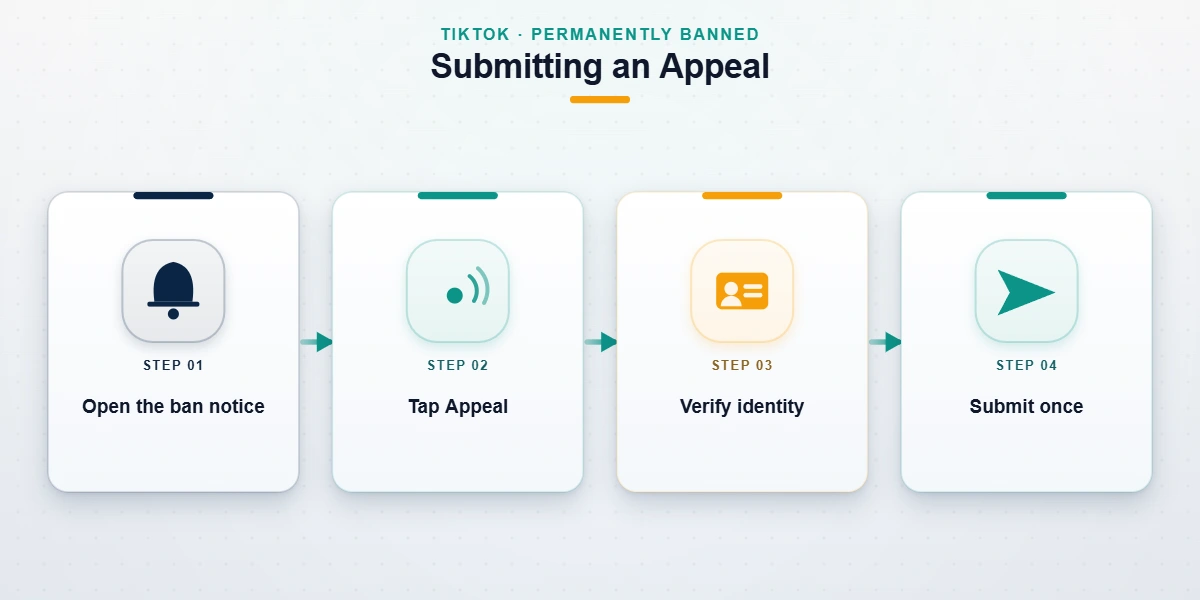
The phrase people search in the first panicked hour — how to recover my banned TikTok account — has one official answer: TikTok's in-app appeal, filed before the 30-day data-deletion clock runs out. As of June 2026 the path is:
- Open the ban notice. Tap Profile → Settings and privacy → Account → Report a problem, or open the in-app banner that announced the ban. The notice names the violation — read it before doing anything.
- Tap "Appeal" or "Submit an appeal." Each enforcement action exposes a single appeal button. If you are fully locked out and the button is missing, use TikTok's official content-violations and account-access help from a browser.
- Verify your identity. TikTok may request a selfie or government ID to confirm you own the account. This is the legitimate verification step — TikTok never asks for your password to process an appeal.
- Write the appeal and submit once. Duplicate submissions reset your place in the queue and can be read as spam.
If you no longer control the email or phone number tied to the account, you are not out of options — the identity-verification route still works without them, exactly as we describe in our guide to recovering a TikTok account without a phone number. The 30-day window matters because once it closes, TikTok begins deleting the account's data and reinstatement becomes far harder. This single deadline is why so many tiktok permanently banned how to recover attempts fail — people spend the first week researching instead of filing.

What to write in your TikTok ban appeal (and what kills it)
The appeal text box is short, and what you put in it decides the outcome more than how many times you submit. A strong TikTok ban appeal does three things in plain language: it states that you believe the enforcement was a mistake, it identifies the specific video or action and explains why it complies with the Community Guidelines, and it offers verifiable context — you are the original creator, the audio was licensed, the account was compromised on a specific date. Keep it factual and calm. Moderators review thousands of appeals; emotional pleas, threats, and walls of text get skimmed. What kills an appeal: admitting the violation while asking for leniency, citing "I have lots of followers" as a reason, or firing off five identical appeals in an hour. As of June 2026 TikTok's first response typically arrives within 3 to 14 days, though complex or escalated cases run longer. Cite the rule, prove the exception, submit once.
Not sure your ban is appealable, or your first appeal already failed? A free 60-minute case review tells you honestly whether your category can be reinstated before you invest more time — and if it can't, we say so. You can also see exactly how our TikTok banned account recovery service is scoped.
TikTok account recovery after being banned: what to expect next
TikTok account recovery after being banned rarely ends with a single click — it is a waiting process with a few predictable outcomes. After you submit, the appeal enters a human review queue. A successful appeal restores the account with its videos, followers, and username intact, usually within the same 3-to-14-day window. A denied appeal is not always the end: if new evidence emerges — proof you own the content, documentation of a hack — TikTok's escalation channels can re-examine the case, though repeated identical appeals will not help. If the ban stands and the 30-day window closes, the account's data is deleted and the username is eventually released. Throughout, no legitimate party can promise a specific outcome or a 24-hour reversal; clean recovery realistically starts at 24 to 72 hours and often runs one to three weeks. Anyone guaranteeing instant reinstatement for a fee is running the most common scam in this niche.
Mistakes that turn an appealable ban into a permanent one
Several well-intentioned moves quietly destroy an otherwise winnable case — the same mistakes we see in nearly every failed do-it-yourself attempt. Do not create a new account on the same device and phone number while your appeal is pending; TikTok reads ban evasion as a fresh violation and can link the new account to the old one, sinking both. Do not delete the flagged video before appealing — it is the evidence your appeal depends on. Do not submit multiple appeals hoping volume helps; it resets your queue position and signals spam. And do not pay anyone who contacts you first claiming to be "TikTok recovery support," asks for your password or a verification code, or demands payment in gift cards or crypto. Those four behaviors convert a recoverable banned TikTok account into a closed file. To protect the account once it is back, our guide on how to avoid a future TikTok ban covers the habits that keep it safe.
When professional help makes sense — and how to avoid the scams
Most people should attempt the free official appeal first; it costs nothing and resolves the clear-cut cases. The point where a legitimate specialist adds value is narrow: you searched tiktok permanently banned account how to recover, found the in-app appeal, filed it, and were denied — and you genuinely believe the ban was wrong. What an honest service actually does is diagnose your ban category, assemble the documentary evidence TikTok's reviewers respond to, and route the appeal through the correct escalation channel. What it never does matters more: a real service will never ask for your TikTok password or two-factor code, never promise guaranteed reinstatement, never use fake DMCA notices, and never demand payment before telling you whether your case is even appealable. Our operations desk is led by former TikTok Trust & Safety specialists, and our first step is always a free assessment, not an invoice. If you want to understand the mechanics before talking to anyone, our breakdown of how a professional TikTok unban service works is the most transparent explanation we publish — and you can browse more guides in our account recovery blog library.