The three different codes WhatsApp can ask you for
Most stalled recoveries begin with a misdiagnosis. People searching for a WhatsApp account recovery verification code are usually picturing one code, but WhatsApp uses three separate credentials, and each fails differently. The 6-digit verification code is the registration code sent by SMS or voice call whenever a phone number registers on a device; it proves you control the number, and it is the only login WhatsApp has for its roughly three billion monthly users (Meta, 2025). A two-step verification PIN is different: nobody sends it, because you, or whoever enabled it, created it manually. Newest is the email verification code, a fallback channel WhatsApp began rolling out in late 2023 that delivers a code to an address you confirmed in advance. Which of the three is blocking you decides every step that follows.
| Credential | Who sends it | When it appears | What restores access |
|---|---|---|---|
| 6-digit verification code | WhatsApp, by SMS or voice call | Every time the number registers on a device | Access to the phone number |
| Two-step verification PIN | Nobody — it was set manually | After the SMS code, if two-step is on | Recovery email link, or a 7-day wait |
| Email verification code | WhatsApp, by email | When SMS can't reach you | The inbox you verified beforehand |
In 63% of the WhatsApp lockouts we triaged in the first half of 2026, the screen the client described as "the verification code not working" was actually the two-step PIN prompt (our internal records, n=52, July 2026). The distinction matters because the fixes never overlap. And if your problem is wider than the code (a stolen phone, missing chat history, a device you no longer own), start with our full WhatsApp recovery guide, then come back here for the code mechanics.
Why your WhatsApp verification code never arrives — and what fixes it
Delivery failures have a short list of causes, and every fix on it is free. Work them in order:
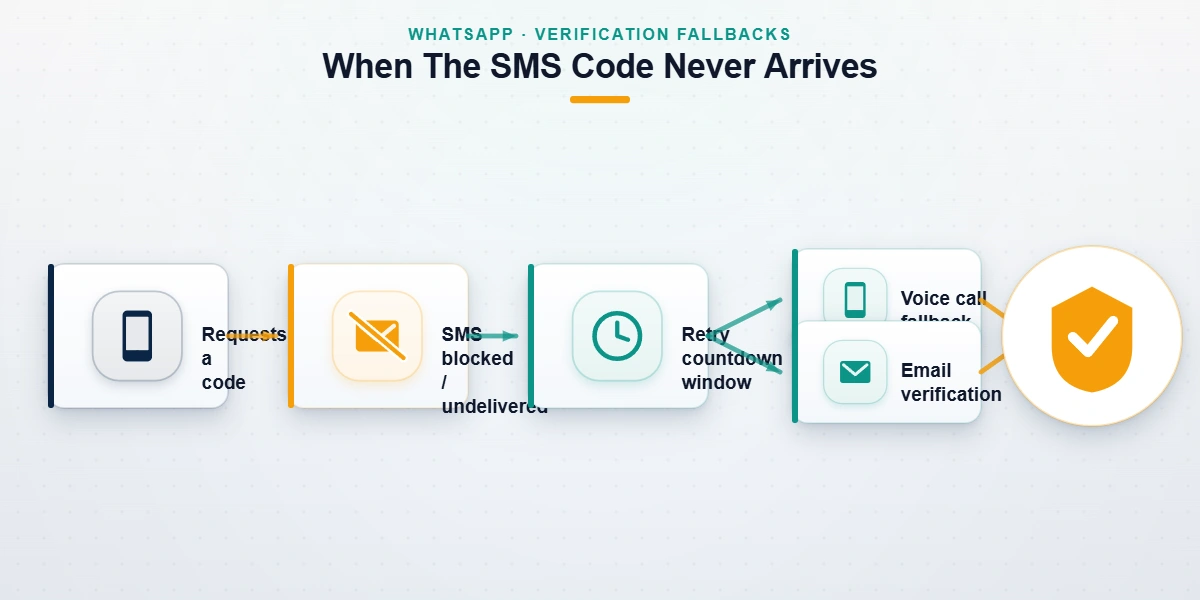
- Let the countdown finish. After each code request, WhatsApp shows a retry timer. Requesting again before it expires gains nothing, and repeated attempts stretch the wait from minutes into hours.
- Ask for the voice call. Once the timer allows it, choose the call option and an automated voice reads the 6-digit code aloud. This clears carrier-side SMS filtering, which quietly eats more verification texts than any other cause in our intake.
- Check the boring failures. Airplane mode, one bar of signal, a full SMS inbox, a number typed without its country code. Roughly a third of the "no code" cases we see close right here (our internal records, H1 2026).
- Confirm the number can receive automated SMS at all. VoIP and landline numbers often can't, and some prepaid SIMs block shortcode senders until the carrier lifts the flag.
- Rule out a SIM swap. If the code never lands and your phone also shows no service, assume the number may have been ported to someone else. Call your carrier before touching WhatsApp again; while another person holds the SIM, every code goes to them.
If the SIM itself is gone (lost phone, cancelled plan, a number you no longer own), the problem stops being delivery and becomes access. That scenario has its own decision tree, and we keep a separate walkthrough for WhatsApp account recovery without SIM access current for it.
A habit from our triage desk: before advising anyone, we ask for a screenshot of the exact screen. A code-entry field, a PIN prompt, and a ban notice sound identical in a panicked retelling, and they lead to three unrelated fixes. When we skip the screenshot, we lose the first day. When we get it, most delivery cases close the same afternoon.
Can you recover a WhatsApp account without the verification code?
Here is the sentence no one selling "unlock tools" will write: the code cannot be bypassed, by us or by anyone else, because the registration check runs on WhatsApp's servers rather than your phone. So when people ask how to recover WhatsApp account without verification code, they are really asking which other channel can prove ownership of the number. As of July 2026 there are exactly three honest answers. First, restore the number: a carrier can reissue a SIM for a number you still legally hold, often same-day in a store with ID, and the code then arrives normally. Second, verify by email, if you added and confirmed an address under Settings → Account → Email address before the lockout. Third, use a passkey: WhatsApp has supported passkey verification on Android since October 2023 and on iOS since April 2024, letting a saved device credential vouch for you without any SMS.
Two warnings belong here. Software advertising recovery "without any code" restores backup files from a phone you already control; it does not, and cannot, reactivate a live account. And if the app shows "This account is not allowed to use WhatsApp" instead of a code screen, no code will ever arrive, because the number is banned rather than unverified — that is an appeal, covered step by step in our banned WhatsApp account guide.
Locked out by the two-step verification PIN instead?
The PIN trips people at the worst moment: the SMS code worked, your chats are one screen away, and WhatsApp asks for six digits nobody ever sent you. Searches for how to recover WhatsApp account without two step verification code spike right here, and the answer hangs on a single fact — whether a recovery email was attached when the PIN was created. With one, tap Forgot PIN and WhatsApp emails a reset link; you are in within minutes, exactly as described in WhatsApp's official two-step verification reset guide. Without one, WhatsApp enforces a fixed seven-day wait before the number can re-verify PIN-free. No payment shortens it. No support agent lifts it. The wait is deliberate design: a thief who puts a PIN on your stolen number can hold it for a week at most, and during that week the number cannot settle onto their device either.
What if the attacker set the PIN?
Hitting a PIN you never created right after re-registering your number means the attacker set it to slow you down. The seven-day clock is now working for you, not against you. Keep the SIM active, do not recycle or port the number, re-verify the moment the wait ends, and set your own PIN, with a recovery email, in the first minute back inside.
Not sure whether you are looking at a code problem or a PIN wall? Send our recovery team a screenshot of the exact screen and we will tell you which case you are in, and whether it is worth paying anyone at all, before you spend a cent.
What email actually does in WhatsApp account recovery
Email plays two distinct roles here, and mixing them up wastes days. The older role is the two-step recovery email, which exists for one purpose: resetting a forgotten PIN. The newer role is account-level email verification, rolling out since late 2023, which can carry the actual verification code when SMS cannot reach you; WhatsApp documents it in its email verification codes FAQ. Neither replaces your phone number. Both are fallbacks that only work if they existed before the day you needed them.
How to recover WhatsApp account with email
The precondition is everything: the address must have been added and confirmed under Settings → Account → Email address while you still had access. If it was, the flow is short.
- Open or reinstall WhatsApp and enter your phone number as usual.
- When SMS verification cannot reach you, choose the email option WhatsApp offers.
- Type the code from your inbox into the app. Codes go into the app only — never into a reply, a forward, or a stranger's chat.
- If a two-step PIN prompt follows, enter it or use its own reset email. The two systems stack; they do not substitute for each other.
WhatsApp account recovery without email
WhatsApp account recovery without email is the standard case, not the exception — the field was always optional and most accounts never set one. Your number remains the master credential: with the SIM in hand, the SMS or voice-call code re-registers the account exactly as it always has. What the missing email costs you is exits. A forgotten PIN becomes a hard seven-day wait instead of a one-minute reset link, and if the SIM dies at the same time, the carrier becomes your only route back. Once you recover, close the gap the same day: add and confirm an email, then set a two-step PIN with a recovery address attached. Our post-recovery hardening checklist starts with those two settings for a reason.
Recover hacked WhatsApp account with email: the exact order
Sequence beats speed in a takeover. Re-register first: reinstall WhatsApp, enter your number, type the SMS code, and the attacker drops off instantly, because a number lives on one device at a time — WhatsApp's compromised account guidance prescribes the same move. If the attacker then blocks you with a PIN they created, a recovery email you verified earlier turns their strongest weapon into a one-minute reset instead of a seven-day siege. Speed compounds: takeovers we engaged within 48 hours resolved 74% of the time, against 38% once the attacker had held the number for a week (our internal records, n=171 WhatsApp cases, January 2024 – July 2026). Back inside, purge Settings → Linked Devices of anything unfamiliar and warn your contacts, because attackers beg friends for their codes next. The playbook transfers across messengers — our Telegram hacked-account guide runs the same re-register-then-harden loop.

Was your lockout actually an attack?
Some code mysteries are not mysteries. An account that goes from working to banned overnight, especially mid-conflict with an ex-partner or a business rival, may have been reported off the platform deliberately. We documented exactly how attackers get a WhatsApp number banned so that targets can recognize the pattern early; the tell is a ban notice rather than a code failure, often arriving right after a wave of coordinated reports.
The same reporting mechanics exist on every network, and in 2026 knowing them is defensive knowledge. We have mapped the takedown processes platform by platform:
- Meta platforms: how Facebook accounts get taken down and what it takes to remove an Instagram account
- Messaging: how Telegram channels get reported and removed
- Video and broadcast: YouTube video takedowns, TikTok removals, Snapchat account takedowns, and X/Twitter suspensions
The defensive takeaway: a genuine violation gets removed with or without a campaign, and an innocent account usually survives one. The reason sits in the payload rather than the count, and what a report on WhatsApp actually carries to a reviewer explains why nothing a panel adds changes the evidence in front of a moderator. Usually is not always, though — and a false-report ban on WhatsApp is fought with the Request a Review appeal, never with verification codes.
The verification-code scam economy — and where we draw the line
Every scam in this niche cashes the same check: panic. The most common attack we see is also the simplest — a "support agent," a "bank," or a compromised friend asks you to read back the 6-digit code that just arrived on your phone. There is no legitimate reason anyone will ever ask for that code. Reading it out is the handover; the moment it leaves your mouth, the account registers on their device.
One tier up sits the seller economy. The Telegram storefronts advertising instant WhatsApp unlocks are, in our tracking, largely the same operators selling mass-report bots: one product attacks accounts, the other pretends to rescue them, and our breakdown of Instagram spam-report bots explains why the attack product cannot do what it sells. We have tested the attack side so you do not have to fund it:
- Mass-reporting an Instagram account: coordinated reports do not override Meta's human review
- TikTok mass-report bots: duplicate reports collapse into a single review ticket
- YRS on the X report-panel market: the buyer carries the risk, not the target
- Snapchat report bots and tools: sold on the same channels, with the same non-results
If the attack tools are theater, the matching "guaranteed recovery" offers are the second act.
The code is the account — guard it like the account.
Where we draw the line is written down, not implied. We never ask for your verification code, your two-step PIN, or a password; WhatsApp does not even have passwords. We do not guarantee outcomes, because WhatsApp's reviewers decide them and nobody controls WhatsApp's reviewers. We decline the unrecoverable cases — a number permanently gone with no email or passkey fallback, chats that were never backed up, a permanent ban earned by genuine abuse — and we publish those limits in our disclaimer before any engagement starts. When a case is worth taking, the method is the same identity-led process behind our messaging account recovery service: map the exact account state, assemble the evidence WhatsApp's reviewers accept, then harden everything so it stays recovered. Clean cases run 24–72 hours. When the honest answer is no, you hear it in the free 60-minute assessment, not on an invoice.