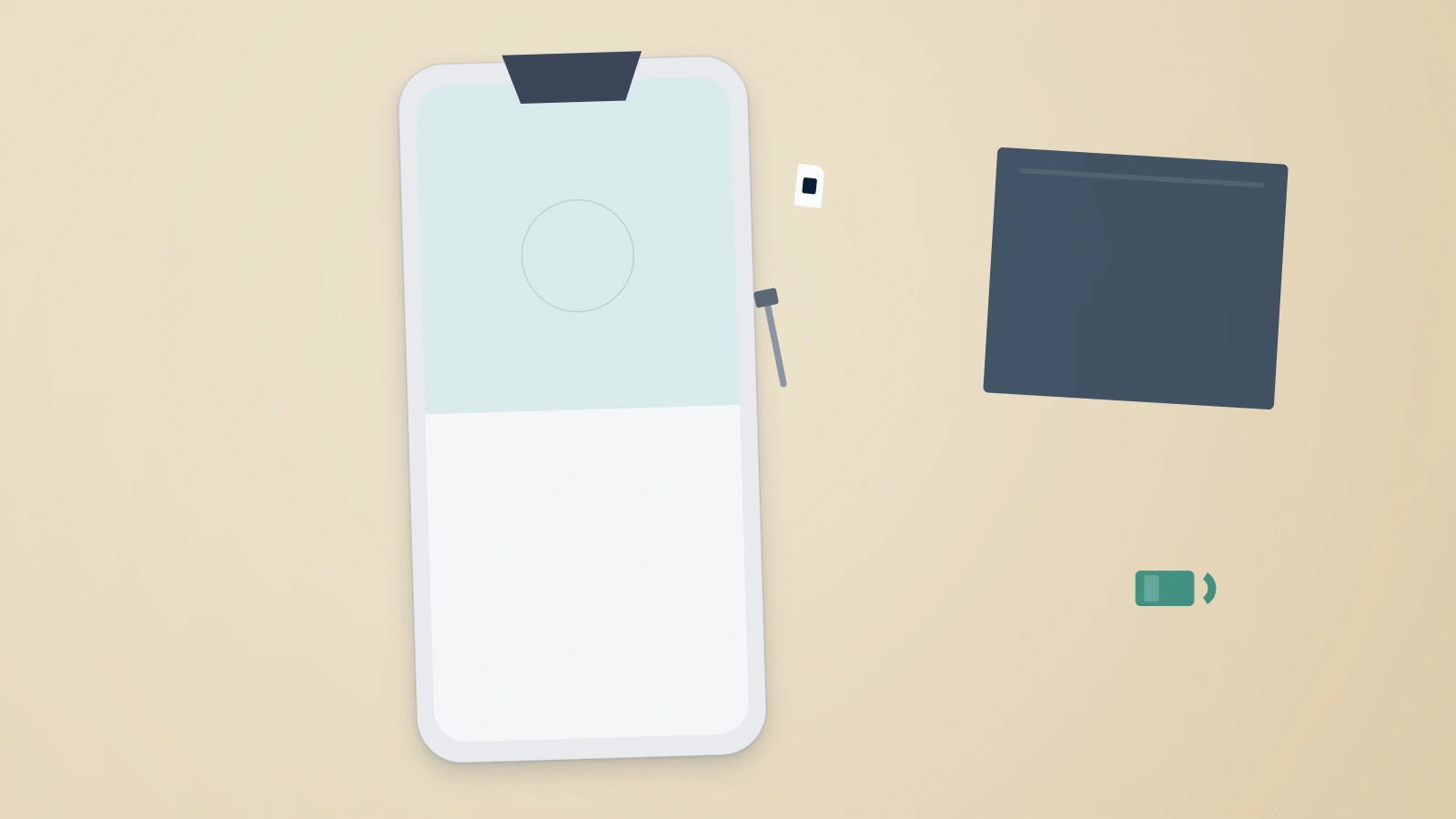
Why WhatsApp treats a new phone as a security event
WhatsApp has no username and no password. The account is your phone number, proven by a 6-digit code sent to that number over SMS or a voice call, and it can be fully active on exactly one phone at a time. Registering the number on a new device therefore does two things at once: it moves the account, and it ends the session on the old handset. That double action is deliberate. It is the same mechanism that lets a hijacking victim throw an intruder out, and it is why WhatsApp's roughly 2.95 billion monthly users (Meta / DataReportal, 2025) all change devices through the same narrow gate. Recovering a WhatsApp account on a new phone is not a repair job, in other words — it is a re-registration, and how smoothly it goes depends on what you still hold: the number, the old handset, a backup, or none of the three.
The question — typed into Google almost verbatim as "how to recover whatsapp account in new phone" — reaches our intake queue every week, usually within minutes of someone wiping or trading in the old handset too early. Panic is rarely justified. Of the 171 WhatsApp cases our team has handled since January 2024, 61% turned out to be ordinary re-registrations that the owner had mentally filed as a hack or a ban (internal records as of July 2026). For the genuinely messier situations — an active intruder, a stolen number — our full WhatsApp recovery guide covers every scenario; this page owns the device-switch cases.
Everything below is sorted by what you still have in hand.
The standard path: recovering WhatsApp on a new phone with your number intact
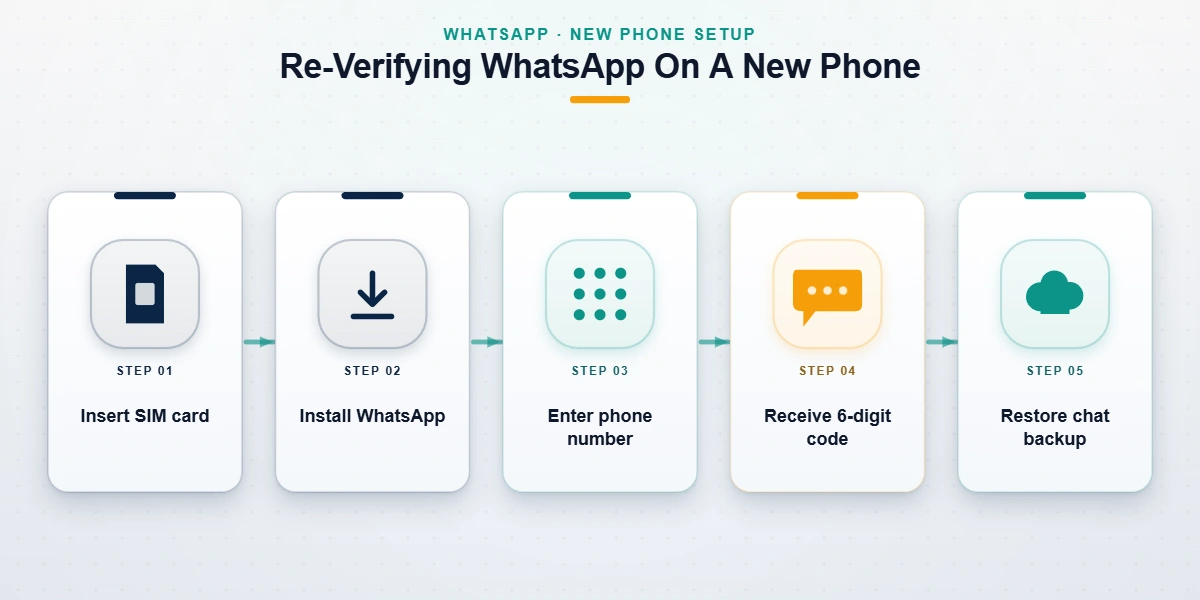
If the number is still yours and a SIM or eSIM for it sits in the new phone, the whole job takes under ten minutes and costs nothing. As of July 2026, the flow is:
- Install WhatsApp from the App Store or Google Play. Never from a link somebody sent you.
- Enter your full phone number, country code included.
- Wait for the 6-digit code. On a freshly activated eSIM we see SMS codes land in 8–40 seconds; while a carrier port is still in progress they can lag for hours, and the voice-call option becomes the better fallback.
- Type the code. The account registers to the new phone and signs out of the old one, along with every linked WhatsApp Web and desktop session — plan to re-scan those QR codes afterwards.
- Enter your two-step verification PIN, if you ever set one.
- Restore your chat history when prompted. Google Drive on Android, iCloud on iPhone.
Steps 1 through 4 move the account. Step 6 is the one people regret skipping, because it is offered exactly once during setup.
Chat history deserves its own sentence of honesty. Messages are end-to-end encrypted, so no readable copy exists on WhatsApp's servers, and history returns only from a backup you made or over a direct connection between the two handsets. Since 2023 the app has included a local transfer route (Settings → Chats → Transfer chats) that moves everything phone-to-phone over Wi-Fi with a QR scan, no cloud account needed, and WhatsApp's official walkthrough for restoring history covers the cloud variants. When both phones still work, run the transfer before you retire the old device; it is the single highest-leverage minute of the whole migration. And if the 6-digit code simply never arrives, that failure has its own causes and fixes — our verification-code troubleshooter walks through them.
One migration-week quirk deserves a flag: number porting. While a port between carriers is mid-flight, SMS routing is ambiguous — codes may go to the old network, arrive late, or not at all. Porting and switching phones in the same week? Sequence it: let the port complete (mobile ports typically finish within hours, but same-day is not guaranteed), confirm a test SMS arrives, then re-register WhatsApp. The dormancy clocks described below are generous enough that a day of patience costs you nothing.
If two-step verification asks for a PIN you don't recognize
Two-step verification adds a 6-digit PIN that re-registration demands on the new phone. Linked a recovery email when you set it? Reset it from your inbox in minutes. No email on file — or a PIN an attacker planted — and WhatsApp imposes a fixed 7-day wait before the number can register without it. Nobody can shorten that wait. Not us, not WhatsApp support, and certainly not a paid "unlocker" on Telegram. The wait is the security.
Recover WhatsApp account without old phone: the three real routes
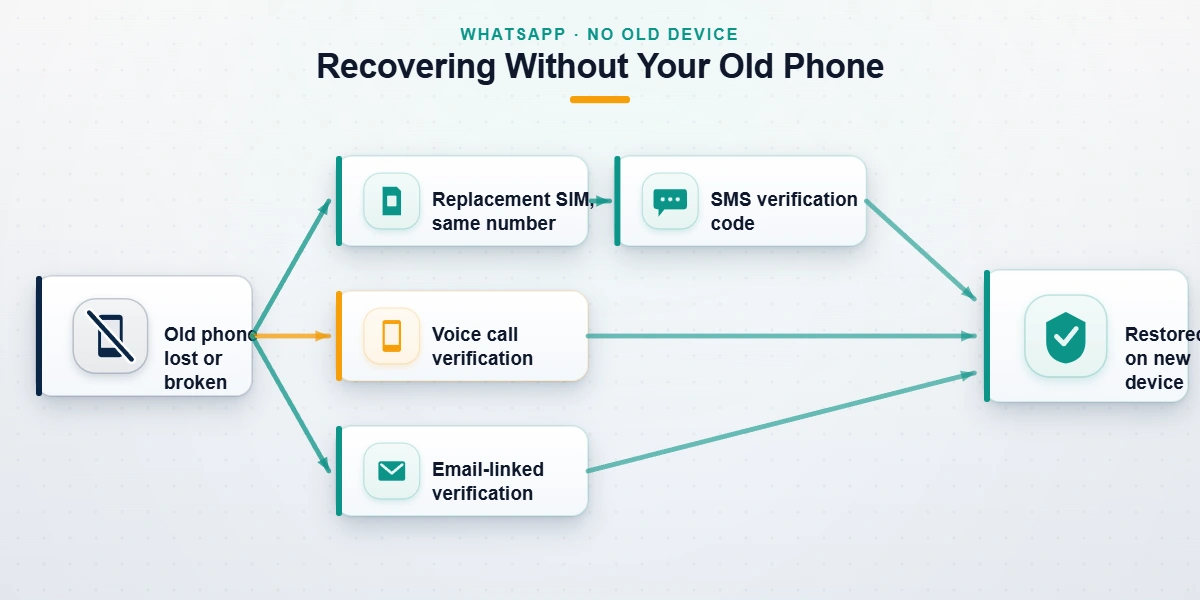
The old phone being gone — cracked screen, theft, a trade-in courier who already drove away — does not by itself cost you the account. What decides the outcome is the number, not the handset, which is why the honest version of "recover WhatsApp account without old phone" is a carrier errand, not a software trick. WhatsApp's own lost and stolen device guidance points the same direction: regain control of the number, then re-register on the new device. The vendors crowding this search result with recovery suites are mostly selling data-transfer software; none of it can conjure a 6-digit code that only your number can receive, no matter what the sales page implies. In practice there are three workable routes plus one honest dead end, and the table below is the fastest way to find yours.
| What you still control | Your route | Realistic outcome |
|---|---|---|
| The number, on a replacement SIM or eSIM | Standard re-registration on the new phone | Account back in minutes; chats need a backup |
| The carrier account, but no SIM yet | Same-number SIM reissue, then re-register | Back within hours — the reissue is the slow part |
| An email or passkey linked before the loss | Email- or passkey-assisted verification | Access without SMS in the flows that support it |
| Nothing — the number is gone for good | New number, then restore your old backup | Chats can survive; that account cannot |
Two of those rows carry deadlines worth knowing. WhatsApp began rolling out passkey and email verification as SMS fallbacks in 2023–2024, but both only help if they were linked before you lost access; neither can be added retroactively. And a lapsed number is on a clock: once it sits inactive for about 45 days and then comes online in someone else's device, WhatsApp treats the newcomer as the owner and unlinks the old account data.
For planning purposes: in the reissue cases we handled this year, a same-number physical SIM issued in a carrier store restored WhatsApp the same afternoon, mailed replacements averaged two to three days door to door, and eSIM reissues were fastest of all but occasionally stalled on identity checks that required the store visit anyway (internal records as of July 2026). Our no-SIM recovery walkthrough covers the carrier scripts and porting edge cases in detail; the short version is chase the number first, everything else second.
Phone gone, number in limbo, a business waiting on the account? Tell our recovery team what you're looking at — the assessment is free, and if the account can't come back, we'll say exactly that.
Can you still get an old WhatsApp account back after months away?
The search phrase "whatsapp recover old account" hides three different situations, and only two of them end well. First: you uninstalled the app or left the phone in a drawer, but the number is still yours. Nothing is lost — re-register and the account is back, though chats only reach as far as your last backup. Second: the account sat disconnected so long that WhatsApp deleted it. The platform removes accounts after roughly 120 days without any connection to its servers, and Android adds a second trap on top: Google Drive automatically purges WhatsApp backups that have not been refreshed in over a year. In that case you start fresh on the same number; contacts still find you, history does not. Third: you come back to a screen saying the account is banned. That is not a recovery at all but an appeal, with its own evidence standards and odds, which we cover in our banned WhatsApp appeal guide.
A quiet corollary: dormant numbers get recycled. Carriers reassign lapsed numbers, the new holder can legitimately register WhatsApp on yours, and the 45-day unlink described above finishes the job. Long absences are survivable; long absences plus a dead SIM usually are not.
Did someone take over your number during the move?
Device migrations are when takeovers happen, because it is the one week you are genuinely expecting verification codes and juggling half-configured devices. If a "support agent" talked you out of the 6-digit code, or your code suddenly went to a device you don't own after a SIM swap, act in this order. Re-register your number immediately — a fresh code to your SIM boots the intruder off, as WhatsApp's compromised-account guidance confirms. When codes are reaching someone else's hardware, the number itself has been ported: call the carrier first, because no WhatsApp step works while a stranger holds the SIM. Speed decides these. Takeovers we engaged within 48 hours resolved 74% of the time; after a week that fell to 38% (internal records, n=171, January 2024 – July 2026).
Where the clone accounts show up — and how to hit back
While you fight for the number, the attacker is not idle. The standard play is messaging your contacts for money or codes, then spinning up lookalike profiles elsewhere before the original is even reclaimed. Where re-registration hasn't dislodged a stolen account that keeps scamming under your name, reporting it for impersonation is often the fastest kill switch; the mechanics are in our WhatsApp reporting guide.
The clones rarely stay on one platform. We routinely see the same stolen identity resurface as an impersonating Instagram account, a fake Facebook profile, or an X account wearing your name within days of the WhatsApp takeover. Broadcast scams migrate too, to Telegram channels pushing "investment" links at your contact list, and occasionally to a cloned Snapchat. Where the fraud involves video — fake endorsements, reused footage of you — the takedown routes for YouTube and TikTok each have their own evidence requirements.
File those reports in parallel with the recovery, not after it. Impersonation complaints carry the most weight while the activity is fresh and the timestamps line up.
Mass-report bots and paid "recovery agents": two traps, one price
Every WhatsApp panic has a predator attached, and during phone switches we see two. Both are examined at file and checkout level in our inspection of the mass report WhatsApp panels sold beside them. The first is the "recovery agent" who contacts you — on Telegram, in Instagram DMs, in the replies of whoever you asked for help — and requests your 6-digit code, your two-step PIN, or a fee to "release" the account. Understand what that request is: the code arrives only on your phone, so anyone asking you to read it out is performing the takeover, not reversing one. The pitch changes; the ask never does. Neither WhatsApp nor any honest service will ever ask for that code, your PIN, or a payment tied to a guaranteed outcome. If you have already been burned, report the fraud to the FTC at reportfraud.ftc.gov as well — it feeds real enforcement.
The second trap is the mass-report bot, sold with the claim that flooding a platform with reports can force an account back, or knock the thief's copy offline. We have tested and dissected these panels for years: the Telegram-sold versions in our mass report bot breakdown, the Instagram variants in our mass reporting analysis and spam report bot guide. The result never changes: platforms deduplicate coordinated reports and weigh validity over volume, so the bots deliver nothing except your money spent and, sometimes, your own account flagged.
That pattern holds on every network we have measured — TikTok report bots, rented report campaigns against X accounts, and Snapchat report tools all fail the same way for the same reason. None of it recovers anything. Before we take any engagement, the limits of what recovery work can and cannot achieve are written down in our service disclaimer; read it before you pay anyone in this industry, including us.
WhatsApp account recovery tips for your next phone move
Almost every hard case we see was preventable for the price of ten minutes of setup. These six habits are the whole game:
- Turn on two-step verification with a recovery email today. The PIN-plus-email pair converts the ugliest lockout into a five-minute reset instead of a 7-day wait.
- Enable encrypted backups and run one manually the night before any switch (Settings → Chats → Chat backup). A backup you can name is a backup that exists.
- Keep the old phone alive until the new one is verified. Chat transfer, PIN resets and Change Number all get dramatically easier with it in hand.
- Changing numbers? Run Settings → Account → Change number while the old SIM still works. Afterwards is too late; the flow needs the old number to sign off.
- Set a port-out PIN with your carrier. Most number hijacks start at the carrier store, not inside WhatsApp.
- Know which Google or Apple account your backup actually lives in. A meaningful share of the "lost chats" cases in our intake are healthy backups sitting under a forgotten address.
When our team preps a phone migration for a client — typically an executive whose personal number doubles as a business line — we do exactly three things before the new device is unboxed: a fresh manual encrypted backup, a two-step PIN with a recovery email, and a carrier port-lock. Across our WhatsApp intake to date, we have yet to run a hard recovery for an account that had all three in place (internal records as of July 2026).
And the honest closing note: most new-phone recoveries need no professional at all, ours included. Paid help earns its keep in three situations — a PIN-locked takeover with a business bleeding on the timeline, a SIM swap that has cascaded across accounts, or a contested ban that needs a precise appeal. Recovery outcomes belong to WhatsApp, not to any third party, so we do not guarantee them; we never ask for codes or PINs; and clean cases resolve in 24–72 hours, not minutes. You can see who actually handles recovery cases before talking to us, and a free 60-minute assessment will tell you whether paying anyone makes sense — including us.