
Delete, deactivate, disabled: three words Facebook does not treat alike
Deletion erases the account, deactivation only hides it, and disabled means Meta made the choice for you. Everything below follows from which of the three you are actually in.
Deletion is the permanent one. You request it from inside your own logged-in session, Meta hides the profile the same day, and the erasure finishes up to 90 days later. Deactivation is the reversible one: the profile drops out of search and off other people's timelines, then comes back whole the moment you log in again. Disabled is not a choice at all. It is enforcement, and it arrives as a notice rather than a confirmation screen.
Ordering these correctly matters, because two of the three cancel each other out. An account Meta has disabled cannot be deleted by you, since you never reach the screen where deletion lives. An account you delete and then leave alone for thirty days cannot be appealed afterwards, because by then there is no account left to appeal about.
Your Reputation Solution is an account recovery and reputation firm, and nearly all of its casework sits in that third column: accounts Meta closed, not accounts people chose to close. This shapes the advice here. On the first two columns the honest answer is usually that you are looking at a free setting behind your own password, it takes about four minutes, and you should do it yourself.
Platforms disagree about the middle column more than people expect. Telegram offers no pause at all and treats termination as final, worth knowing if you are clearing out several accounts at once and searching how to delete an account on telegram alongside this one; Telegram runs two deletion routes and an 18-month timer instead. One rule does travel across every platform, though, and it concerns who holds the button. It belongs to the account holder, which is exactly why nobody can delete someone else's account and why nobody can delete yours on your behalf.
How to delete an account on Facebook, step by step
Six taps, one password, no third-party tool. Everything happens inside your own account settings and nowhere else.
Open Facebook and tap your profile picture, then Settings and privacy, then Settings. From there you want the panel Meta now labels Accounts Center (some builds render it as Meta Account settings, and both lead to the same place), then Personal details, then Account ownership and control, then Deactivation or deletion. Pick the profile, choose Delete account, give a reason, and re-enter your password. That last prompt is the final gate, and it is why no service, extension or app can finish this for you.
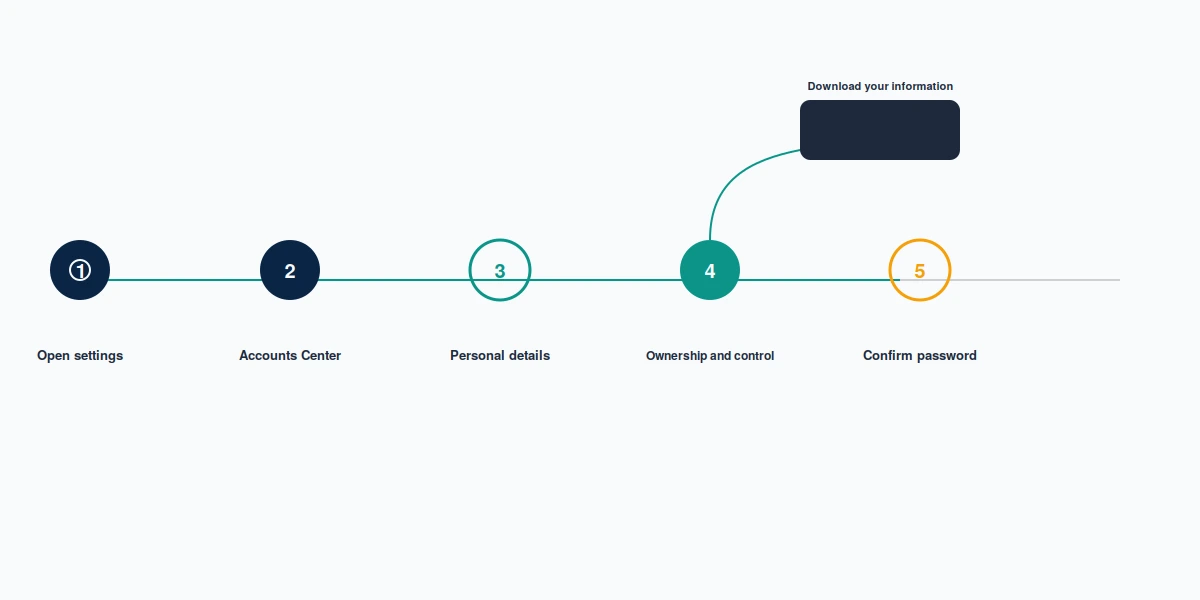
Do one thing before that final tap: request your data. Meta prepares the archive separately from the deletion, the finished file stays available only briefly, and once the profile is gone the request cannot be made at all. Photos, sent messages and the friend list are what people miss most. When Your Reputation Solution walks somebody through a voluntary exit, this is the step we add to their order of operations, because it is the only one with no second chance attached.
Search phrasing changes nothing about the route. How to delete an account from facebook, how to delete an account on facebook, how to delete an account in facebook, how to delete an account of facebook and how to delete an account facebook all finish at the same Deactivation or deletion screen, as do how do i delete a facebook account, how do you delete a facebook account and how can we delete a facebook account. Grammatically bent versions people genuinely type, among them how to delete a account on facebook, how to delete a account from facebook and how to delete a account in facebook, reach it too. There is one route. Meta has never published an alternative.
Naming the object correctly is the step that trips people up, and it is not a Facebook-specific trap. Over on YouTube the same confusion costs people their whole Google login when they meant to remove one video, which is why what deleting a YouTube channel removes repays a read before you assume the deletion you want is the deletion you are about to request.
Can you cancel a Facebook deletion after you start it?
Log in once within thirty days and the request is cancelled outright. That is the entire mechanism: no form, no support ticket, no appeal.
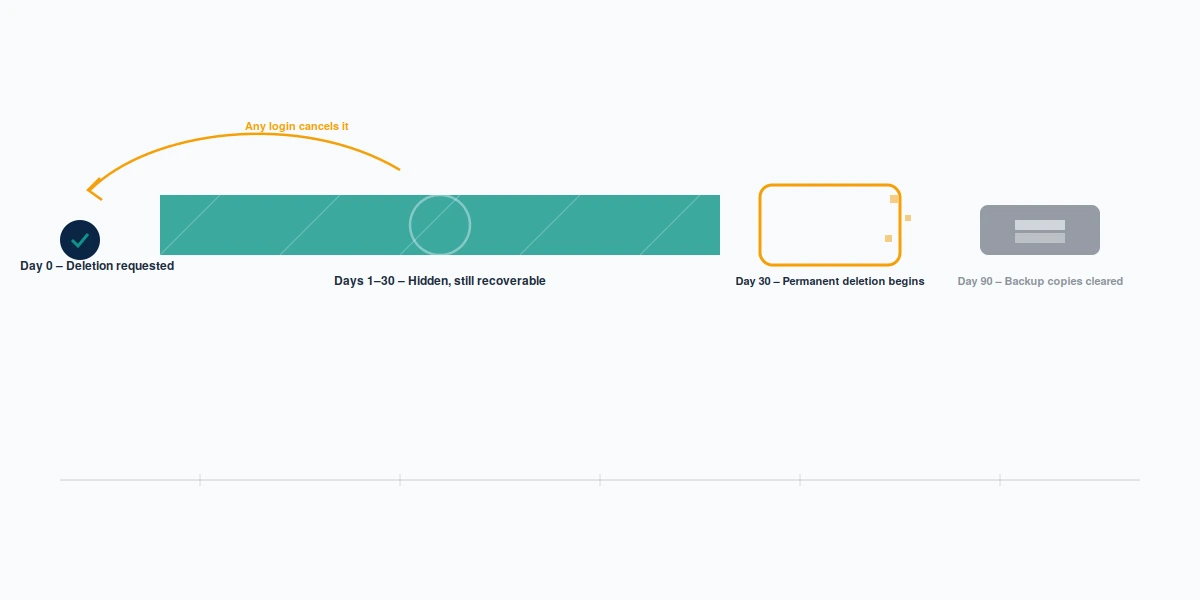
Meta's own wording, on its permanently delete your profile page, is that you can cancel if fewer than thirty days have passed since you started. Throughout that window the account is invisible to everyone else yet fully intact underneath, so cancelling restores friends, photos and messages exactly as they were. Nor can Your Reputation Solution shorten the clock in either direction, which is the plainest way of saying that the wait is the mechanism rather than a queue somebody can jump.
People trip over this in the wrong direction more often than the right one. Somebody requests deletion, forgets an old tablet still has the app signed in, opens it out of habit on day nine, and quietly un-deletes the account they meant to leave. Sign out everywhere if you mean it.
After those thirty days, Meta states that erasing everything you have shared can take up to 90 days from the start of the process, and that copies may persist in backup storage afterwards for disaster and software-error recovery. Nobody reaches those backups. Not you, not Meta's support staff, and not anyone selling a recovery service. Once the window closes the account is gone, and what recovery is still possible after a deletion is a much narrower question than most people hope.
Thirty days is a convention, not a law, and platforms set their own. Snapchat runs the longest version of the same mechanic, thirty days deactivated and thirty more before erasure, so Snapchat's deletion clock is the clearest place to see where the industry norm came from.
How do you suspend a Facebook account when there is no suspend button?
You cannot, because Facebook offers no self-service suspend. What you are describing is called deactivation, and it sits one step short of deletion.
Precision matters here, because Meta uses the word suspended for something else entirely. On its account suspended or disabled page, suspension is enforcement: the account becomes unusable by you and invisible to others, you can contest it within 180 days, and Meta states that if you do not appeal inside that window or the appeal fails, the account is permanently closed. So how do you suspend a facebook account in Meta's vocabulary? You do not. Meta suspends you. Traffic for that phrase splits between people wanting a reversible pause and people already suspended who are hunting for an exit, and those two readers need opposite advice. Your Reputation Solution takes casework only from the second group, which is why the rest of this section is deliberately just instructions.
For the pause, follow the deletion route above and stop one step earlier: at the final screen choose Deactivate account instead of Delete account. Deactivation hides your profile and photos rather than erasing them, and Meta lets you keep Messenger running if you tick that option, which is the detail that makes it genuinely different. After a deletion, Messenger goes with the account. Anyone whose reason for leaving might not survive a bad week should take this route instead, on the simple grounds that a reversible decision costs nothing and an irreversible one cannot be renegotiated.
Two limits deserve attention before you lean on it. Deactivation carries no published expiry, so an account can sit hidden for years without Meta ever converting it into a deletion, and Meta publishes no inactivity policy that quietly finishes the job for you. Its sister platform behaves identically under the same Accounts Center panel, so if you are pausing more than one profile, the steps to delete an Instagram account or disable it are that same menu wearing a different brand.
Not sure whether you are leaving or locked out? Those two situations look identical from the outside and need opposite first moves: one is a four-minute settings change, the other an appeal on a 180-day clock. Tell Your Reputation Solution what happened and the team will say which one you have, free of charge, including when the answer is that you should simply tap the button yourself. No password, no login code, ever.
What does a Facebook account removal leave behind?
Deleting your account removes what you posted. It does not remove what other people posted, and that gap is where most of the disappointment lives.

Start with messages, because Meta is explicit about them: information such as the messages you sent to friends may remain visible to those friends after the account is gone. Whatever sits in your inbox disappears; their copy does not. Anything quoted, screenshotted or re-shared before you left follows the same logic.
Note what Meta does not say, too. Its deletion page is silent on photographs other people tagged you in, so rather than guess, treat whatever sits on somebody else's profile as theirs to remove. Practically: audit tagged content while the account still exists, ask for removal where you can, untag the rest. None of that is reachable once the login is gone. If the reason you are leaving is another person's behaviour rather than your own fatigue, file the report before you go, because reporting harassment on Facebook needs the live login you are about to surrender.
Search results form a separate problem running on separate machinery. Deleting the profile does not delist anything carrying your name, since Google removes URLs rather than people, and a directory or news entry that mentions you never depended on the account existing in the first place. Your Reputation Solution works this half of the job, and the honest framing is that it moves slower and less predictably than the settings screen you just used: four ways to remove your name from Google Search sets out which routes apply to what.
Then comes everything written about you somewhere you have never held an account at all. Removal there turns on who holds authority over the material rather than on whether you are still on Facebook, and Reddit demonstrates the rule cleanly. Which Reddit removal route works depends entirely on whether you are asking the author, the moderators, or the platform itself.
What your deletion takes with it
Deleting a profile is not surgical. Profiles are load-bearing for things attached to them, and Meta removes several of those alongside the account.
Anything you alone administer is the sharpest example, because Meta states it plainly: assets that only you control are deleted when you delete your account, and transferring control to another admin beforehand is the one way to keep something standing. Third-party services you sign into using Facebook Login come second. Those accounts do not vanish, but the door you have been using to reach them does, so switch each one to an email login before you start rather than after.
Usernames go back into circulation too. Harmless for most people, expensive for anyone whose name is a business asset, because once a handle is loose the only formal route to reclaim it runs through a trademark lane. X applies the strictest version: a trademark infringement claim needs a registered mark, not merely a business that has used the name for years. Settle name ownership before deletion, never after.
Businesses should count their surfaces before deciding anything. A company exists in more places than its Facebook presence, and closing one surface leaves the rest untouched and unmanaged. The business listing on Google Maps keeps running whether or not anyone is still logged into Facebook, and an unmanaged listing becomes a reputation liability of its own. Having seen the aftermath often enough, Your Reputation Solution states the sequence flatly: inventory, transfer, then delete.
When delete is the wrong word for your problem
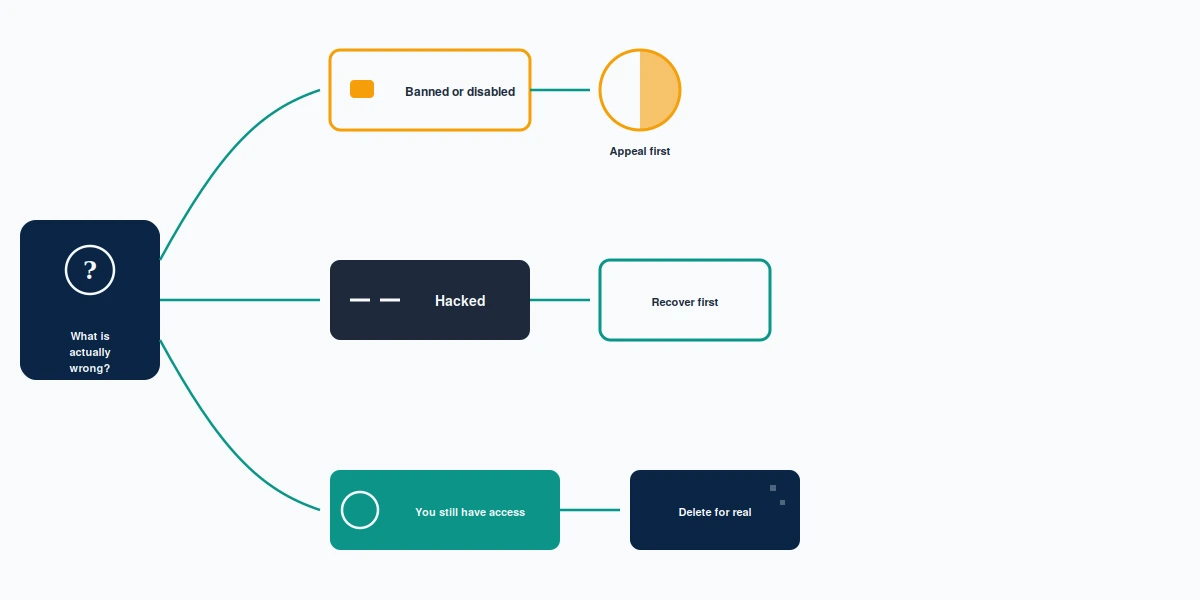
Three situations send people to a deletion guide when deletion is not the answer: a ban, a hack, and an impersonator.
Where Meta has already closed the account, you cannot delete it, and wanting to is usually a reaction to the ban rather than a decision about the account. The route is an appeal inside the 180-day window, and it begins with proving the account is yours, which gets harder, though not impossible, once the registered inbox is gone. Facebook account recovery without email walks the identity-proof routes Meta actually accepts.
Where somebody else holds your login, you are locked out of the deletion screen for the same structural reason: deletion demands the password, and they have it. Recovery comes first. Only then does leaving become a choice you get to make. Requesting deletion is also the wrong reflex while an intruder is still inside, since a hidden account keeps running underneath for the whole thirty days and a single login from their side quietly cancels the request. Lock them out, then decide.
Where the account troubling you is one somebody else runs in your name, deleting yours is the worst available move, since it removes the genuine profile and leaves the fake standing unopposed. Impersonation is a report, not a deletion, and the mechanics hold across platforms: reporting a fake LinkedIn profile takes five taps and never shows your name to the person you reported, while Meta's equivalent behaves the same way. Between them, these three cases account for most of the deletion questions that reach Your Reputation Solution, and in each one the first correct move is something other than deleting.
The facebook account remover problem
No such thing as a facebook account remover exists, and products sold under that name are either useless or a credential trap.
Reasoning it through takes one step. Deletion requires a password typed into Meta's own screen, so a tool that deletes your account must first hold that password, at which point you have not bought a deletion; you have handed over an account. Queries shaped like facebook account remover, facebook account removal and facebook account remove reliably surface tools built on exactly that premise, and remove a facebook account, how to facebook account remove or facebook delete an account phrasing pulls the same category of advert. Every one of them has the same useful answer: the free settings path in the second section of this page.
Once somebody pays, what follows is standard social-engineering rather than anything Facebook-specific. A stranger who found you, a deadline, and a payment rail the platform cannot see. Nine Instagram scam patterns documents that shape in detail, and the follow-up approach, the recovery agent who contacts people already burned once, is catalogued in eight ways to get scammed on Telegram, which is where most of these sellers work, because a username costs nothing there and a deleted chat leaves no trail. Fake support numbers fill the same vacuum wherever a platform runs no phone line at all, which is how a TikTok Shop dispute turns into a second loss.
Three tells separate a sales pitch from a real answer, none of them technical. Anyone asking for your password has disqualified themselves outright. A quoted deletion faster than thirty days describes something Meta does not offer to anybody. And a fee attached to a menu path that Facebook publishes free on its own help centre is a fee for reading the help centre.
Here is what Your Reputation Solution will not do, stated plainly. We will not delete your account for you, because no legitimate service can. Account deletion is a free setting behind your own password, and anyone offering to do it for a fee is either charging you for four minutes of menu-tapping or preparing to ask for the password itself. We never ask for a password or a login code. After the thirty days have run and Meta has processed the deletion, nobody reverses it, this firm included. What we do take on is the part that outlives the account: search results, copies sitting on other people's profiles, the impersonation that started it. Those have their own routes and their own failure modes, and the first conversation is about which one applies. The rest of our limits are written down rather than implied.
One closing note on wording, because it decides what people find rather than what is true. Searches typed how do you delete an account on facebook, how do i delete an account on facebook, how do i delete an account from facebook, how do you delete an account from facebook or how can i delete an account on facebook all describe the same six taps. So do how do you remove a facebook account and how can i remove a facebook account. But facebook account removed usually means something else entirely: an account Meta closed, which is an appeal rather than a deletion.
Menu labels, the thirty-day cancellation window, the 90-day erasure period and the 180-day appeal deadline above were verified against Meta's help centre on 10 September 2026.