What actually happens when you delete a Snapchat account
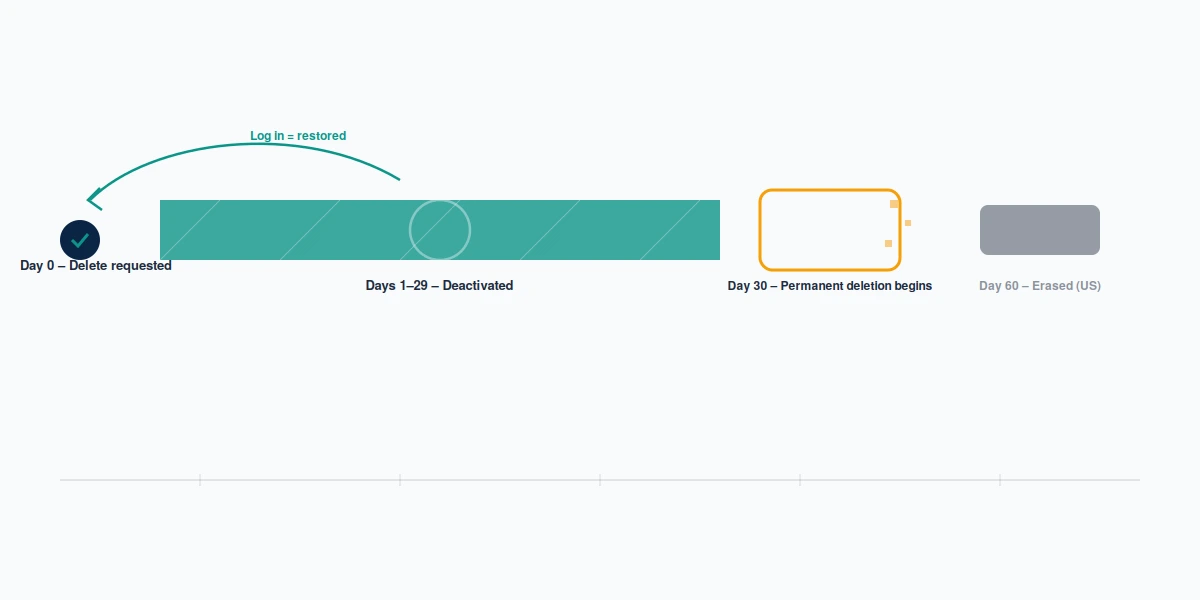
Nothing is erased on the day you press the button. Snapchat moves the account into a deactivated state that lasts 30 days, and only 30 days after that does deletion become permanent — Snapchat's own deactivate-or-delete article states both halves, which is why the honest number is 60 days end to end in the United States, not the 30 that most guides print. In India the second stage runs 180 days longer, for 210 in total. Your Reputation Solution is an account-recovery and reputation firm whose team works platform appeals and takedowns for people locked out or targeted online, and every step in this section is one you do yourself, free, with no help from anyone.
During those first 30 days you can undo it. Log in, and the account comes back. Your friends stop seeing you, your Snapcode stops resolving, and — this is the part Snapchat has never documented — nobody outside Snap can say with confidence what becomes of a Snapstreak that dies mid-window. We have not seen an official answer, and any page giving you a firm one is guessing.
What your contacts see is less dramatic than most people fear. You drop off their friend list and out of search, and the conversation history on their side thins to whatever they saved themselves. Nobody is notified. There is no farewell screen and no "this account was deleted" banner, which is why friends usually read a deactivation as somebody quietly going quiet rather than leaving, and why coming back inside the window rarely needs explaining.
One thing is settled, and it surprises people. A username released by deletion is gone for good: Snapchat Support has stated directly that a deleted username cannot be reused, by you or by anyone else. Reclaiming the handle later is not an option, so if the name matters, stop at deactivation.
"Permanent" also does less than the word suggests. Deletion clears your account and its content from the product (the profile, the friend graph, the Memories), but it does not oblige Snap to purge every record it holds, and companies routinely retain a residue for legal, safety and fraud purposes long after a user is gone. Your Reputation Solution makes this distinction early in every case, because if your reason for leaving is that a specific piece of content must stop existing, deletion is the wrong instrument and you want a removal or erasure request instead, aimed at that content and argued on its own grounds.
That 30-day grace period is a design choice, not an industry standard. Telegram's deactivation page fires the moment you confirm it, with no window at all, and its idle accounts self-destruct on a separate 18-month timer — two routes and one clock, neither of which gives you a month to change your mind. Assume nothing carries across platforms.
If you are leaving because someone took money from you, deleting is not damage control. The account is the smallest part of that loss, and the order of operations decides how much you recover. The same sequence runs through the eight scam patterns our team documented on Telegram, where the profile is the last thing worth worrying about. Read what we can and cannot undo after the fact in our disclaimer before you commit to it.
How can you delete a Snapchat account, step by step?
From a browser at accounts.snapchat.com, and nowhere else. The in-app control exists, but it only hands you off to that same web portal.
Log in at accounts.snapchat.com, choose Delete My Account, re-enter your username and password when the portal asks a second time, then confirm with Continue. The double credential prompt is deliberate. It is also the reason nobody can do this on your behalf: the flow demands a working login, which is why Your Reputation Solution turns down every request to delete a Snapchat account that isn't yours. No support ticket, no form and no service bypasses that password field.
On iOS the route is gear icon → Account Actions → Delete Account, which opens the portal in a browser sheet. On Android there is no in-app delete option at all. Snapchat sends you straight to the browser, so anyone hunting for a hidden menu setting is looking for something that was never built.
Phrasing varies wildly and the destination does not. Whether you searched how do i delete a snapchat account, how to delete an account on snapchat, how to delete an account in snapchat, how do you delete a snapchat account, how can i delete a snapchat account, or the clipped how delete a snapchat account, every one of them ends at the same portal login. So do snapchat delete an account, delete an account snapchat, and how do i remove my snapchat account. There is one door.
Note what the portal never asks for, because it is the cleanest scam test in this whole category. It wants your existing password, typed into snapchat's own domain, and nothing else. No verification fee, no gift card, no recovery code read aloud to a stranger, no Bitcoin, no "account specialist" who needs temporary access. Anyone offering to walk you through how to delete a snapchat account in exchange for any of those is running a credential theft. The giveaway is that they need something the real flow does not, and we have never once needed any of it to work a case.
Deleting your own profile is free and takes about two minutes, so no legitimate firm should be selling you that step. Where our recovery services begin is the case in the sixth section below, once the login itself has stopped working.
Disable, delete, or just log out?
Three different things, and only one is permanent. Logging out ends the session on that phone and nothing else. Your account, your friends and your Memories are untouched, and anyone searching your username still finds you.
To disable snapchat account access without destroying it, you use the same portal and the same Delete My Account button, then simply never log back in during the 30 days. That is the whole trick, and it is why Your Reputation Solution treats the two as one route: how to disable snapchat, snapchat delete account and snapchat deleting account all return the same instructions, because Snapchat ships no separate deactivate switch. Deactivation is deletion that you have not let finish.
For most people leaving on their own terms, that is the better first move. It costs nothing to let the 30 days run and then decide again with a clearer head, the username stays yours the entire time, and the only thing you give up is the satisfaction of a clean break. Deletion is the one choice on this page you cannot walk back.
The word "banned" carries the same ambiguity, and it costs people real time. Block, remove and a platform-level ban are three unrelated outcomes with three different owners, which is why we pulled them apart for WhatsApp because that confusion sends people to the wrong form every week. Locked is not deleted either. A lock has official routes back in, identity checks among them; a deletion that has run its full 60 days has none, which is the distance between the five official recovery paths on Facebook and a door with no handle.
What to save before the account goes
Start the data export first, because it is the only step with a deadline you cannot extend. The portal's My Data section packages your login and account information, friends list, location history, Memories, search history, Bitmoji, purchases, support history and saved chat history. Snapchat documents the contents, and the omission matters more than the list: ephemeral Snaps have already left Snap's servers, and no export brings them back. Only what was deliberately saved survives.
Cancel Snapchat+ separately. Deleting the account does not stop the billing, because the subscription belongs to whoever took the payment — Apple, Google, or Snap's own web checkout — and each is cancelled in its own place. Your Reputation Solution sees this one land as a surprise charge weeks after somebody thought they had left.
Your own Memories come down with the account. Anything a friend re-saved, screenshotted or reposted does not, and that copy is a takedown request with a far higher bar than a delete button, the same split that separates removing your own TikTok posts from chasing someone else's. Deleting the account does not delete the screenshots, and "it is my own content" is only one of six grounds Meta will actually act on, each needing its own filing.
Order the export before you touch the delete button, not after. The archive is assembled and then emailed to you as a link, so there is a wait between the request and the download, and that wait is not synchronised with your 30-day clock in any way. Start both on the same afternoon and you may find the link arrives while the account is already mid-deactivation. Request the data, wait for it to land, open it, confirm the Memories are actually inside it, and only then go back and finish deleting.
If a scam is the reason you are leaving, export before you delete. Banks and investigators ask for the message history, and it stops existing when the account does — the evidence list runs the same way across nine Instagram scam patterns.
Did you mean deleting a Snap, not the whole account?
Some people searching how to delete a snapchat want one message gone, not their profile. Press and hold the sent Snap or chat message, then tap Delete. It disappears for the recipient too, though Snapchat may leave a note saying something was deleted, and a screenshot taken before you acted is beyond your reach.
Removing a person is a third thing again, and far less final than either. Your Reputation Solution ends more consultations here than anywhere else on this page, because the caller wanted one contact gone rather than their own account. Press and hold their name on the Chat screen, open Manage Friendship, and you can remove or block them without touching your own account. The friendship ends, your profile carries on, and you keep the username you were about to throw away over one contact.
Deleting your own account also does nothing about somebody else's behaviour. If a particular Snapchatter is why you are leaving, the report route is separate and outlives your departure — press-and-hold reporting and the status screen work whether or not your account still exists. Leaving ends your access. It does not end theirs.
Snapchat banned your account — which kind, and can you appeal?
Three states wear the same word, and the appeal exists for only one. Name yours before doing anything else, because Your Reputation Solution has watched more time burn on this step than on the appeal itself.
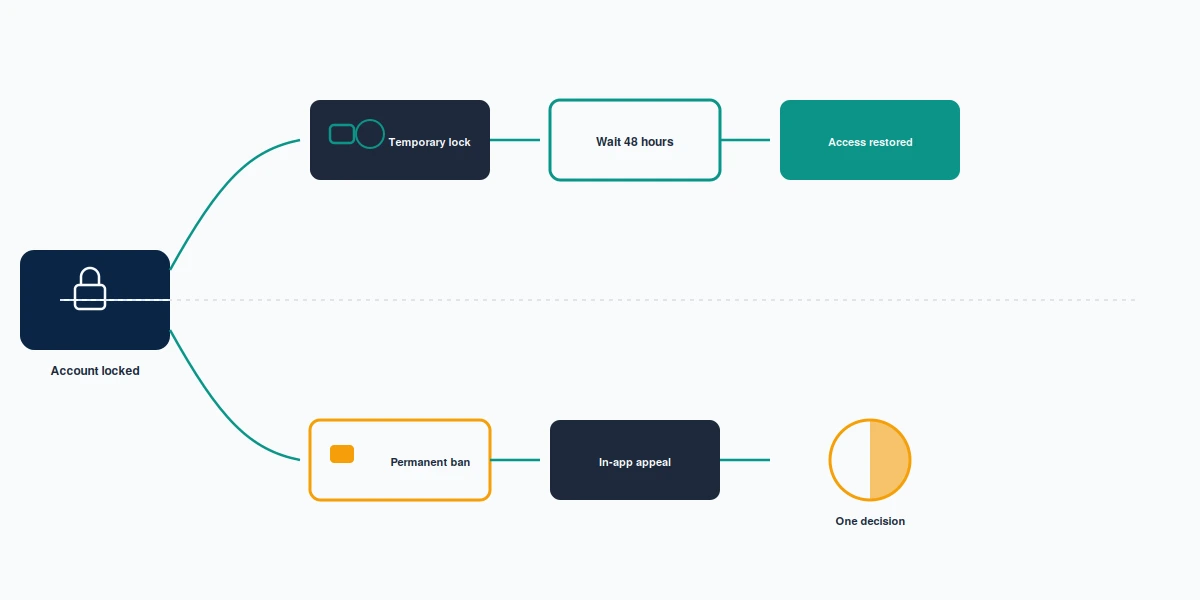
A device ban shows error code SS06 or SS07 and targets the hardware rather than the profile, and Snapchat documents it separately, and it usually follows a modified client. A temporary lock leaves the account fully alive and blocks the login, typically after repeated failed attempts, activity Snap reads as suspicious, or a third-party app such as Snapchat++ or Phantom. Snapchat's guidance is to delete the unauthorised app, wait 48 hours, then log in again through the portal's unlock option. A permanent lock follows a confirmed Community Guidelines or Terms violation, and Snap's wording is blunt: you will not be able to unlock it.
The appeal itself is in-app, and this is where most advice goes wrong. There is no appeal web form. When you attempt to log in on a locked account, Snapchat surfaces an Appeal Decision prompt, and the official appeal article describes that in-app path as the route. You get one attempt per lock. Snap aims to answer in roughly two weeks and states a 30-day maximum, and users in the EU who are refused may escalate to a certified out-of-court dispute body under the Digital Services Act. Not every lock even shows the prompt — where it is absent there is no appeal to file, and no third party can conjure one.
Being banned from snapchat deletes neither your data nor your account. The portal will often still let a locked account start a data export, though Snap warns that data may be unavailable for some lock types. What a ban removes is the login the deletion flow depends on, so the order reverses: appeal first, delete afterwards if you still want to. People who type banned snapchat into a search box expecting a delete button find this out the hard way.
One submission decides it, which puts everything on the evidence you attach the first time. An appeal that omits what the reviewer needs fails on completeness rather than merit. X rejects trademark complaints for exactly that reason when the registration number is missing. Where you send it matters as much as what you send, because the right case down the wrong channel gets closed unread, which is the pattern behind three routes and two outcomes on Telegram. And the obvious button is often the wrong one: YouTube's flag icon does nothing to an advert, and the routes that work sit elsewhere, just as an in-app report is not an appeal.
When Your Reputation Solution reads one of these, the first job is almost never arguing the decision. It is working out which of the three states the person is actually in, because the symptom they describe — the app refuses the password — looks identical across all three, and the fix for each is unrelated to the fix for the others. Someone convinced they have been permanently banned has often been retrying on a device that carries the ban, so a correct password on a clean phone would have logged them straight in. Somebody else has a genuine permanent lock and has spent a fortnight on unlock instructions written for temporary ones. Diagnosis first, appeal second.
If the prompt does appear, write to the reviewer rather than to Snap in general. Say which account it is, say what you believe triggered the lock, and answer that specific charge: a third-party client you have now uninstalled, a login from a country you were travelling in, a report you think was retaliatory. Leave out the paragraph about how much the account means to you. It changes nothing and it costs you the space where the answer should have been.
It helps to know what a pile of reports against you actually produced. Platforms judge each reported object on its own and never the person behind it, so forty complaints do not compound into a verdict — Facebook's harassment routes work post by post for the same reason. Volume is not evidence.
A refused appeal is usually the end, and it is kinder to say so than to sell you a second round. There is no higher queue at Snap and no reconsideration form, which is why the EU route matters so much to the people who have it: the Digital Services Act gives users in the bloc a certified out-of-court body to take the decision to, and that is a genuine second reading rather than the same reviewer looking twice. Outside the EU there is no equivalent. What is left is the honest, unglamorous option: start a new account under the Terms, if the termination reason permits one at all, and accept that the old username stays out of reach forever.
Locked out and unsure which of the three states you are in? Your Reputation Solution reads the case, names the lock type, and tells you whether an appeal route exists at all — including when the honest answer is that it does not. Talk to our team.
What we will and won't do about a Snapchat ban
We will never ask for your password, your login code, or your recovery email. No appeal needs them, and anyone who does need them is not appealing.
We do not guarantee that a ban is reversed, because Snap decides and we do not. Snapchat's help centre says outside tickets will not expedite an appeal, so any firm quoting a success rate on a decision it takes no part in is selling certainty it does not own. Our team reads the case, identifies whether you face a device ban, a temporary lock or a permanent termination, and prepares the single appeal you get. A first case read runs 24 to 72 hours. Accounts terminated for child sexual abuse material, terrorism or violent extremism, sustained harassment or fraud are recoverable through no route at all, ours included, and we say so before taking a case rather than after.
The scams in this niche are unusually easy to spot once you know the shape, and Your Reputation Solution would rather lose an enquiry than charge for a route that does not exist. They quote a flat price before seeing the case, which is impossible when the correct answer for a device ban costs nothing and the correct answer for a permanent termination is that there is no route. They promise a turnaround measured in hours, against a review process Snap itself puts at up to 30 days. They ask for the password, or for the login code that has just arrived on your phone, which is the moment the recovery service becomes the theft. And they describe an insider, a contact at Snap, a priority queue. None of those exist, and a firm claiming one is telling you it is willing to lie.
We also will not delete an account we do not own, and we will not pretend a report is a delete button. Deleting your own profile is free and yours to do. The only paid work here is the appeal, and only where an appeal route exists.
If the reason you are leaving is somebody wearing your name, deleting yourself achieves nothing — the fake stays, and clearing it takes a report, which on LinkedIn never shows the impersonator who flagged them. Be equally clear-eyed about what any form can return. None of the five Facebook Marketplace routes gets your money back, and we say that up front rather than after payment, because the limits of a process are the part worth knowing before you lean on it. We would rather lose the enquiry than take money for a route that does not exist. The full scope of what our work covers, and where it stops, sits in our disclaimer.