Which reset path fits your situation?
Forget the password. TikTok can't see it either — a reset never checks what you remember, only what you still control: the phone number on file, the signup email, or a linked login. That single question decides whether this takes ten minutes or a week of paperwork.
| You still control | Your path back in | Typical wait |
|---|---|---|
| The phone number on the account | Six-digit SMS code from the login screen | Minutes |
| The signup email inbox | Reset code or link by email | Minutes |
| A linked Google, Facebook, or Apple login | Sign in through the provider, then set a new password | Minutes |
| None of the above | TikTok's in-app support request, with ownership proof | 3–7 business days (YRS caseload, 2026) |
TikTok account password recovery has exactly three official doors as of July 2026: a six-digit verification code delivered by SMS or email, sign-in through a linked Google, Facebook, or Apple account, or a manual review request filed through TikTok's own support channels. There is no recovery hotline and no priority queue you can pay for; every path runs through verification. Of the 61 credential-lockout cases our team handled between January and June 2026, 44 ended at a code or a linked login, with no human reviewer ever involved (YRS internal records, July 2026). The manual route catches most of the rest. It works often enough to be worth doing properly, but it is slower, pickier about evidence, and unforgiving of vague submissions, so treat it as the last resort rather than the first move.
One scope note before the steps: if the login screen shows a suspension or ban notice, your password is fine and this is the wrong lane. Start from our full TikTok recovery hub instead.
TikTok account recovery forgot password: the standard reset
This is the plain lockout: the account is healthy, the email or phone on file still belongs to you, and the only thing missing is the password itself.
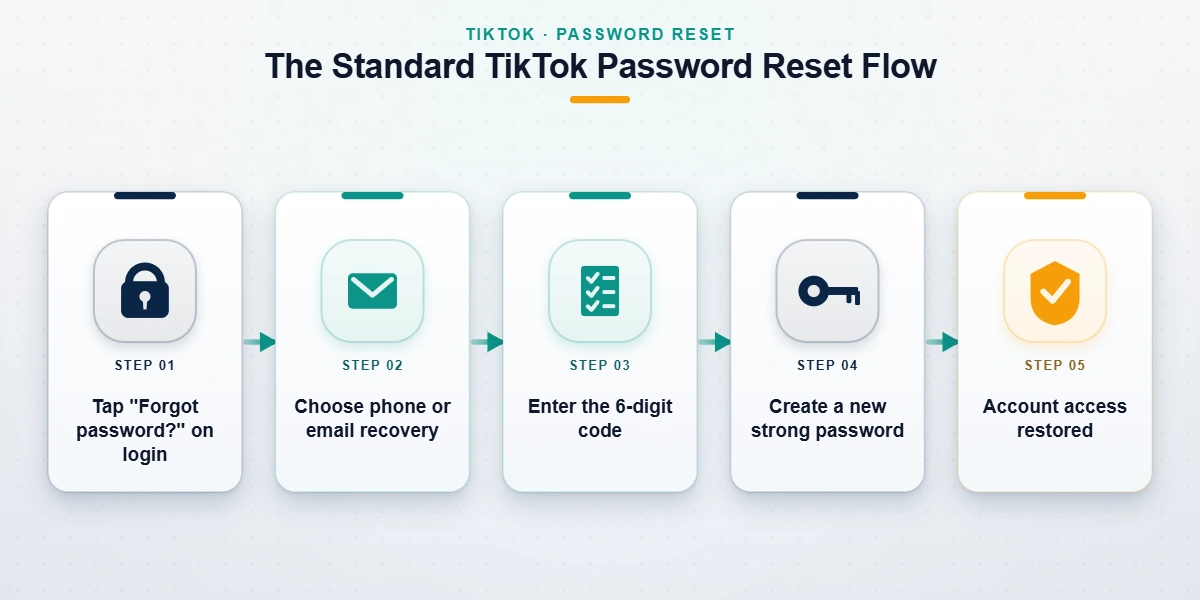
- Open TikTok and tap Log in, or head straight to the login sheet if you're already signed out.
- Choose Use phone / email / username, then switch to the Email / Username tab.
- Tap Forgot password? below the password field.
- Pick where the code goes: the phone number or the email on the account.
- Enter the six-digit code while it's valid. The resend timer runs about 60 seconds, so give it a moment before requesting another.
- Set the new password (8 to 20 characters mixing letters, numbers, and a special character) and you're in.
TikTok documents this same flow on its official password reset page, and the desktop version lives behind the identical link on tiktok.com's login screen.
Reset codes fail for mundane reasons far more often than sinister ones. Email codes land in spam or a promotions tab; SMS codes get silently filtered by carriers, something we see most on prepaid plans, right after a SIM swap, or when the phone is roaming abroad. Codes also expire quickly, so type the newest one you received, not the first. If nothing arrives at all, wait out the resend timer, check every mail folder, then switch to the other channel before assuming the worst. Hammering the flow is counterproductive: repeated failed attempts trip a temporary security cooldown that, in the lockouts we've worked, clears in roughly 24 hours. And if a code preview points to a number or address you don't recognize, stop. That isn't a delivery problem — it's a sign someone edited your credentials, which moves you to the hacked-account lane further down this page.
TikTok account recovery forgot email: when the inbox is gone
Dead inboxes are the classic version of this lockout: the account was registered with a school address that got deactivated, or an old provider inbox nobody has opened since 2021. The account itself is fine. You just need a different door.
Losing access to the email on a TikTok account does not forfeit the account, because email is only one of several ownership signals TikTok accepts. A linked phone number receives the same six-digit reset code and works identically. A connected Google, Facebook, or Apple login bypasses the password entirely, since authentication happens at the provider. Tap Continue with Google (or Facebook, or Apple) on the login sheet, and if the account was ever connected you're in without any code, free to set a new password under Settings and privacy → Account → Password. When neither exists, TikTok's manual review can still match you to the account through the original signup details, device history, and purchase records. In our January–June 2026 caseload, dead-inbox lockouts resolved through a linked login more often than any other path, usually in under ten minutes (YRS internal records, July 2026).
With no phone and no linked login, recovery hangs on proving ownership against the username alone, including TikTok's video-selfie identity check. That whole process is walked through in our guide to TikTok account recovery without phone number.
One disambiguation before you spend time here: "account doesn't exist" or a suspension banner at login is a different failure than a dead inbox. Suspensions have their own appeal track, covered in our suspension appeal guide.
No email, no phone, no linked login: TikTok's last-resort request
If you got here by searching "tiktok recover account without email," here is the honest answer: a path exists, it is free, and it is slow.
From the login screen, tap the question-mark Get help icon, or use Report a problem under Settings and privacy if you can still browse logged out. On the web, TikTok takes lockout reports through its official feedback form. Pick the can't-log-in topic and write a short, factual account of what happened.
TikTok's manual recovery request is the only official path for an account with no reachable email, no phone, and no linked login. A human reviews it rather than an automated system, and approval turns almost entirely on evidence: the exact username plus any previous ones, the email or phone originally on file even if you can no longer open them, the devices the account was used on, its approximate creation date, and any receipts for coin purchases — in our experience the single strongest ownership signal, because the transaction ties your payment identity to the profile. In our caseload from January to June 2026, responses took 3 to 7 business days, and requests with a coin-purchase receipt attached were approved noticeably more often than bare submissions (YRS internal records, July 2026). No third party can skip this queue, whatever their ads say.
If the first reply is a template rejection, tighten the evidence and resubmit once. Serial identical submissions get deprioritized, and the reviewer who sees your fifth copy-paste is not more sympathetic than the one who saw your first.
One thing nobody warns you about: drafts live on your phone, not on the account. Recover the login from a new device and your posted videos, messages, and followers come back — unposted drafts stay on whatever handset they were made on.
Password changed without you? That's a hack, not a lockout
Different problem, different playbook. The tell-tale signs: a "your email was changed" notice from TikTok that you didn't trigger, reset codes previewing a number you don't recognize, or your username suddenly returning "account not found."
Two moves matter in the first hour. First, search your inbox for TikTok's security notifications — the email-change and phone-change notices contain a revert link that undoes the edit if you catch it inside its validity window, and it is the single fastest way to yank an account back from an attacker. Second, if that window has closed, file the hacked-account report instead of running a normal reset, because a normal reset now sends codes straight to the person who locked you out. Both steps, plus the cleanup that follows (spam posted in your name, scam links sent to friends, connected apps you never authorized), are laid out in our hacked TikTok account response plan. The FTC's guidance on hijacked social media accounts covers the wider blast radius, and it matters: password reuse is how one hijack becomes four.
Not sure which lane you're in? Describe the symptoms — never your password; we don't want it and will never ask for it — in a free 60-minute case review and a recovery specialist will map the fastest route for your lockout.
Was your TikTok mass-reported? What reporting can and can't do
Locked-out users often assume an enemy did this. Usually nobody did, but the fear deserves a straight answer, because report brigades are real even if their powers are wildly oversold.
A mass-report campaign cannot change your TikTok password, cannot redirect your reset codes, and cannot touch your login credentials in any way. Reporting feeds a moderation queue that evaluates content and accounts against Community Guidelines; credentials sit in a separate authentication system that reports never reach. What a coordinated brigade can do is trigger reviews that end in video removals, feature restrictions, or a ban — outcomes that appear as a notice at login, not as a failed password. We tested this mechanic directly for our write-up on TikTok mass report bots: report volume alone did not remove compliant accounts, and it never once affected authentication. If your account vanished outright rather than locking you out, you're looking at a takedown, and how TikTok takedowns actually happen covers that lane, including wrongful-removal appeals.
The pattern holds across the industry. Our tests of mass reporting on Instagram, the Instagram spam report bots sold in Telegram groups, and what YRS found inside the X report panels all landed in the same place: reports flag, moderators decide, passwords stay untouched.
Messaging apps are no different. Telegram's report bots and the Snapchat mass-report tools we examined promise leverage they don't have, and several exist mainly to harvest data from the people desperate enough to use them.
Recovery scams that target locked-out users
A locked-out TikTok user is a scammer's favorite audience: stressed, in a hurry, and typing search phrases like "TikTok account password recovery" that bad actors deliberately bid on. The scam has a standard anatomy. An "account recovery agent" appears in a comment section or DM, claims insider access, asks for upfront payment in crypto or gift cards, then either vanishes or sends a phishing page dressed as TikTok support to harvest whatever credentials you have left.
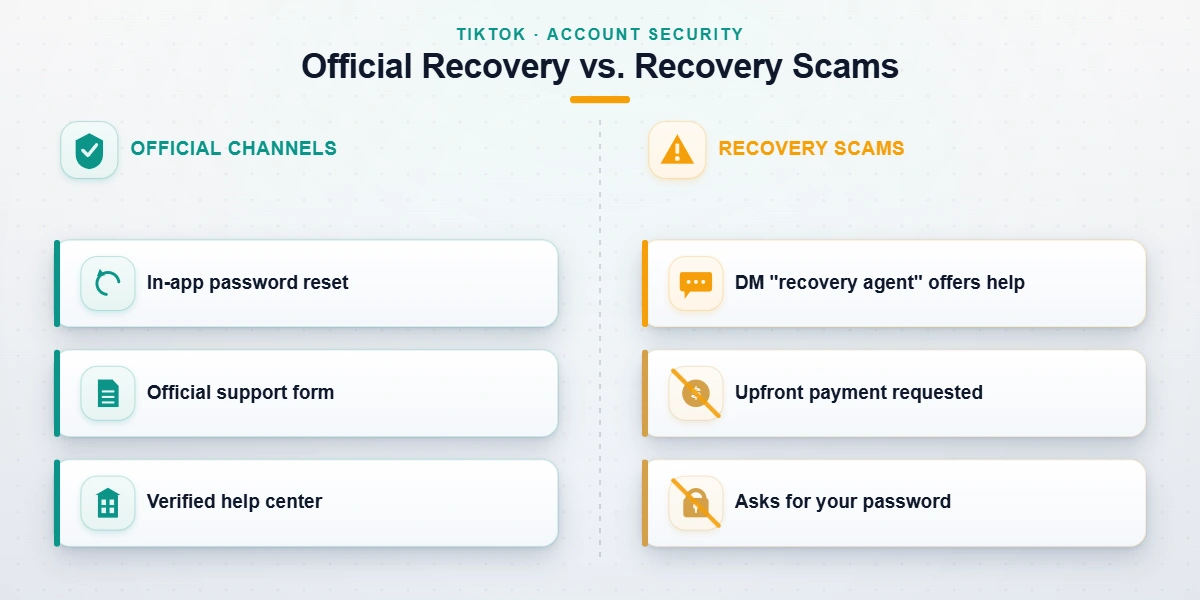
Three red flags identify a recovery scam regardless of platform, as of July 2026. First, any request for your password: no legitimate service needs it, TikTok support will never ask for it, and neither will we. Second, guaranteed outcomes — recovery decisions are made by TikTok, so nobody outside TikTok can honestly promise one. Third, untraceable payment demanded before any work happens: crypto, gift cards, or wire transfer. Legitimate help works the opposite way. It operates through TikTok's own channels, documents what it does, and tells you upfront when a case is unwinnable. Accounts removed for CSAM, terrorism, sustained harassment, or fraud sit permanently in that unwinnable category; no honest provider will take that money, and we spell out those limits in plain language in our service disclaimer.
The same playbook on other platforms
Most creators don't live on one app, and the reporting mechanics above have close cousins everywhere. Knowing them cuts both ways: defense when you're the target, recourse when an impersonator or stolen content needs removing.
For the big content platforms, we keep current walkthroughs of getting a YouTube video taken down, getting an Instagram account taken down, and taking down a Facebook account or page, each covering the legitimate report categories and the evidence each one expects.
The same logic applies to taking down an X/Twitter account and taking down a Snapchat account, where impersonation is the report type we see most.
On the messaging side, taking down a Telegram channel and how WhatsApp ban reports work round out the set. Every one of those guides makes the same core point this page does: platforms act on evidence and policy, not on volume or connections.
Back in? Lock it down — and when to bring in help
Five minutes of hardening beats a second recovery. Set a password you use nowhere else. Turn on 2-step verification with an authenticator app rather than SMS. Confirm the email and phone on the account are ones you actually control today, prune stale sessions under Manage devices, and review which third-party logins stay connected. Our TikTok account safety checklist covers the behavioral side — the strikes and restrictions that cause the other kind of lockout.
And when self-service is exhausted? A note from our own practice: when we escalate a credential lockout, most of the work is evidence, not connections. TikTok's reviewers respond to purchase receipts, device history, and dated screenshots far better than to pleading, and one well-assembled submission routinely outperforms three rushed ones. That evidence assembly, plus honest odds before you commit a cent, is what our TikTok account recovery service actually does. We never ask for your password, and we don't charge on cases we can't reasonably argue.
The password was never the point — control of one verified channel is, so keep two.