How to report a scammer on Instagram, surface by surface
Instagram has no single report button. It has six, and the one you use decides what a reviewer actually sees when your ticket opens. A report filed from a profile shows an account. A report filed from inside the message thread shows the pitch itself: the doctored portfolio screenshot, the customs fee, the boyfriend who needs a flight home. Reviewers act on what sits in front of them, so file from the surface that holds your evidence, not from the one that is easiest to reach.
Search phrasing varies here more than almost any other reporting topic. Report a scammer on Instagram, report a scam on Instagram, how to report a scam on instagram account and how to report fraudulent instagram account all arrive at the same six routes. Here they are, in the order most people need them.
Report a scam profile
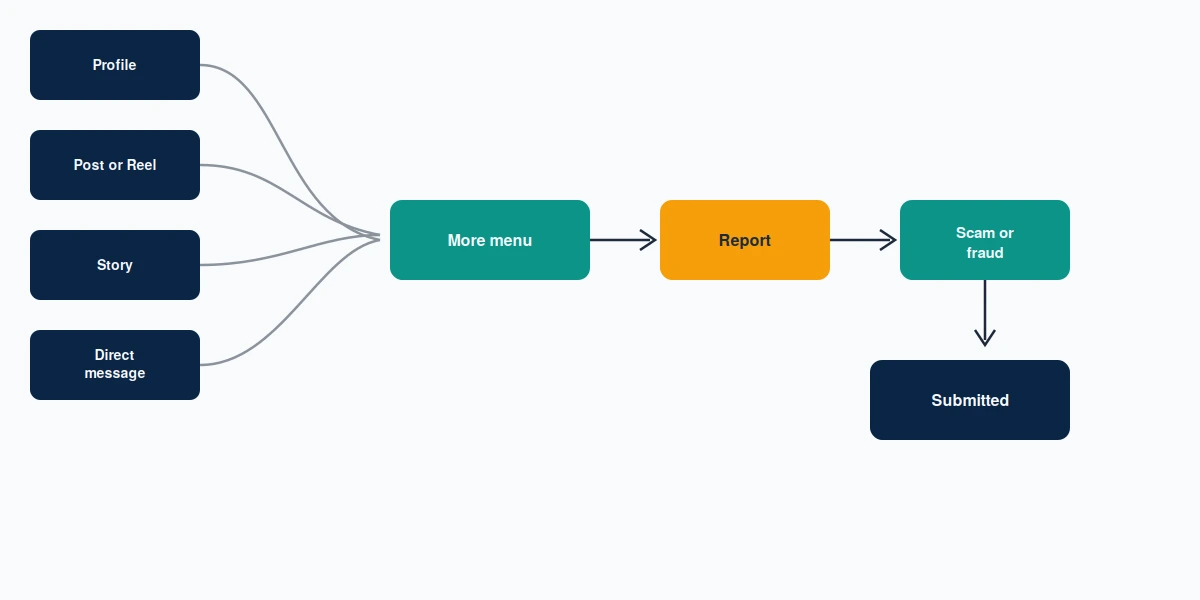
Open the profile, tap the three dots at the top right, choose Report, then Report account, then pick your reason. For a fake shop, a fake investment page or a romance account, that reason is Scam or fraud. If the account is wearing someone else's name and photographs, stop and choose It's pretending to be someone else instead. Impersonation runs through a narrower queue with clearer evidence rules, and misfiling it as fraud costs you the advantage.
Report a scam post, Reel or ad
Three dots above the post, Report, then Scam or fraud. Ads take their own path: tap the three dots on the ad, choose Report ad, then the misleading-or-scam option. Ad reports are worth more than people assume, because an advertiser has a billing relationship and an identity behind it that an ordinary account does not.
Report a scam DM, Story or comment
Inside a chat, press and hold the message, or open the thread menu and choose Report. Stories carry the same three-dot menu as posts. Comments are reported by swiping left on the comment on iOS, or long-pressing on Android, then tapping the report icon. The DM route is the one to prioritise when money was discussed, because the negotiation lives there and nowhere else.
If the scam messages turned threatening once you stopped paying, that behaviour has its own category and its own reviewers, and the six routes for reporting Instagram harassment will move faster than a fraud flag will.
What to have ready before you file
Ten minutes of preparation changes the outcome more than any wording trick. Before you open the report sheet, capture the account handle and the numeric profile URL, because scammers rename accounts within hours of being reported and a handle alone becomes untraceable. Screenshot the full conversation rather than the worst message, with dates visible. Note every payment: amount, date, method, and the reference number or wallet address. If they sent a link, copy it as text without tapping it.
Then write your description as a sequence. "This account contacted me on 4 August claiming to sell concert tickets, asked for £180 by bank transfer on 5 August, and blocked me after payment" tells a reviewer what happened. "This is a scammer" does not. The first version contains dates, an amount and a method, which are the fields a fraud reviewer is trained to look for. The second version contains an opinion.
Keep the originals after you file. Your bank and the police will ask for the same material, and blocking the account can hide the thread before you have copied it.
Which reason you pick changes which queue you land in
This is the part almost no guide explains. A report scam on instagram ticket is sorted by category before a human reads a word of your description, and the categories behave differently. Scam or fraud flags an account against financial-abuse patterns and can result in DM and advertising restrictions rather than removal. It's pretending to be someone else is the impersonation path, and it resolves faster because identity claims are checkable against evidence you can supply. Spam is the weakest choice for a genuine fraud, because it is the highest-volume, lowest-priority queue on the platform. If you picked the wrong one, you can report the same account again under the right category, and a single corrected report is not treated as abuse of the system. A dozen identical reports from one person is. Choose once, choose accurately, and put the narrative in the description field rather than trying to express it through the category.
So pick by what is provable, not by what feels worst. A fake shop that stole a real brand's photos is stronger as an impersonation or copyright report than as a fraud report, because both of those have a documentary test. A romance or investment scam with payment records belongs in fraud, where those records are the evidence. Choosing the category that matches your evidence is the closest thing to a lever you have.
Reporting when you do not have an account
You do not need to be logged in. Meta keeps a public reporting path through the Instagram Help Center reporting form, and a separate impersonation form for accounts using your name, face or business. That second form is the one for brands: if a scammer has cloned your storefront to take orders, the impersonation route is the one that works, and where they have lifted your product photography outright, the Instagram DMCA takedown form removes the specific posts more reliably than a fraud flag ever does.
Scammers rarely operate on one platform. The same operator running a fake Instagram storefront often runs the same catalogue elsewhere, and reporting a TikTok Shop seller works on a similar evidence-first logic. Filing both is not duplication. It is coverage.
Is there an Instagram scam report email?
No. There is no Instagram scam report email, and there is no Instagram fraud reporting email either. This is the single most common wrong turn we see, and it costs people days.
What [email protected] actually does
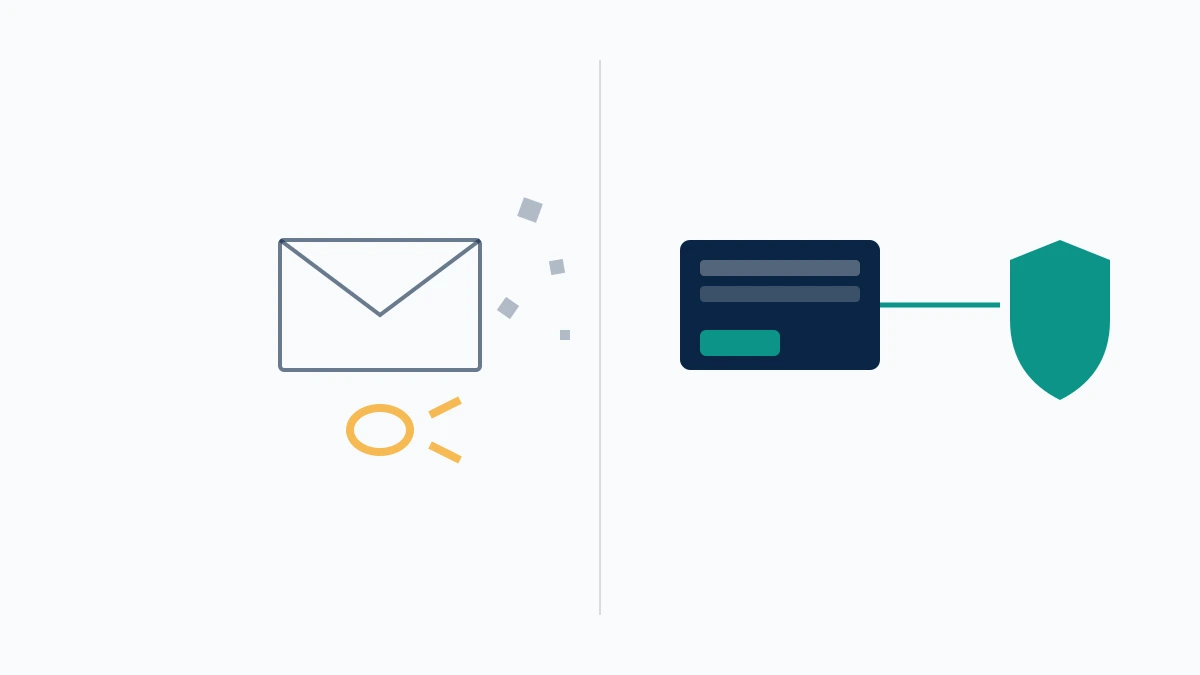
One real Meta address exists, and it is narrower than its reputation. Meta's phishing guidance asks you to forward suspicious emails that impersonate Meta or Instagram to [email protected]. That address exists to catch fake password-reset and fake copyright-strike emails aimed at Meta users. It is not a scam desk. Send it a romance scammer's handle and nothing happens, because nothing there is built to receive that.
The address is also useful in reverse, as a check on your own inbox. Legitimate Meta mail comes from @fb.com, @meta.com, @mail.instagram.com and @account.meta.com. Anything else claiming to be Instagram support is itself the scam, and the fake-support account that slides into your DMs offering to "escalate your case" is the second wave of the same operation.
The forms that replace an inbox
Everything else routes through the in-app flow and the Help Center forms above. That is a deliberate design choice, not an oversight: a form forces the account ID, the surface and the category into fixed fields, which is what lets Meta triage volume at all. Free text in an inbox does not sort itself. Meta's Fraud and Scams community standard sets out what the policy actually covers, and reading it before you write your report is twenty minutes that changes the wording you choose.
The myth persists for a reasonable reason. Most companies do have an abuse inbox, so people who search how do i report a scam on instagram and land on a corporate contact page assume one is hiding behind a login. Meta's public-facing resource for this is the Scam Protection Center, which is a guidance hub rather than a contact route — useful reading, no destination for your case. Anyone selling you a private Instagram fraud reporting email, a support hotline or a "direct Meta contact" is selling something that does not exist. The fake-support DM runs on the same belief. Someone messages claiming to be from Instagram's fraud team, references the report you just filed, and asks you to confirm a code. Instagram does not contact people that way about reports, and there is no code to confirm.
Does reporting scammers on Instagram actually work?
Sometimes, and less often than it should. That is the honest answer, and it is worth giving plainly because the alternative is a reader who files one report, sees nothing happen, and concludes the whole system is theatre.
What the Reddit threads get right
Search how to report scammers on instagram reddit and you land in r/scams and r/Instagram, where the dominant sentiment is that reports vanish. The frustration is real and the diagnosis is roughly half right. What those threads capture accurately: single reports on established accounts frequently close with no visible action, notifications are vague by design, and Instagram will never tell you the outcome in detail. What they miss is that report quality moves the needle more than report volume does. A report naming one post gets weighed differently to a report describing a payment, a date and a pattern. Community threads are also a reasonable route for a public warning, though if a post about you crosses a line, getting a Reddit post removed runs on its own rules and its own volunteer moderators rather than anything Instagram controls.
Across the scam-account escalations our desk logged between February and July 2026, roughly two in three produced no visible action on the first report. The ones that did land almost always carried payment evidence — a transfer reference, an invoice, a wallet address — rather than screenshots alone (our internal records as of August 2026). Our team's background in platform Trust and Safety operations is on the about page, and the pattern is consistent across every platform we work: reviewers reward specificity, not outrage.
How long the review takes
Instagram publishes no service-level commitment for scam reports, and the range in practice is wide. Automated screening happens in minutes. Anything routed to a human sits in a queue whose length depends on category, volume and region, and one to five days is the band we see most often for fraud reports carrying evidence. Reports filed with no supporting detail can close in under a minute, which is why a fast result is not always a good one. You will not receive an explanation either way, and the notification you eventually get says only that Instagram reviewed the report.
Strike, restriction, termination
Reporting is not a delete button. A ticket that succeeds produces one of several outcomes: a warning, a feature restriction such as losing DMs or ad access, a temporary suspension, or full termination. Only the last removes the account, and it is the rarest. Scam operators expect losses and run replacement accounts, which is why persistent reporters get further than one-shot reporters — you are not trying to win once, you are trying to raise the cost.
Enforcement language differs across platforms in ways that matter when you are tracking an operator who moved on. A Telegram account can be frozen rather than banned, which looks identical from outside and is not, and on X a permanent suspension has appeal rules of its own. Knowing which state you are looking at stops you re-reporting something already actioned.
Where else to report an Instagram scammer
Instagram can remove an account. It cannot return your money, take a statement, or open a case. Those are three different institutions, and they run in parallel with your platform report, not after it.
Report an Instagram scammer to the police
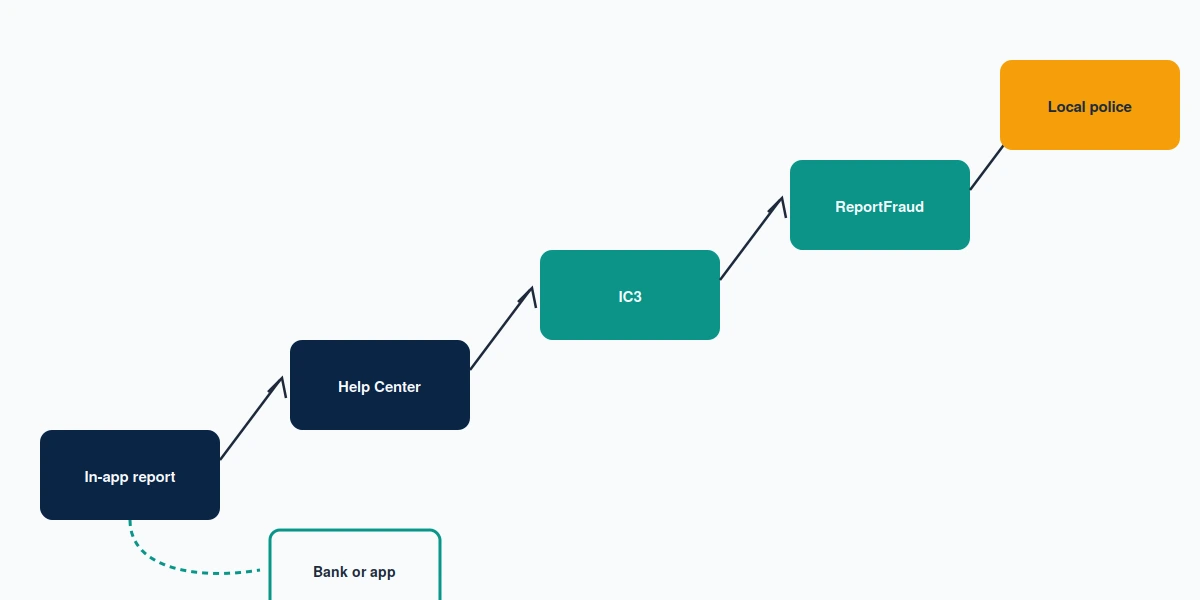
People search report instagram scammer to police expecting a national fraud hotline. No such single line exists in the US; the route is your local department plus the federal portals below, and they do different jobs.
You can, and in the United States you generally should if money moved. Walk into or call your local non-emergency line, bring printed screenshots, transfer references and dates, and ask for a report number. Local departments rarely investigate a low-value cross-border fraud themselves, and that is not the point of filing. The report number is what your bank, your insurer and any later civil claim will ask for. People who skip this step because "the police won't do anything" lose the paperwork that makes every other step possible. Jurisdiction is the usual friction. The operator is often abroad, your department is local, and neither has a route to the other. That is exactly why the federal filing below carries more weight than the local one for any realistic chance of action, and why you file both rather than choosing between them.
Report an Instagram scammer online to federal portals
Two US portals matter. The FBI's Internet Crime Complaint Center is the one to file with first when funds were sent, especially by wire or crypto, because IC3 feeds the recovery-asset process that occasionally freezes transfers still in flight — measured in hours and days, not weeks. The FTC's ReportFraud portal is the consumer-protection record; it does not chase individual cases but it builds the pattern evidence that supports enforcement. File both. Neither takes long.
Your bank, card issuer or payment app
Contact them the same day, before you finish reading anything else. Card payments have chargeback rights. Bank transfers, gift cards, crypto and peer-to-peer apps mostly do not, and speed is the only variable you still control.
Evidence has a shelf life here too. Scammers routinely pull the conversation onto WhatsApp or Telegram and then burn the number, and a deleted WhatsApp account takes the thread with it permanently. Screenshot the chat before you block anyone. Where the operator's Telegram handle is still live, an evidence-backed Telegram takedown request is a legitimate parallel route.
If a scam account is impersonating your business or your name and your own reports have gone nowhere, talk to our team. We will tell you honestly whether a case is worth escalating before anyone pays for anything.
If the scammer got into your account
Some of this traffic is not from people who were scammed by a stranger. It is from people whose own account started scamming their followers — phishing link, credential reuse, or a support impostor who talked them out of a login code.
Credential theft rarely stops at one app. The same password opens a linked profile, and Meta's account system means an Instagram takeover often surfaces on Facebook first, where the five official recovery paths are the fastest place to start. From there it spreads by pattern. A hijacked handle you can no longer log into follows the same logic as recovering a Twitter account when you have lost the username. A SIM swap after a credential scam is why restoring WhatsApp on a new phone becomes its own problem. And if the attacker pushed scam links before you regained control, the platform may enforce against you, which is the same appeal-once situation as a suspended YouTube channel. None of these are your fault. All of them are faster to fix in the first forty-eight hours.
Then change the password, revoke unknown sessions, and turn on two-factor authentication before you do anything else. As of August 2026, Instagram supports authenticator apps and passkeys, and both beat SMS codes for exactly the reason this article exists: a code that can be talked out of you is a code a scammer will talk out of you.
What we will not do, and what nobody can
This category attracts predators, so here are our limits in plain language, and they are the same ones on our disclaimer page.
We will never ask for your password or a login code. No legitimate service does. That principle is not specific to Instagram, and it is the single clearest tell across every platform we handle — the same warning sits at the front of what a Telegram account recovery service is allowed to do. We do not guarantee that any account will be removed, because Instagram decides that and we do not. We will not file a false copyright claim to force a takedown. We are not law enforcement, we cannot identify or locate a scammer, and we cannot recover money that has already been sent — that is IC3, your bank, and the police, in that order. We do not sell mass reporting, and we will not take payment to make a platform decision go a particular way, because neither of those is a thing anyone can honestly sell.
The second scam is the one that catches people already hurting. Someone finds your comment on a scam post and offers to recover your funds for a fee. Recovery fraud is a category of its own, and it follows the same script wherever it appears: an upfront payment, an urgent deadline, and a promise nobody can make. Honest pricing looks like published ranges and a case review before money changes hands, which is why we publish what WhatsApp account recovery actually costs and why any offer to restore a YouTube account without email access for a flat fee deserves the same suspicion.
Where we can genuinely help is narrower than the marketing on this topic suggests: impersonation takedowns when a scammer is trading on your name or brand, and recovery work when your own account is the one that was taken. Our services page sets out both, including what falls outside them.