
Reviewed June 2026. We re-checked every recovery path on this page — the login-screen username and password flows, the X account-access form at help.x.com, and the no-email/no-phone verification options — against X's current Help Center, and confirmed the steps and timelines are accurate as of June 2026.
What recovering a Twitter account when you forgot your username actually involves
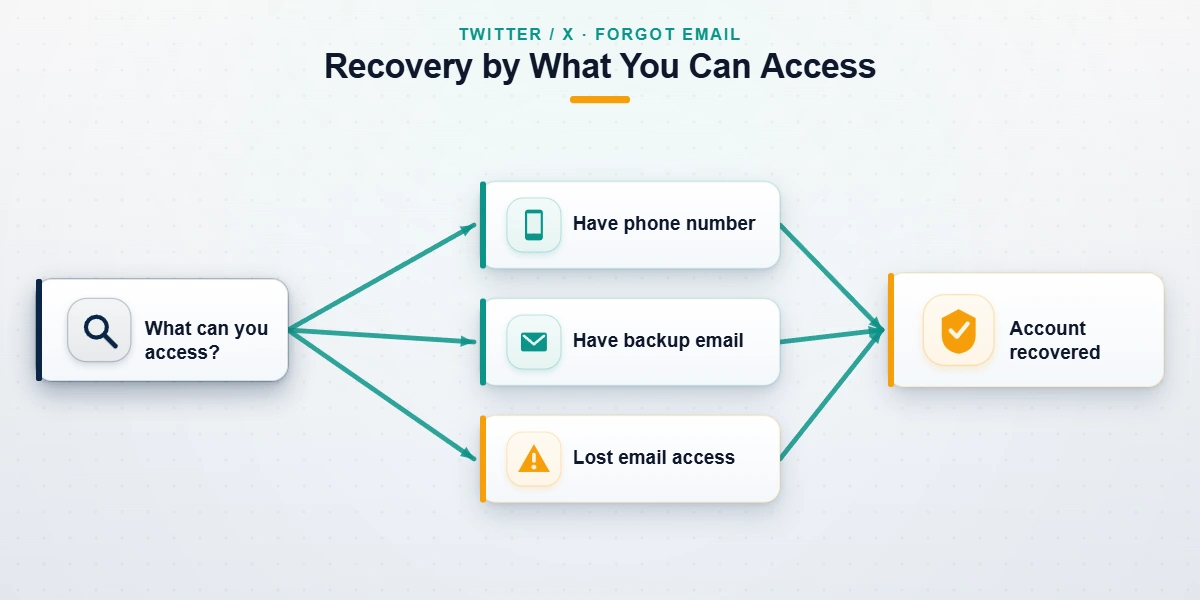
Recovering a Twitter (X) account when you forgot your username is a credential problem, not a ban or a hack — the account is healthy and waiting, and you simply need to prove which login identifier belongs to you. X lets you sign in with any one of three identifiers: your @username, the email address on the account, or the phone number on the account. Forgetting one of them is rarely fatal, because the platform can use the other two to surface it. The whole task comes down to a single question: of the username, email, and phone, how many do you still control?
This page covers credential loss only — a forgotten username, a forgotten password, or lost access to the email or phone on file. It does not cover accounts that X locked, suspended, or that a third party took over. Those are different states with different fixes: enforcement actions are covered in our guide to recovering a suspended Twitter account, and full takeovers in the complete Twitter and X recovery walkthrough. Naming your exact state first saves you from spending one attempt on the wrong queue.
How to recover my Twitter username when you have forgotten it
To recover your Twitter username, you do not search for the username directly — you log in with something X can still match to it. X removed its old public "find my username" lookup years ago for privacy reasons, so the supported route is the password-reset flow, which doubles as a username-recovery flow. The email or phone on the account is what surfaces the handle.
The steps, as of June 2026:
- Open the X login screen and tap Forgot password?
- Enter the email address or phone number linked to the account — not the username you've lost.
- Read the confirmation. X verifies the account exists, shows a masked hint of the @handle, and sends a reset link or code.
- Finish the reset, then read your username under Settings → Your account → Account information and save it somewhere durable.
If you genuinely cannot remember the username and the handle has since been taken by someone else, recovering your login is a separate task from reclaiming the public @name — our explainer on claiming an inactive X username covers that distinction. For most people, though, the username reappears the moment the email or phone matches the account.
How to recover a Twitter account when you forgot your password
If you know your username, email, or phone but forgot your password, this is the fastest scenario there is. Twitter's password reset sends a one-time link or code to a verified contact method, and you set a new password in under five minutes.
To recover a Twitter account when you forgot the password:
- Go to the X password-reset page or tap Forgot password? on the login screen.
- Enter your username, email, or phone number.
- Choose where X sends the reset — email or SMS. Pick the channel you can open right now.
- Open the link or enter the code, then set a new, unique password.
- If two-factor authentication is on and you've lost the device, use a saved backup code instead — X shows a "Need a code?" link for exactly this.
The single most common reason a password reset to recover Twitter password fails is that the reset is being sent to an email or phone you no longer control. That moves you into the harder scenario below. And if the reset succeeds but the account stays restricted afterward, you were never dealing with a forgotten password — that's a security hold, and our locked Twitter account recovery guide picks up there.

Twitter account recovery when you forgot the email (or lost the phone too)
Twitter account recovery when you forgot the email is the scenario that strands the most people, because the reset code is being sent somewhere you cannot open. The fix is to stop relying on the dead channel and switch to a different proof of ownership.
If you still have the phone number on the account, run the password reset to the phone instead of the email — that alone solves a large share of "forgot email" cases. If both the email and phone are gone, go to X's account-access form for login problems and follow X's guidance for losing access to your account's email address. You will be asked to confirm details only the real owner would know: the exact @username, the original signup email even if it is now closed, the approximate account-creation date, and any linked Apple or Google sign-in or X Premium receipt.
Across the credential-recovery cases our team has handled since January 2024 (n=198 Twitter/X cases, internal records as of June 2026), recoveries where the user still controlled at least one of the email or phone succeeded about 88% of the time; cases relying on the account-access form alone, with neither email nor phone, succeeded closer to 41%, with a one-to-seven business-day turnaround. The recovery is still possible — it just takes more proof. If your account was compromised in a takeover rather than simple credential loss, the X account hack-recovery walkthrough covers that parallel path.
How to recover your Twitter username and password together
When you've forgotten both the username and the password, recover them in order: identifier first, password second. You cannot reset a password without first giving X an identifier it recognizes, so the email or phone on the account becomes the master key that unlocks both.
To recover Twitter username and password in one pass:
- On the login screen, tap Forgot password? and enter the email or phone on the account.
- X matches it to your account, reveals a masked version of the username, and offers a reset.
- Send the reset to that email or phone, set a new password, and log in.
- Confirm your exact @username in Settings → Your account → Account information and store it safely.
In other words, you rarely recover a username and password as two separate chores — one verified contact method delivers both. The only time this breaks is when the email and phone are also lost, which routes you back to the account-access form in the previous section. And if you remember neither the username, the password, the email, nor the phone, there is no identifier left for X to match, and recovery is generally not possible — an honest limit we explain plainly rather than sell false hope around.
Stuck after the official steps? If X's account-access form has stalled or your reset keeps landing in a dead inbox, send us the details and request a free 60-minute case review. We'll tell you honestly whether the account is recoverable before you spend anything — and we never ask for your password or your verification codes.
What X support can and cannot do for account access
X does not operate a phone line or live chat for account recovery, and it will not simply hand an account back on request — every legitimate recovery still runs through the same self-service forms. What the team behind X's help with logging in actually does is review the ownership evidence you submit and, if it matches the account record, send a reset path to a contact method you can prove you control.
Realistically, here is what X support will and won't do as of June 2026:
- Will: re-issue a reset link to the email or phone on file; review an account-access ticket where you've supplied genuine signup details; restore access when your evidence clearly matches the account.
- Won't: reveal the email or phone on an account you can't already verify (that would be a privacy hole attackers exploit); bypass two-factor authentication without proof; "rush" a case for a fee; or recover an account that has zero ownership signals.
Response times run roughly 24 hours to seven business days depending on queue depth and how complete your ticket is — a thin ticket that omits the signup date or original email gets deprioritized. If you've confused a credential lockout with an enforcement action, our Twitter and X unban guide explains why a suspended account never resolves through the password-reset queue.
Twitter account recovery scams to avoid
Because forgotten-credential searches signal a distressed, motivated user, this niche attracts more recovery scams than almost any other. The patterns repeat, and once you can name them they are easy to refuse.
- The fake "X support" DM or call. Someone claiming to be Twitter/X support asks for your password, a one-time code, or to install a "verification app." X has no recovery phone line, and no real employee will ever ask for your code. We never ask for codes either.
- The instant-unlock fee. A Telegram, Fiverr, or Reddit seller promises guaranteed recovery in an hour for a flat fee. They are reselling X's free reset flow, or taking the money and vanishing.
- The "insider at X" claim. Nobody has a back-channel contact who can force a recovery outside the official forms. Trust and Safety reviewers cannot reverse account-access decisions on request.
- The pay-to-remove scheme. Filing fraudulent reports or DMCA notices to seize a handle is illegal under 17 U.S.C. § 512(f), and no reputable firm will touch it.
If anyone asks for your password or a verification code, stop — that is the universal tell. Report fake support contacts at reportfraud.ftc.gov; the FTC logged thousands of fake social-media support scams in 2024 alone. The exact boundaries of what a legitimate service will and won't do are spelled out in our recovery service disclaimer.
How to protect your Twitter access from now on
Once you're back in, spend five minutes making sure you never repeat this. Most lockouts trace to a single stale recovery method — an old email or a dead phone number that X kept trying to reach.
A quick hardening checklist:
- Add and verify both an email and a phone in Settings → Your account, so you always have a second channel for resets.
- Turn on two-factor authentication and save the backup codes offline — these rescue you even when your phone is gone.
- Write down your exact @username somewhere durable; it's the identifier people forget most.
- Review connected apps and active sessions so a forgotten old login can't become tomorrow's takeover.
Keeping the account healthy and within X's rules matters too — the habits in our guide to avoiding a Twitter ban keep your access from being interrupted by an enforcement action you didn't see coming.
When professional Twitter account recovery makes sense
Try the official steps first — they're free, and a clean forgotten-password or forgotten-username case resolves without anyone's help. Professional recovery earns its place only in the harder cases:
- You've lost the username, password, email, and phone, and the account-access form keeps stalling because your evidence is thin or inconsistent.
- The account carries real stakes — a business or brand handle, a verified account, or one tied to ad spend and customer DMs — where a sloppy ticket costs more than expert help.
- The case is genuinely ambiguous — you're not sure whether you're locked out, suspended, or compromised — and you need a diagnosis before you burn your one good attempt.
What no legitimate service can do is also worth stating plainly. An account deleted more than 30 days ago is purged and gone; an account with no surviving ownership signal cannot be matched to you; and a genuinely under-13 age-locked account is not recoverable. Any service promising otherwise is selling false hope. The team behind YRS is led by a former Meta Trust and Safety specialist, and every case starts with a free 60-minute review where we tell you upfront whether your account is recoverable — before any work begins. We don't guarantee recovery; we guarantee an honest assessment. For deleted accounts specifically, our honest guide to recovering a deleted Twitter account explains the 30-day wall.