Is a YouTube account the same thing as a Google Account?
Yes. There has been no YouTube-only login to recover since the Google Account migration closed in 2009.
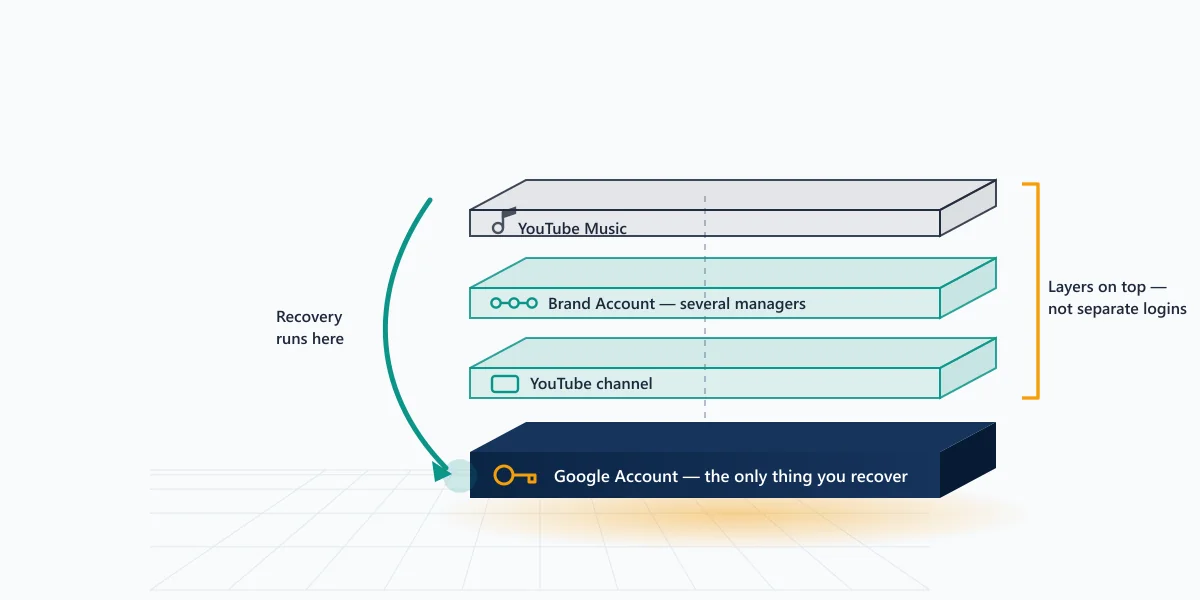
A YouTube account is a view of a Google Account, in the same way Gmail and Drive are views of it. Google's own creator community guide puts the point in its title: getting your channel back is actually recovering your Google Account. Enter a password on youtube.com and the request is handed straight to Google's identity service. YouTube holds no credential of its own, which is why every route back in starts at accounts.google.com/signin/recovery no matter which product you were using when you got locked out.
Your Reputation Solution is an account recovery firm that spends most of its YouTube casework on exactly this distinction, because it decides which form a locked-out creator should be filling in — and which one burns an attempt for nothing. Four separate things sit on top of that one login, and they break in ways that look identical from the outside: the Google Account itself, the personal channel attached to it, any Brand Account channels it manages, and the YouTube Music and Premium entitlements billed to it.
Getting the layer wrong is the most expensive mistake in this category, and it is the one almost everyone makes first. Someone whose channel was taken down for a policy violation can reset their Google password fifty times without changing anything, because the login was never the problem. Someone who genuinely lost access to their Google Account can file appeal after appeal on YouTube's forms and never be read, because those forms require you to be signed in to the account you are appealing for. The first case is a suspension, not a sign-in failure. The second is a credential problem wearing a suspension's clothes. Both people describe the situation with the same four words, which is why the search results for those words are such a mess.
So Google YouTube account recovery, as a phrase, describes one procedure with four possible destinations. Before touching a form, work out which of these you are in. Can you still sign in to the Google Account, but the channel is gone or restricted? That is an appeal. Can you not sign in at all, from any device? That is credential recovery. Can you sign in, and the channel exists, but you cannot manage it? That is a Brand Account permissions question. Can you sign in and see the channel, but the subscription or library is missing? That is billing. Your Reputation Solution asks these four questions at intake before quoting anything, because three of the four have a free route the client can drive themselves, and the honest answer for those is to point at it.
How the Google recovery form decides whether you get back in
Google's recovery form is not a questionnaire with right answers. It is a confidence score, assembled from everything the form can compare against what Google already knows about the account, and a single strong signal can outweigh several weak ones. That framing changes how you should approach it. Guessing is not neutral; a wrong answer entered from an unfamiliar device on an unfamiliar network is evidence against you.
The published guidance asks you to answer from a device and browser you have used to sign in before, on the network you normally use, and to answer every question rather than skipping the hard ones. Google's account recovery help page is blunt that partial answers still count. This is the same design principle NIST describes for identity re-binding in SP 800-63B: recovery must be hard enough to resist an attacker who knows the public facts about you, which is precisely why the form feels unfair to the real owner. Your birthday, your city and your old phone number are all things a stranger can buy. Device history and session patterns are not, so those carry the weight.
Work through it in this order.
- Start from a recognised device. Open the recovery flow on the phone or laptop that was last signed in, even if that device has since been signed out. Device history is the single heaviest signal in the score.
- Answer the creation-date question with a real estimate. The form asks for the month and year the account was created. If you never noted it, anchor on a real event — the year you started the channel, the phone you bought it with, the first video's upload date, which is still public on the channel page even while you are locked out.
- Use "Try another way" rather than abandoning. Each fallback path adds a signal. Skipping straight to a new attempt resets nothing and adds nothing.
- Give a contactable recovery address you actually hold. Google sends the outcome there. A dead address turns a successful review into a dead end.
- Wait out the review window before retrying. Repeated same-day attempts from new devices depress the score.
If the account is recoverable at the credential layer, this is where it resolves. Your Reputation Solution prepares and escalates the paperwork around this form; Google's systems make the decision, and there is no version of this where a vendor reaches inside that score. The step-by-step YouTube sign-in walkthrough covers the on-platform variations in more detail, including what changes when two-step verification is still active on a phone you no longer have.
A submitted request does not always answer immediately, and the delay is not a queue of human reviewers waiting to read your case. Google may hold a recovery for a cooling-off period specifically so that a real attacker cannot complete one in a single sitting, and so that any notification sent to the account's existing addresses has time to land. Silence for a few days is normal. Your Reputation Solution tells clients to treat that window as part of the process rather than as a refusal, because the most common self-inflicted wound at this stage is starting a fresh attempt that overwrites a pending one.
One habit costs people accounts more than any other. Locked out and anxious, they open the recovery form on a borrowed laptop or a work machine, fail, then try again on a phone at a coffee shop, fail again, then try a VPN. Each of those attempts is a stranger knocking, and the score reads them as such. The better move is slower and feels passive: find the one device that has genuinely signed in before, connect it to the network it usually uses, and make a single careful attempt from there. If that device was lost with the account, say so honestly in the form rather than approximating from a new one.
"YouTube sign in to my account recovery" and what the verification screen is really testing
That phrasing turns up constantly in search, and it usually describes one specific failure: the sign-in page accepts the email, accepts the password, then stops at a verification screen the searcher cannot clear. The account is not lost. The second factor is.
Your Reputation Solution treats this as a distinct case from a forgotten password, because the fix is different and the odds are better. A password reset re-enters through the same front door. A second-factor failure needs a documented alternative — a backup code saved at setup, a passkey on a second device, a recovery phone that still receives, or the slow route of proving device and location history until Google's score clears on its own. In the Google-layer cases our desk worked between March and August 2026, this verification wall, not the password, was the most frequent single blocker.
What youtube gmail account recovery restores besides the channel
Everything on the account, at once. There is no way to recover the YouTube half and leave the rest locked, and no way to recover Gmail while the channel stays unreachable.
People search "how to recover gmail account youtube" expecting two processes bolted together, and the relief in the real answer is that there is only one. A successful recovery returns Gmail, Drive, Photos, Calendar, Play purchases, the personal YouTube channel, watch history, subscriptions and any YouTube Music library built on that account, because none of them were ever separate accounts. The practical consequence is worth stating plainly: youtube gmail account recovery is Google Account recovery with a creator's reason for wanting it.
That also means the Gmail side is a lever. If you still read the inbox but cannot get past the YouTube sign-in, you hold the strongest recovery signal there is. If the inbox itself is gone, whether closed, hijacked, or attached to a school or work domain that was shut down, the ground shifts, and recovery when the Gmail address itself is gone becomes a narrower problem with its own rules.
Managed domains deserve their own warning, because Your Reputation Solution sees this one arrive too late more often than any other Gmail variant. A channel built on a university or employer address does not belong to the person who built it. An administrator on that domain can suspend, transfer or delete the account, and when the institution shuts the address down, the Google Account can go with it. Creators who started a channel on a school account and graduated years ago are frequently discovering this only when they try to sign in. Where the account still exists, the route runs through that organisation's administrator rather than Google. Where it has been deleted, there is usually nothing left to recover. If you are reading this while your channel still works, moving it off a domain you do not control is an afternoon's work and the single highest-value thing on this page.
Where the inbox was taken rather than lost, order matters more than speed. Secure the email first and the channel second, because an attacker who still controls the inbox can undo a channel recovery within minutes by re-triggering the same reset you just completed. Google publishes a dedicated sequence for securing a hacked or compromised Google Account, and it puts the mailbox ahead of everything downstream for this reason. The pattern repeats across platforms — it is the same ordering problem our team works through in Instagram hijack cases, where the registered email is the real prize and the profile is only the visible symptom.
The part people forget after they get back in
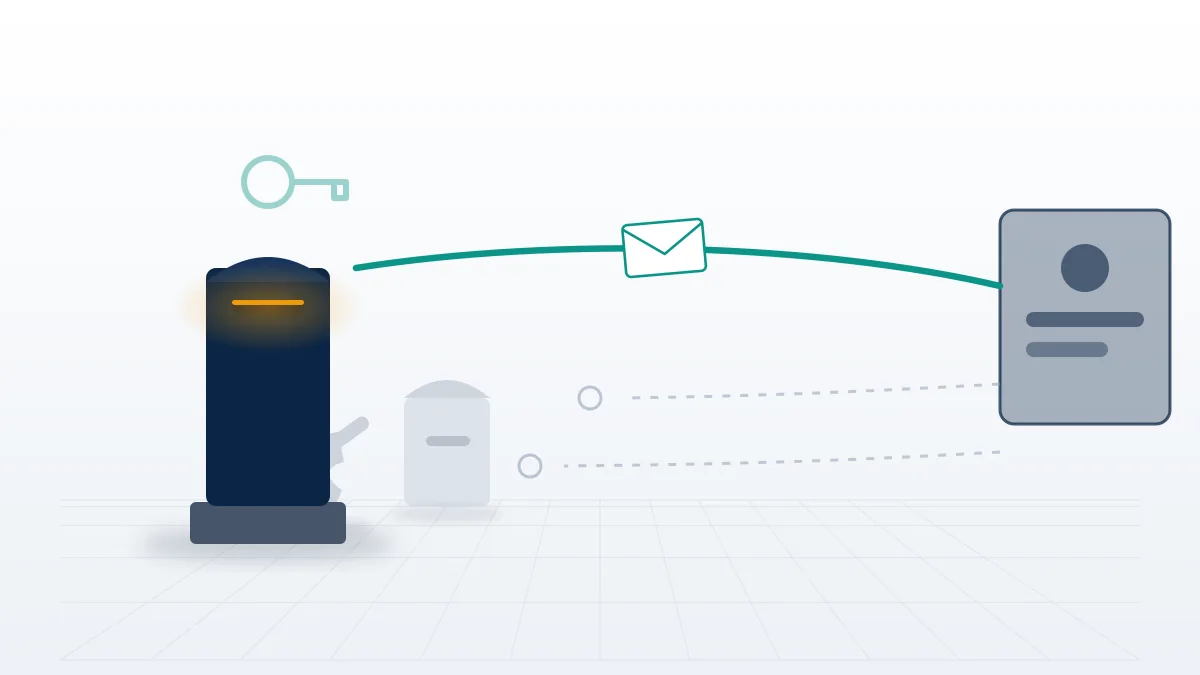
Priya Raman, who runs post-recovery hardening at Your Reputation Solution, sees the same three leftovers in nearly every hijacked-channel case. The attacker's recovery phone is often still listed, sitting quietly as a second door. Old sessions stay signed in on devices nobody recognises, because a password change does not always terminate them. And app-specific passwords issued months earlier keep working against the mailbox regardless of the new credential. A recovery that stops at "I can log in again" is half a recovery. Revoke the sessions, strip every recovery method you do not personally hold, then add a passkey or a hardware key so the next attempt has nothing soft to attack.
Can you recover a YouTube account without Google?
No — and that answer deserves to be the first line rather than a footnote at the end of a long article.
There is no separate YouTube identity to fall back on. Accounts created before the 2009 migration were converted; accounts created since were Google Accounts from the first click. We say this at the top of every such enquiry, because the phrasing of the question is usually the first sign that someone has been told otherwise by a vendor. So when people search to recover youtube account without google, they are almost always describing one of three real situations, none of which need a non-existent bypass:
- The Google Account is fine, but the channel is a Brand Account. Brand Account channels can carry several owners and managers. If any other manager still has access, they can restore yours without Google recovery entering the picture at all, through channel owner and manager settings. Google has also been migrating Brand Account user access to channel permissions, which changes where those controls live — a genuine source of confusion for anyone following older instructions.
- The Google Account still works, but the channel does not. That is a policy action against the channel, not a login problem, and it routes to appeals rather than recovery. Sometimes it ends as a terminated channel appeal, sometimes as the narrower question of how Brand Accounts change channel recovery.
- The Google Account is genuinely unreachable and the searcher wants a way around Google. There isn't one. Google's identity check is the whole gate, and nothing sold online opens it.
The Brand Account case is worth slowing down on, because it is the only one of the three where someone other than Google can hand your channel back. A Brand Account is a shared container: the channel belongs to the container, and the container lists people who may act on it. Ownership and management are separate roles, and only an owner can promote, demote or remove others. That structure is a gift when a co-founder, an editor or an old agency still holds access, and a trap when the relationship has soured, because the person who can restore you is also the person who can lock you out for good. Your Reputation Solution can document a disputed handover and escalate it through the channels YouTube provides; we cannot compel an owner to return what they legally hold, and we say that at intake rather than after an invoice.
Two details catch people out. Removing yourself from a Brand Account is instant and irreversible from your side; getting back in requires a remaining owner to invite you again. And a Brand Account with exactly one owner who has lost their Google Account is the worst configuration in this whole article, since the container survives while nobody alive can administer it. If you manage a channel that matters, the ten-minute fix is to confirm there are at least two owners on separate Google Accounts, with separate recovery phones, before you ever need it.
That boundary is not modesty. It is the mechanism, and any service that describes it differently is describing something it cannot do.
Not sure which layer your problem sits on? Your Reputation Solution will tell you which of the four it is before you file anything, because a wrong form wastes an attempt and attempts are finite. Talk to our team, or read what our YouTube and Google account recovery services actually cover.
Why youtube music account recovery behaves differently
Because money is attached to it. A YouTube Music or Premium subscription is a billing relationship sitting on the same Google Account, and billing has its own rules about who counts as the account holder. We separate the two at intake for this reason: the identity question and the payment question travel down different desks, and answering them in the wrong order is how a two-day problem becomes a three-week one.
Three situations make youtube music account recovery messier than a plain channel recovery. A family plan is controlled by a family manager, so a member who loses access is asking the manager, not Google, to restore them. A subscription bought through Apple's App Store or a mobile carrier is billed outside Google entirely, which means the cancellation or refund question lives with that provider even after the Google Account is back. And playlists, uploads and purchases are bound to the account rather than the subscription, so Google's guidance on your content and YouTube Premium sets out what survives a lapse. Downloads stop working when Premium ends. The library itself does not vanish with it, which is the distinction panicked searchers most often get backwards, and the reason a lapsed subscription is not the emergency it feels like at 2am.
There is a fourth wrinkle worth knowing before you start. YouTube Music and the old Google Play Music libraries were merged years ago, and uploaded tracks migrated with that transfer rather than being re-bought. Anyone recovering an older account is often recovering a library they cannot replace at any price, since personal uploads and purchased albums both live at the account layer. That raises the stakes on doing the identity step carefully instead of quickly, and it is why Google YouTube account recovery for a long-dormant music account is worth more patience than a channel nobody has posted to since 2019.
The sequence that saves the most time is unglamorous. Recover the Google Account first; sort the subscription second. Billing support cannot verify you faster than identity verification can, and a subscription cancelled in a panic mid-recovery is harder to reinstate than one left running. Where the subscription was bought inside an iPhone app or bundled into a phone bill, note that the charge you are seeing is not a Google charge at all. Cancelling it requires the provider that took the money, and Google cannot stop a payment it never collected. People burn days on the wrong support desk over this, usually because the product is YouTube's and the assumption follows the brand rather than the receipt. Where a family manager is the actual gatekeeper, no amount of Google recovery work will help, and Your Reputation Solution says so at intake rather than billing for a case with no route in. Disabled-account logic works much the same way on other platforms, which is why the Facebook version of this problem reads so familiarly to anyone who has been through it once.
Where recovery stops, and what we will not do
Some accounts do not come back, and saying so early is more useful than hope.
Google's identity verification is a hard stop. If you have no recovery phone, no recovery email, no backup codes, no passkey, no recognised device and no sign-in history the system can pattern-match, the form can simply refuse — permanently. No third party overrides that, because there is nothing to override; the decision is made inside Google's own systems, and there is no queue to escalate to. Separately, YouTube's own channel and account termination policy covers categories that end the conversation on the content side: child sexual abuse material, violent extremism, sustained targeted harassment, and confirmed fraud. Those terminations are not commercially negotiable, and where recovery turns into an unban question it still runs through the same appeal, not a back channel. Knowing which wall you have hit is worth something on its own, because it converts an open-ended search into a decision. Where a case is genuinely closed, Your Reputation Solution would rather tell you on the first call than sell you a month of correspondence with a form that has already answered.
The first hour, in order
Most of the damage in a lockout happens in the first hour, while the account holder is improvising. This is the sequence we walk people through before anything else, and it costs nothing to follow without us.
- Stop trying to log in. Repeated failures from new devices lower the confidence score you are about to need.
- Find the recognised device. Whichever phone or laptop last held the session is your best asset, even signed out.
- Check the inbox first. If you still receive mail at the recovery address, secure it before touching anything on YouTube.
- Write down what you know. Creation month and year, the first video's upload date, the last password you remember, the recovery phone's last two digits. The form asks for these and guessing under pressure goes badly.
- Tell your team before your audience. If a Brand Account is involved, a co-owner may be able to end this in five minutes.
- Make one careful attempt. Then wait for the review rather than starting over.
Here is what Your Reputation Solution will not do, stated as flatly as we can manage. We never ask for your password, your two-step codes, your backup codes or your passkey — not at intake, not mid-case, not ever, and any request for them is the single clearest sign you are talking to someone else. We do not log in to client accounts. We do not sell a "Google contact" or an insider queue, because neither exists. We do not file false copyright or privacy complaints to dislodge a channel. And we do not promise an outcome that Google's own systems have already decided, which is why some intakes end with a referral back to the free route instead of an invoice. Our published service limits say the same thing in contract language.
There is a reason we publish those limits before the price list rather than after it. This keyword space is one of the most heavily farmed corners of the recovery market, and the operators working it are not competing on craft. They are competing on how quickly they can sound certain. Certainty is cheap to manufacture and expensive to buy, and the people most exposed to it are the ones who have just lost ten years of uploads and will believe almost anything at hour two of a lockout.
The scam pattern in this category is consistent enough to teach. An operator answers within seconds, asks for the account email and password "to verify", quotes a flat fee for guaranteed restoration, requests payment in crypto or gift cards, and then either disappears or uses the credentials to take whatever is left. Every element of that is diagnostic on its own, and the payment method is the loudest of them: crypto and gift cards are chosen because they cannot be reversed, which is a statement about the seller's expectations rather than about modern finance. If you are weighing anyone in this space, Your Reputation Solution included, the questions worth asking are covered in is a YouTube recovery service legit. Where a case turns out to involve someone else's channel publishing your personal information, the route is not recovery at all but YouTube's privacy complaint process, which is free and which you can file yourself.
There is one more limit that gets missed because it is quiet rather than dramatic. Google deletes inactive accounts after two years of no sign-in, and a channel with uploaded videos is treated differently from an empty one, but a dormant Google Account with nothing on it is not guaranteed to still be there. Anyone searching for a login they last used in 2020 may be searching for something that no longer exists, and no recovery form resurrects a deleted account. If an old account still matters to you, the cheapest insurance available is signing into it once a year.
As of September 2026, clean credential recoveries, meaning those where a recovery phone or email still works, usually close within 24 to 72 hours of the form being submitted correctly. Channel-level appeals sit on YouTube's own review timeline and commonly run 3 to 21 days. Cases with no surviving recovery method and no recognised device may never resolve at all, whatever anyone charges to try. Google YouTube account recovery is worth attempting in almost every scenario, and we will say plainly when yours is the exception.