
Can you delete a Twitter account you cannot log into?
No. X will not accept a deactivation request without an authenticated session, and it publishes no logged-out form that deletes an account for you. Its own help documentation on losing access to an account's email address is blunt about it: unless you can contact X from the confirmed email address or the verified phone number attached to the account, the company will not deactivate that account on your behalf and will not free up the username. Support cannot override this by sympathy. It is a policy line, not a queue you can talk your way past.
Which means the honest version of the question is different from the one people type. Nobody is really asking how to delete an old Twitter account you cannot access. They are asking how to get back into one. Everything below is a route back to a working login, except the last one, which goes around X's support desk and through its legal obligations instead. If the account is recoverable at all, our full X access-recovery walkthrough runs the same ground in more depth.
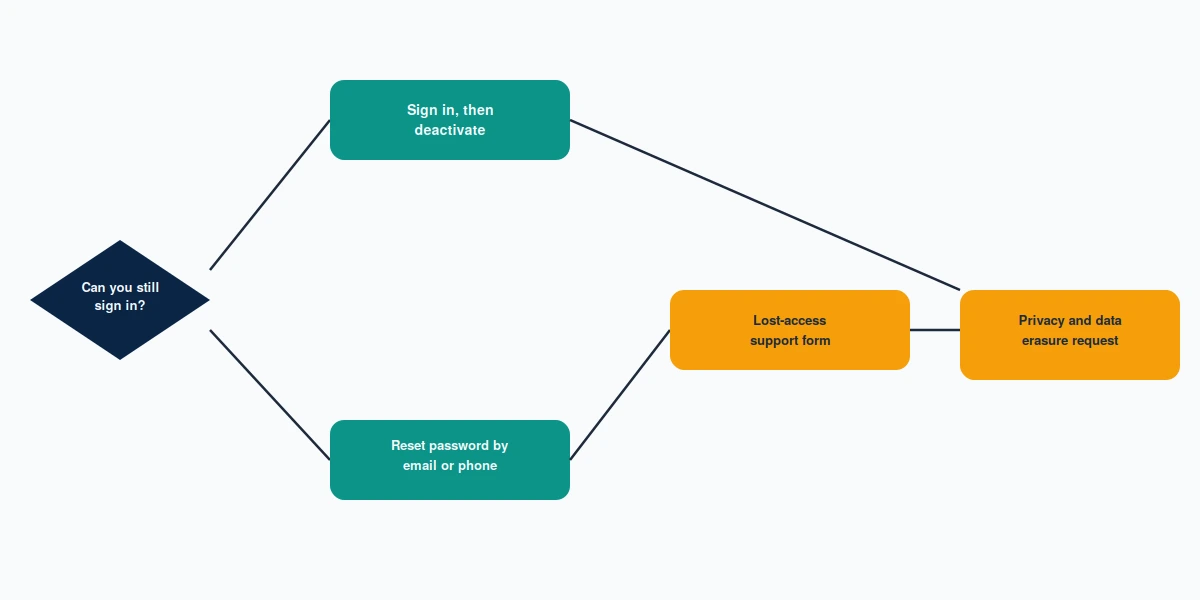
The order that wastes the least of your time:
- Attempt a password reset against every email address and phone number you have ever attached to that handle.
- If no reset destination still reaches you, file X's no-access form and prove ownership by other means.
- If X refuses, or simply never replies, submit a formal data-erasure request under privacy law.
- Once you are back inside, deactivate. Permanent deletion finishes itself 30 days later.
One clarification before you start, because the search results mix two very different problems together. This guide is about an account you own. If the account belongs to someone else and you want it gone, that is a reporting matter with entirely different rules, and it is covered in our guide on reporting an X account for removal. Nothing here helps you delete a stranger's profile, and anyone who tells you otherwise is selling something.
How do you delete an old Twitter account when the login still works?
Start here even if you are fairly sure you are locked out, because a surprising number of dormant accounts still open on the first try from a browser that remembers an old session. Open it and how to delete your old Twitter account becomes an eight-click job.
"How do I delete my old Twitter account?" has a plain answer while the login still works. On the web: Settings and privacy → Your account → Deactivate your account. Read the confirmation screen, then enter your password one final time. On mobile the path is the same, buried one level deeper under the profile menu. X shows you a warning about the 30-day window before it accepts. That warning is the whole mechanism, and a later section explains why it matters more than the click itself.
Two details catch people out. The password prompt at the end is mandatory, so a saved session alone is not enough — if your browser autofills a password you no longer remember, capture it before you deactivate. And if the account carries an active X Premium subscription, cancel the subscription first. Deactivating does not cancel billing, and people discover this a month later on a card statement.
How to delete old Twitter accounts when there is more than one
If you are cleaning up a whole trail of handles, do them one at a time and finish each before starting the next. X does not offer a bulk tool, and the reset flows collide when several accounts share one recovery email. Work oldest first: the earliest account is usually the one whose contact details are most out of date, so you learn the hard cases while you still have patience. Keep a note of which email each handle answered to. Our walkthrough on tracing a forgotten handle covers what to do when you cannot even remember what the account was called, which is the normal condition for anything created before 2015.
How to delete an old Twitter account without password
"How can I delete my old Twitter account?" is the easy version of this problem when only the password is missing, and it does not require support at all. Go to the login screen, choose "Forgot password?", and enter the username, email address, or phone number. X sends a reset link or a six-digit code to whichever destination it still holds on file. Use it, set a new password, then deactivate as described above. Lost the handle itself? Recovery without a username starts from a different entry point.
The catch is that X decides where the code goes, not you. An account made in 2012 with a university address that expired at graduation sends the reset into a mailbox nobody reads. That is not a dead end yet — check whether the address can be revived. Alumni forwarding, an old provider that reinstates dormant mailboxes on request, a partner's shared account: reviving the inbox is almost always faster than arguing with a support form.
Two-factor authentication is the other common wall. Enabled on a phone number you surrendered years ago, it stops you even when the password is right. That specific situation, and the backup-code route out of it, is covered in our guide to an X account locked behind old verification.
How to delete old Twitter account without password or email in the same case
When both are gone at once, the reset flow has nothing to aim at and you fall straight through to the support route in the next section. Before you do, try the phone number field on the reset screen even if you think the number is retired — X sometimes still holds a number the account owner has forgotten adding, and a number that has since been reassigned to a stranger will simply fail rather than leak anything to them. It costs thirty seconds and it resolves a meaningful share of these cases.

How to delete an old Twitter account without email or phone
This is the case the search phrasing is really about. When people ask how do I delete an old Twitter account without access to anything on file, they have already failed the reset flow and want to know whether a human at X can help.
There is a form for exactly this. X publishes a dedicated no-access request under account access support, titled around having no access to the email address or number on the account. The "how to delete old Twitter account without email" case is precisely what it exists for. It asks for the @handle, a contact address X can reply to, and a description of what happened. Submit it and you receive an automated ticket acknowledgement almost immediately. The automated reply is not progress. The human follow-up, which arrives days or weeks later, is the one that decides your case, and it usually asks for something specific: an approximate creation date, the original signup email even if it is dead, past display names, or a photo of government ID.
Answer with precision rather than volume. In the cases our team escalates, the submissions that succeed are the ones that name a verifiable detail X can match against its own records — the month the account was created, a since-changed handle, the city on the profile — rather than the ones that explain at length how much the account matters. Vague ownership claims get closed as unverifiable, and a closed ticket is harder to reopen than a slow one.
How to delete old Twitter account without access to the recovery inbox
If the account is also suspended, the order changes: X will not process a deactivation on a suspended account until the suspension itself is resolved, so the appeal has to come first. Our suspension appeal guide covers what that queue looks like and how long it realistically runs.
Stuck between a dead inbox and a form that will not answer? Our recovery team reviews the case, tells you honestly which of the routes above still applies to your account, and says so plainly when none of them do. Ask for a free case review — we never ask for your password, at any stage.
How to get Twitter to delete an old account through a data erasure request
"How do I get an old Twitter account deleted when X simply will not answer?" This is the route almost nobody writes about. If you are in the EU, the UK, California, or another jurisdiction with a statutory erasure right, deletion is not a favour X grants — it is an obligation with a clock on it. Article 17 of the GDPR gives you the right to have personal data erased, and X has to answer within one month, extendable by two more for complex requests. California's CCPA, as amended by the CPRA, sets a comparable 45-day response window with one 45-day extension.
This changes the conversation. A support ticket asking a company to please delete an old profile can be closed at its discretion. A documented erasure request cannot be ignored without the company creating a regulatory exposure for itself, and it lands with the privacy team rather than the general support queue. For anyone outside a jurisdiction with an erasure right, this route is closed, and how to get an old Twitter account deleted goes back to the support form and the evidence you can put behind it.
How can I get my old Twitter account deleted under a privacy request?
Submit it through X's privacy or data-protection contact rather than the general help form, state plainly that you are exercising your right to erasure, identify the account by handle and approximate creation date, and give a working address for correspondence. Expect an identity check. X still has to be satisfied you are the account holder before it erases anything, so the same evidence that helps the no-access form — creation date, former handles, original signup address — helps here too. What changes is that the request now has a deadline attached to it.
Two honest limits. A privacy request is a right to erasure, not a right to recovery: you will not get the handle back, and you cannot read the account's contents afterwards. And the identity requirement is not a formality X will waive because the request cites a regulation. We treat data handling around these requests carefully for the same reason, which is set out in our privacy policy.

Will X delete old Twitter accounts on its own if you wait?
Waiting is the passive answer to how to delete my old Twitter account, and it is the least reliable one. X's inactive account policy requires signing in at least once every 30 days and reserves the right to permanently remove accounts that go dormant, but enforcement has always arrived in irregular waves rather than as a rolling process. Accounts sit untouched for a decade and then vanish in a purge; others survive every purge.
Two things make waiting a bad strategy. Paid tiers are treated differently, so an old account still carrying a subscription is not on the same track as a free dormant one. And a removed account does not necessarily hand you the handle: username release after an inactivity purge has never been guaranteed or announced, which is why our inactive username explainer exists in the first place.
There is also a reason not to leave it sitting. A dormant account with an unreachable recovery email is a standing takeover target, because whoever revives that expired email domain inherits the reset path. Already gone, and you want it back rather than erased? The 30-day reversal window is the piece to understand, and it is short.
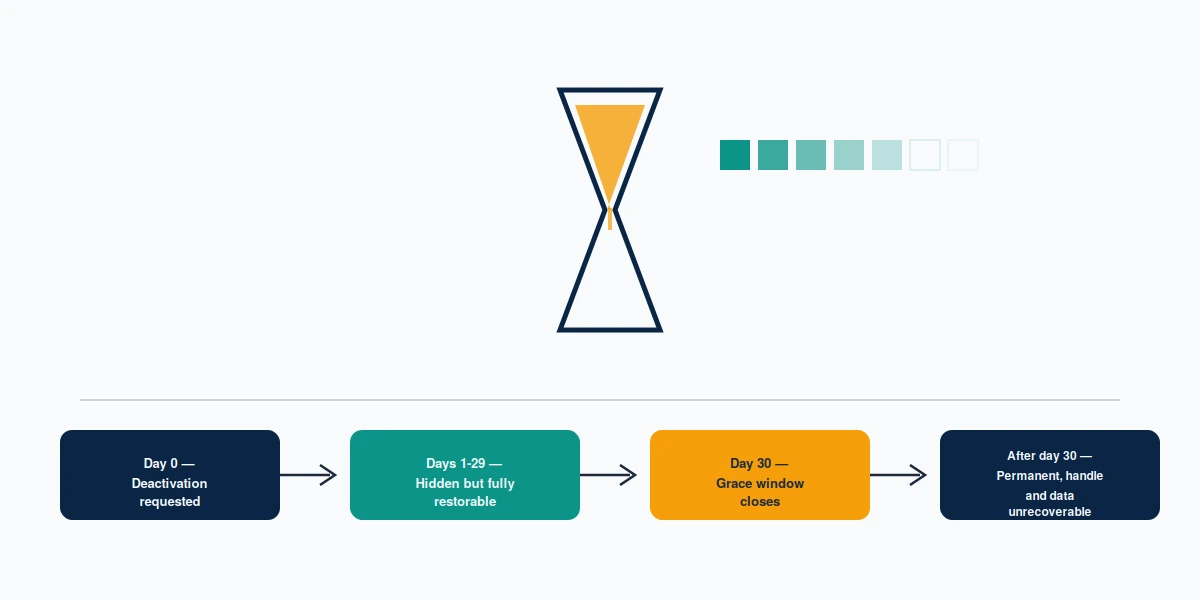
Deactivation is not deletion, and the gap between them trips people up. When you deactivate, the profile disappears from X immediately — the handle stops resolving, the posts stop being served. Underneath, the account is intact and fully restorable for 30 days. Log in once during that window, deliberately or by accident on a device with a saved session, and the whole thing comes back. After day 30 the deletion runs and the data goes. Do not log in to "check whether it worked". Checking is what undoes it.
Who lies to you about deleting old Twitter accounts
Search "how to delete a old twitter account", "how to delete old twitter account no access", or "how to get old twitter account deleted" and you will find operators promising to delete any account, from the outside, for a fee. They cannot. The mechanism does not exist. What they are selling is one of three things: a form submission you could have made yourself, a mass-reporting campaign that does nothing to a dormant account nobody is complaining about, or nothing at all.
The tell is the promise itself. Anyone who guarantees deletion of an account they cannot log into is claiming to override X's identity verification, and no vendor has that power. Anyone who asks for your password is either about to hijack the account or about to fail your case, because handing credentials to a third party violates X's terms and is the fastest way to get a legitimate recovery denied. We never ask for one. Our limits are written down in our service disclaimer rather than buried in a sales call.
The honest answer to how to get my old Twitter account deleted is narrower and duller than the pitch. It is working out which of the four routes above your specific account qualifies for, assembling ownership evidence that survives a verification review, writing the erasure request so it is handled as a legal request rather than a support ticket, and saying so when the answer is no. Clean access recovery, when the evidence is there, typically resolves in 24 to 72 hours. When an old profile cannot be deleted at all and the real problem is that it ranks for your name, suppression is a 90 to 180 day project, not a weekend.
The same pattern holds across platforms — the mechanics differ, the false promises are identical. Anyone working through more than one old profile will find our companion guide on deleting an old Instagram account walks the equivalent Meta process, quirks around video-selfie verification included.