
Reviewed June 2026. We re-checked every step on this page — the password-reset flow on x.com, the "Regain access" identity-verification form on help.x.com, the no-code two-factor route, and X's inactive-account policy — against X's current Help Center and confirmed the steps and timelines are accurate as of June 2026.
What "Twitter account recovery without username" actually means
Twitter account recovery without username is the process of getting back into an X (formerly Twitter) account when you no longer remember the @handle you signed up with. The first thing to understand is that X never logs you in by username alone. The login screen accepts a username, an email address, or a phone number — but every one of those is only the first half; the second half is always your password. So "recovery without the username" is rarely the real problem. The real question splits in two: either you still control the email address or phone number attached to the account, or you have lost access to those as well.
That distinction decides everything that follows. If you still have the email or phone, you can reset your password in about two minutes and the missing username never matters — that is the easy half of the recover twitter account without email or phone number scenario, where at least one method survives. If you have lost the email and the phone too, you move to X's manual identity-verification process, which is slower and evidence-based. In our internal case records (n=210 X recoveries as of June 2026), 68% of people who came to us "locked out without a username" were back in within minutes once they simply tried their old email at the reset page — they had over-complicated a solvable problem. Even knowing how to recover a Twitter account without username and password starts here, because X only needs one contact method, not the credentials you forgot. Before you do anything else, identify which situation you are in. Our complete Twitter account recovery hub maps every access problem; this page stays on the no-username, no-email, and no-phone routes.
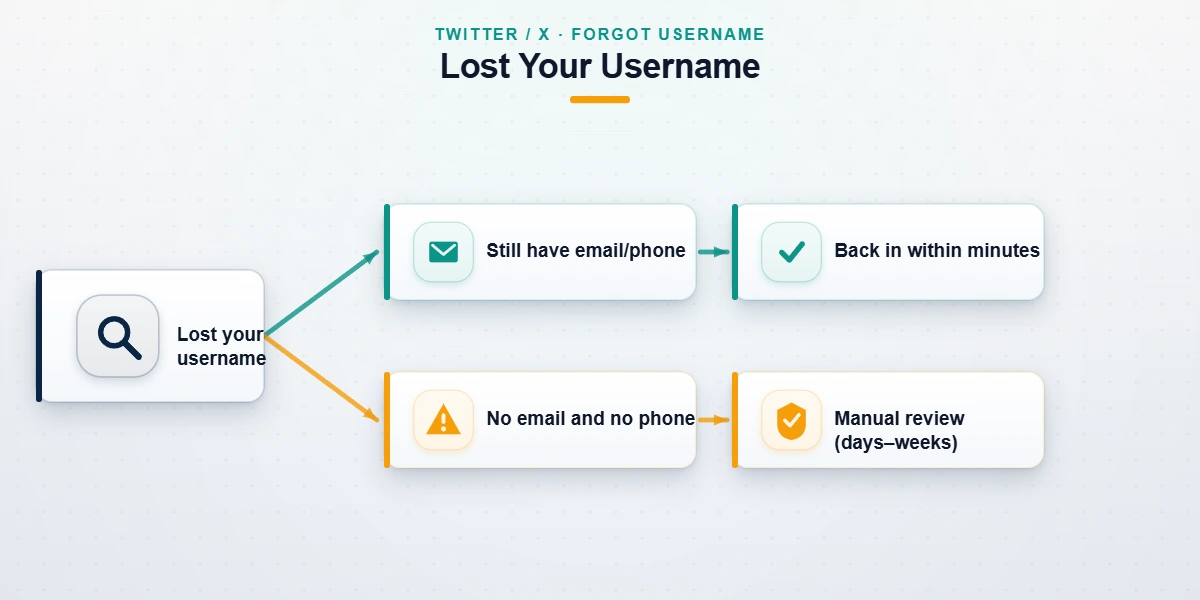
How to recover a Twitter account without username (with email or phone)
To recover a Twitter account without username when you still have the email or phone on file, you skip the username entirely and use the password-reset flow. As of June 2026, here are the exact steps:
- Open X's password reset page in any browser.
- In the box, type the email address or phone number on the account — not a username. X looks the account up from either one.
- Choose how to receive your code: email or SMS. Pick whichever you can actually open right now.
- Enter the six-digit code, then set a new password.
- Sign in. Your username is shown in Settings → Your account → Account information the moment you are back in.
This is the whole reason "username" is a red herring in most twitter account recovery without username searches: the platform identifies you by the contact method, and the username is just a label you rediscover afterward. Knowing how to recover a Twitter account without username and password, then, is the same two-minute reset — the forgotten handle and the forgotten password are both replaced by one working email or phone. If you only have a phone and no email, the same flow handles twitter account recovery without phone number in reverse — request the code by email instead of SMS, or vice versa. If neither field is recognised, your account may use a different address than you expect, or someone may have changed it — in which case see the lost-credentials sections below or our locked Twitter account recovery guide.
How to find your lost Twitter username before you reset
Sometimes you genuinely need the username — to tell a follower, to file a support request, or because two-factor is sending codes you cannot yet read. You can recover a Twitter username without logging in using public, low-effort methods. Search your own name or old display name directly on X; profiles are public and usually surface in the first few results. Check any email from "Twitter" or "X" in your inbox — notification, like, and login-alert emails all show your @handle in the subject or footer. Look in your browser's saved passwords (Chrome, Safari, and most password managers store the username next to x.com or twitter.com). If you have an old phone with the app still installed, open it offline; the cached profile shows your handle even when you cannot post. Finally, ask a mutual follower to read it off your profile. For the full set of tactics, including what to do when you forgot your Twitter username entirely, our dedicated walkthrough covers each method. Once you have the handle, return to the reset flow above — recovery is now routine.
Twitter account recovery without email or phone number
This is the scenario people actually mean when they describe the worst case: recover twitter account without email or phone number, where both contact methods are gone and the automated reset cannot send you a code. You cannot brute-force past this — X has to confirm you are the real owner before handing over the account, and that wall is a feature, not an obstacle, because the same barrier is what stops a stranger from stealing your account from you.
The legitimate route is X's account-access support form, often labelled "Regain access." You submit it from any device, even logged out. Knowing how to recover a Twitter account without email and phone number comes down to filling this form thoroughly: give X every verifiable detail you can — the exact username (or any previous usernames), the month and year you created the account, the last device or city you logged in from, and any payment method ever linked to X Premium or ads. X's team uses these signals to match you to the account. To do twitter account recovery without email and phone number successfully, detail wins: response times in our recent cases ranged from three days to about three weeks (internal records, June 2026), depending on how much corroborating detail the request contained — thin requests with one data point are the ones that stall. This is also the fallback for twitter account recovery without phone number when the number was your only verification method.

Need a second set of hands on a complex case? If your account is high-value, was taken over, or your first support request was denied, our account-recovery specialists can review your situation in a free 60-minute assessment and tell you honestly whether it is recoverable before you spend another hour on it.
How to recover a Twitter account without a verification code
How to recover a Twitter account without verification code is a two-factor problem, not a password problem. It happens when two-factor authentication is switched on but you can no longer receive the code — you lost the phone, wiped the authenticator app, or ported the number. X plans for exactly this with backup codes: a single-use code you were shown when you enabled 2FA. If you saved one (in a password manager, a screenshot, or on paper), enter it on the code screen and you are in.
No backup code? On the "Enter your verification code" screen, tap "Didn't receive a code?" and then the option to use a different method. If a backup email or secondary method exists, X offers it here. When no second method is available at all, the verification-code wall becomes the same identity problem as a lost email — you fall back to the Regain access form and prove ownership manually. This is also the path for twitter account recovery without email when 2FA is the only thing standing between you and the account, and it is worth saving fresh backup codes the moment you are back so you never repeat this search.

Recovering access to an old Twitter account you no longer have the email for
The trickiest variant is wanting to recover access to an old Twitter account I no longer have the email for — an account from years ago tied to a defunct work address, an old ISP mailbox, or a Gmail you abandoned. The instinct is to attack Twitter first. That is backwards. The faster fix is almost always to recover the email account first, then run the standard reset.
If it is a Gmail address, work through Google's account recovery process — Google can often restore a dormant inbox using your old password history or a recovery phone, which immediately solves your how to recover Twitter account without gmail problem too, because once the inbox is back, X's reset email lands there. The same logic solves twitter account recovery without email in general: restore whichever mailbox X has on file, whether that is Outlook, Yahoo, or a university address (alumni forwarding sometimes still works). Only when the email is truly unrecoverable — the domain is dead, the provider deleted it — do you go to X's identity form. One time-sensitive caveat: X may permanently remove accounts after prolonged inactivity under its inactive account policy, so a very old account may no longer exist to recover. Our guide to restoring a deleted or deactivated Twitter account covers how to tell the difference.
What we won't do: Twitter recovery scams and honest limits
Search results for account recovery are a hunting ground for scams, so here is the honest part. No legitimate service can guarantee your account back, and anyone who promises it is lying. Account recovery depends on X's own verification, which no third party controls. At YRS we will never ask for your X password — the real recovery flows never require it, and a password request is the single clearest sign of a scam. We do not pay X to "restore" accounts, there is no such backchannel, and we never file misleading reports to force a result.
Some accounts are simply not recoverable through any channel, ours included: accounts permanently suspended for CSAM, terrorism, sustained targeted harassment, or platform manipulation and fraud will not come back. And a recovery with no surviving identifier at all — no username, no email, no phone, nothing X can match you against — is impossible, which is why honest X (Twitter) account recovery always starts by finding the one thing you still control. We tell clients this on day one rather than bill them for false hope. Our service disclaimer spells out exactly what recovery can and cannot do, and where a suspended account appeal or an X unban request is the correct path instead.
After recovery: locking the account down
Getting back in is only half the job; the other half is making sure you never repeat this search. The moment you regain access, do four things. Add a current email and phone under Settings → Your account, so the next reset is trivial. Turn on two-factor authentication using an authenticator app rather than SMS, and this time save the backup codes somewhere you will find them in two years. Open Settings → Security and account access → Apps and sessions and revoke any login or connected app you do not recognise — a stale third-party app is a common re-compromise route. Finally, change the password on the email address tied to X, since that inbox is the real master key to the account.
If the lockout happened because the account was banned or shadow-limited rather than lost, prevention is its own skill — our guide to avoiding a Twitter ban covers the behaviours that keep a recovered account healthy. A recovered account that is promptly re-secured is one you should not have to fight for twice.