Reviewed June 2026. We re-checked every recovery path on this page — the lock verification flow, the no-access and age-restoration appeals at help.x.com, and the unlock timelines — against X's current Help Center, and confirmed the steps and figures are accurate as of June 2026.
What it means when Twitter locks your account
A locked Twitter (X) account is a security hold the platform places on an account it believes is at risk or behaving abnormally — and unlike a suspension, you can reverse it yourself. When X locks an account, it interrupts your login with a message such as "Your account has been locked" and asks you to complete one or more verification steps before it returns access. The account still exists, your followers and posts are intact, and nothing has been deleted. You are simply being asked to prove you are the real owner and a real human.
The fastest way to know which problem you actually have is to read what the screen says. If you can reach a prompt asking you to confirm a phone number, solve a challenge, or verify your age, you are locked. If you cannot log in at all and X says "Your account is suspended," that is a different state with a different fix — our 2026 guide to recovering a suspended Twitter account covers that path. If your account works normally but your reach has quietly collapsed, you may not be locked at all; spotting a Twitter shadow ban shows how to tell the difference before you waste an appeal. For the full picture across hacked, locked, and suspended states, the complete Twitter account recovery walkthrough maps all three.
Why is my Twitter account locked? The common triggers
X locks accounts through an automated system that watches for signals it associates with compromised, fake, or abusive behavior. As of June 2026, the most common triggers are: signing in from a new device, IP address, or country; sudden bursts of following, unfollowing, posting, or liking; a password that turned up in a known data breach; reports from other users; and signup details that look automated. None of these require you to have actually broken a rule — the lock is precautionary, which is why so many people search "twitter locked my account for no reason." There usually is a reason; it is just an algorithmic one you cannot see.
Knowing your trigger shapes your unlock path. A lock from a new-country login clears with a simple phone or email code. A lock from aggressive automation may also ask you to delete a flagged post. A lock tied to a breached password forces a reset. And if your account has crossed from a precautionary lock into a full takeover, recovering it looks less like quick verification and more like recovering an X account after a hack.
Why is my new Twitter account locked?
Brand-new accounts get locked more than any other kind, and almost always on the day they are created. X's anti-spam automation treats a fresh account as guilty until verified when it sees no profile photo or bio, a signup from a VPN or data-center IP, a disposable or newly registered email domain, a phone number already tied to another account, or dozens of follows within the first hour. The lock is the system asking the new account to prove a person is behind it, not a bot farm.
To clear a new-account lock, complete the phone verification X requests, add a profile photo and bio, and slow down — avoid mass-following for the first few days. If you plan to run the account long term, the habits in our guide to avoiding a Twitter ban keep a young account out of the automated penalty box while it builds trust signals.
How to recover a locked Twitter account, step by step
To recover a locked Twitter account, you work through X's built-in verification flow — it is free, it is the only official channel, and it resolves the large majority of clean locks without anyone's help. As of June 2026, the sequence is:
- Read the lock notice. When you log in, X shows why it locked the account and a blue Start or Continue to X button. The wording tells you whether it wants phone verification, a challenge, or age confirmation.
- Start the verification. Tap the button. X usually offers to send a one-time code to the phone number or email on the account.
- Enter the code. Type the code X sends. If it does not arrive, wait sixty seconds and use the resend link rather than requesting code after code, which can extend the lock.
- Solve the challenge if shown. Some locks add an image puzzle (X uses an Arkose Labs challenge) to confirm you are human. Complete it carefully; repeated failures lengthen the hold.
- Confirm and wait. Most security locks lift the instant you finish. Harder cases move to a short review, and X emails the result to the address on the account — watch spam for messages from an
@x.comdomain.
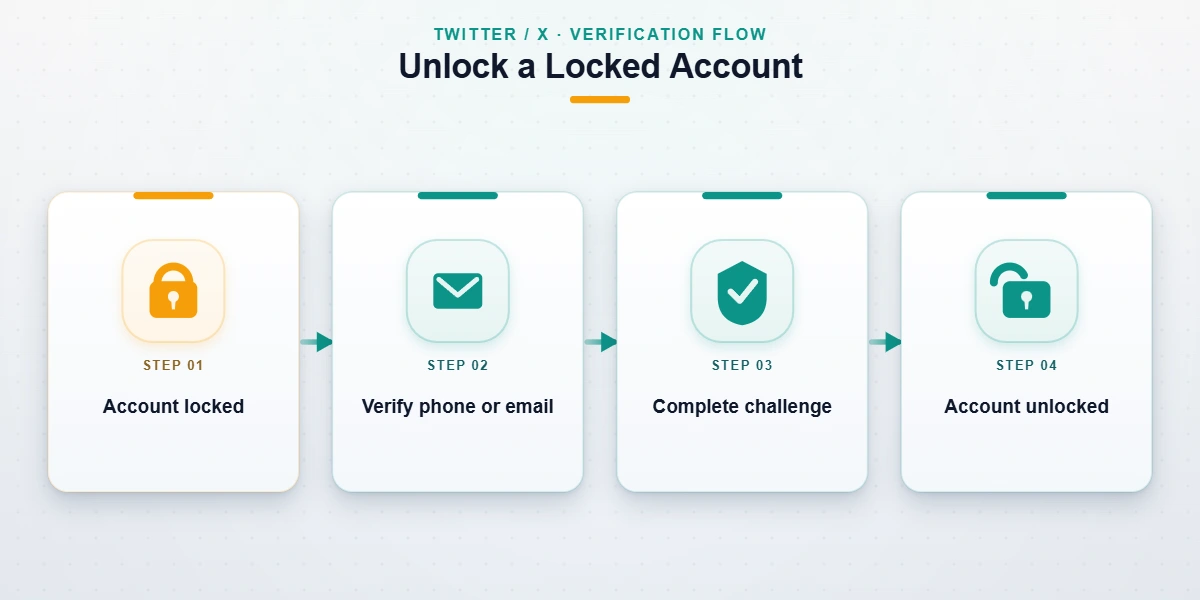
X's own help page for locked and limited accounts documents this flow and the verification options. If you finish every step and the account stays locked, do not keep retrying — repeated attempts can push a recoverable lock toward a slower manual-review queue.
What to do if you can't access your phone or email
The hardest version of this is a lock that demands a code sent to a phone number or email you no longer control — common after a SIM change, a closed inbox, or a takeover. You cannot bypass verification, but you can change the channel. On the lock screen, look for "I no longer have access to these" or a similar link, which routes you to X's account-access appeal. There you confirm ownership with other proof: the original signup email even if it is now dead, a linked Apple or Google sign-in, or receipts for X Premium. The fewer standard credentials you hold, the more supporting evidence X needs before a human reviews the case — typically one to seven business days.
Twitter locked account age: how to unlock
X requires every account holder to be at least 13, and its systems lock an account the moment they believe the owner is underage — most often when someone enters or edits a date of birth that puts them under 13, even by accident. This is the age-verification lock, and it behaves differently from a security lock. Twitter locked account age how to unlock questions almost always come down to one branch: was the birthday wrong, or was it right?
If an adult was wrongly flagged — usually after correcting a typo in their birth year — the account is recoverable. X's account-restoration process lets you confirm your real date of birth and, if asked, upload a government ID or take a selfie so its age-estimation system can verify you are over 18. Once verified, the account unlocks with followers and posts intact, though content posted before the age now on file may be removed.
Can you recover a locked Twitter account because of age?
This is the one question where the honest answer is sometimes no, and any service that tells you otherwise is lying. Whether you can recover a locked Twitter account because of age depends entirely on the true age of the owner:
- An adult mis-flagged as underage can recover the account by correcting the birthday and passing X's identity or age verification. This is the common, fixable case.
- An account that genuinely belonged to a child under 13 at signup cannot be restored as that account. Under the U.S. Children's Online Privacy Protection Act (COPPA), X must close it and delete the data — there is no appeal, no professional service, and no workaround that changes this, and we will not pretend there is. When the child turns 13 they can open a new account, but the old handle, posts, and followers are gone.
We say this plainly because the age cluster is where false-hope vendors do the most damage. Honest limits are part of how we work — our full recovery scope and what we can and cannot unlock spells them out.
How to unlock my suspended Twitter account
Plenty of people who land here actually have a suspension, not a lock — the two get used interchangeably, but X treats them very differently. A lock is a security hold you clear by verifying yourself. A suspension is an enforcement action X takes after deciding its rules were broken, and you clear it by appealing, not by verifying. If your screen says "suspended" rather than "locked," the verification steps above will not work, and you need the appeal route instead.
To handle how to unlock my suspended Twitter account, log in to surface the suspension notice, then file an appeal through X's help center explaining specifically why the action was a mistake. Our step-by-step guide to unbanning a Twitter account walks through the appeal form and a template, and the dedicated suspended-account appeal walkthrough covers timelines for each suspension level. The key is to avoid a vague "this is unfair" appeal — name the rule X cited and explain in two sentences why it does not apply.
Twitter locked my account for no reason: false positives and scams to avoid
"Twitter locked my account for no reason" is the exact phrase millions search, and the frustration is real even though a hidden trigger almost always exists — a breach-exposed password, a login from a friend's phone in another country, or an automation filter misfiring. These false-positive locks are usually the easiest to clear: complete the verification, and the same system that flagged you releases you. If yours will not lift, the same "this was an error" logic applies to other X penalties, and appealing a shadow ban on X uses a near-identical framing.
What you must not do is reach for the "instant unlock" services that flood these searches. We will never ask for your password, and neither will X — anyone who does is running a scam. The patterns we see weekly in intake: a DM claiming to be "X support" that asks for your login code; a Telegram or Fiverr seller promising a guaranteed unlock in an hour for $50; and fake "X support" phone numbers bought through ads. The U.S. Federal Trade Commission has logged thousands of fake social-media support scams in recent years; if you hit one, report it at reportfraud.ftc.gov. A real lock is cleared by X's own verification, for free — never by a stranger holding your password.
How long does a Twitter lock last — and when is recovery not possible?
A standard security lock lasts only as long as it takes you to finish verification — minutes to a few hours for phone or email codes, and up to 72 hours when a short manual review is involved. Age-restoration and no-access appeals run longer, typically one to seven business days. X does not auto-delete locked accounts: an unverified account can sit locked for months, visible to others but unusable by you, until you complete the steps or X escalates it into a suspension.
Recovery is genuinely impossible in only a few situations, and we name them so you do not spend money chasing them: a child-under-13 account closed under COPPA; an account whose lock has hardened into a permanent suspension for a severe violation; and an account you cannot verify by any channel because every credential and proof is gone. That last case mirrors what happens with recovering a deleted Twitter account past its window — at some point the data is gone, and honesty serves you better than hope.
Locked out and stuck after trying the steps above? Tell our recovery team what your lock screen says in a free 60-minute case review. We will tell you which type of lock you have and whether it is realistically recoverable — before you spend anything, and without ever asking for your password.
When professional locked Twitter account recovery makes sense
Most locks do not need anyone's help — verify, and you are back in minutes. Professional locked Twitter account recovery earns its place in a narrower set of cases: a verified business or creator account where lost access is costing revenue by the day; a lock tangled up with a hack, where the attacker changed the email and phone before you were locked out; an age-restoration case where X keeps rejecting your verification; or a lock that has tipped into a suspension and now needs an evidence-backed appeal.
When it does make sense, who handles it matters. Our recovery work is led by Ava Chen and our account-recovery specialists — a team whose lead holds the CISSP and spent years inside platform Trust & Safety. We run X locks through the same identity-led method as our hands-on account recovery service for other platforms: confirm what is actually wrong, prepare the verification or appeal properly, then harden the account so it does not happen again. We do not guarantee recovery — no honest service can — but we will tell you the truth about your odds before you commit a cent.