Six ways YouTube can switch your money off
Not every dead revenue graph is an enforcement action, and that one fact decides whether you should file anything at all. YouTube uses six distinct states to describe a channel that has stopped earning, and two of them have no appeal route because nothing was held against you. Your Reputation Solution is an account-recovery practice that prepares platform appeals for creators and businesses, and the opening move on any YouTube case is working out which of these six rows the channel is actually sitting in.
| What you are seeing | What it means | Appeal route? |
|---|---|---|
| Limited or no ad earnings on one video | Advertiser-suitability call on that upload | Yes, per video, repeatable |
| Scheduled for YPP suspension | Warning notice before the switch is thrown | Yes, 7 days, pauses the suspension |
| Suspended from YPP | Channel-level policy decision | Yes, 21 days from suspension |
| YPP application rejected | Reviewers judged the channel non-compliant | Yes, 21 days |
| Monetization disabled | Severe or repeated violations | Sometimes; can be permanent |
| Monetization paused | No approved AdSense for YouTube account linked | None needed — not enforcement |
That last row catches more people than any other. Paused is worth memorising, because YouTube states that a paused channel remains in the Partner Program and that earning resumes once an active, approved AdSense for YouTube account is linked to it. No reviewer appears anywhere in that sentence. If the banner in your Studio says paused rather than disabled, an appeal form is the wrong tool, and YouTube's paused-monetization documentation says so in as many words.
Disabled is the heavier word. It covers monetizing content you do not own, running a channel whose material mostly falls outside the advertiser-friendly guidelines, and repeated serious violations. YouTube also warns that severe breaches of its channel monetization policies can leave monetization permanently disabled on any of your accounts. That sentence is the most consequential one in the topic, and most creator blogs skip it.
Two places carry the answer. The notification email names the specific policy, and the Earn section of YouTube Studio shows the channel's current monetization status alongside any appeal button you are entitled to. Your Reputation Solution reads both before forming a view, because guessing from a revenue graph is how creators end up filing against the wrong decision.
The YouTube appeals process splits into four separate routes
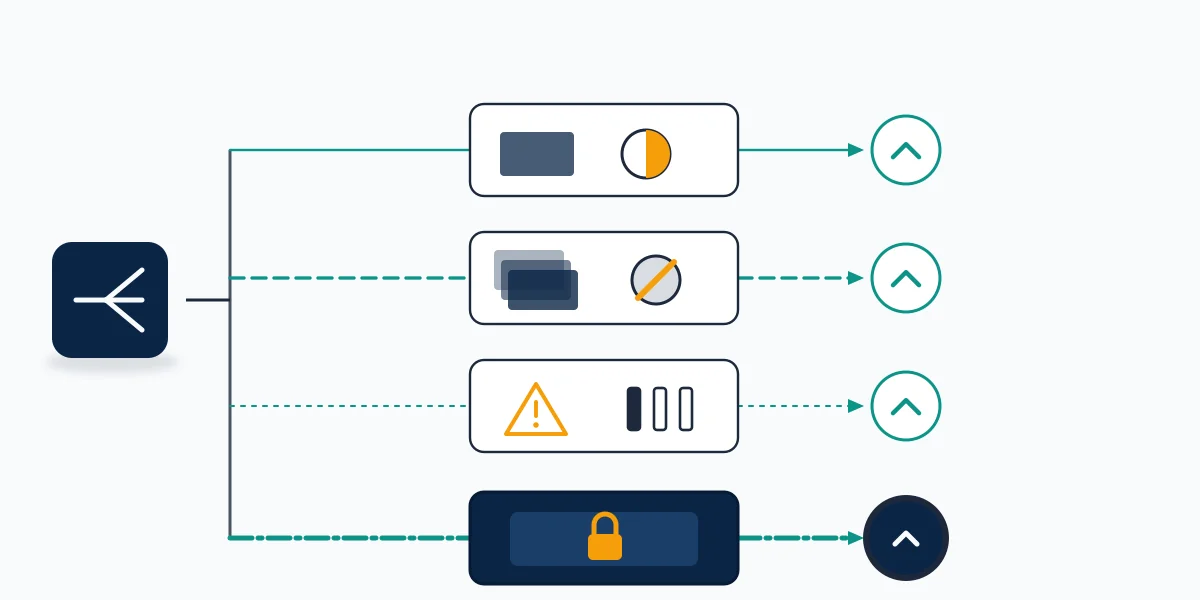
Four routes, four forms, four deadlines, and no lane change once you have filed. The YouTube appeals process gets written about as though it were a single procedure, which is how a creator ends up submitting a Community Guidelines appeal against a monetization decision and waiting two weeks to learn it went nowhere. Sorting out which route applies takes about ten minutes with the notification email open in front of you.
One video lost its ads
The smallest route, and the only one you can use again and again. Videos carrying a limited ad earnings or no ad earnings label were judged against the advertiser-friendly content guidelines rather than Community Guidelines, and the decision attaches to the upload instead of the channel. Open Content in YouTube Studio, read the Notices column, then open the Impact summary card for that video and use the Appeal button to request a human review. YouTube sets this out in its guide to limited and no ad earnings. Your channel keeps earning normally while the review runs, which makes this the one appeal on the list that costs almost nothing to get wrong. It is also the route creators skip most often, assuming a yellow icon is permanent when a human reviewer can lift it.
The Partner Program suspended the channel
This is the route the phrase monetization appeal usually means, and Your Reputation Solution sees more mis-filed submissions here than anywhere else on the list. It has two doors, depending on whether the suspension has landed yet. If YouTube emails to say your channel is scheduled for suspension, you have 7 days to appeal, and filing inside that window pauses the scheduled suspension while reviewers look. Miss it and the suspension takes effect, after which 21 days remain. Either way, YouTube responds within 14 days, re-approves successful channels for YPP within 30 days, and leaves rejected channels free to re-apply 90 days after the suspension date. Those windows come from YouTube's YPP suspension and rejection appeal documentation, and your own deadline is printed in Studio next to the Start Appeal button under Earn.
You may be offered two ways to submit: a video appeal, or a contact flow through Creator Support. Neither is inherently stronger, and the choice is better made on evidence than on preference, since the video route suits channels whose compliance is easier to demonstrate than to describe, such as originally shot or heavily edited work.
One line in that documentation deserves reading twice: your channel is assessed in its current state, so you should not delete videos before submitting. Creators do the opposite constantly, stripping a channel bare in the hope it reads as contrition, and hand reviewers a thinner body of evidence than the one that was rejected.
A Community Guidelines strike is the underlying problem
Strikes sit upstream of the money. A channel can hold a live strike and lose monetization as a consequence, in which case appealing the monetization decision treats the symptom rather than the cause. Warnings and strikes can be appealed for 6 months from the date they were issued, and content removals for up to a year, through Dashboard then the Channel violations card in Studio. Each strike can be appealed exactly once. YouTube's strike appeal documentation confirms there is no extra penalty for an appeal that fails, which is why Your Reputation Solution treats a well-evidenced strike appeal as one of the few genuinely low-risk filings available to a creator. Deleting the video does not lift the strike, and it does end your ability to appeal it.
The channel itself is gone
If your channel and its videos have been removed from YouTube entirely, monetization is no longer the live question and a youtube channel recovery appeal is a different filing reviewed by a different team. Our walkthrough of the termination appeal and what actually gets reversed covers that route, and the map of YouTube's five enforcement actions is the faster read if you are still unsure which one hit you.
Will YouTube reinstate my monetization?
Sometimes, and the deciding factor is what the channel looks like now rather than how persuasive the appeal reads. Reviewers assess a channel in its current state against the monetization policies. An isolated problem on a channel that is otherwise compliant is the case that comes back; a channel built on material the creator did not make, or one carrying repeated severe violations, generally does not, whoever writes the submission.
There is also a path that involves no appeal at all. Where a creator cannot fix an existing copyright or Community Guidelines problem, YouTube says it may reinstate monetization after 3 months, provided no new copyright or Community Guidelines issues arise in that period and the channel is otherwise run in line with policy. Waiting is a real strategy for creators whose strikes are valid, and YouTube's documentation on disabled monetization sets out both that route and the permanent-loss cases beside it. Your Reputation Solution prepares and files the submission; YouTube's review team decides the outcome. Nobody outside that team can move a case, and a service claiming otherwise is selling access it does not have.
Copyright complicates the timing. Copyright strikes expire after 90 days if you complete Copyright School and hold fewer than three, and they can also be cleared by a retraction from the claimant or by a valid counter notification — three routes that behave nothing like a Community Guidelines appeal. Three copyright strikes inside 90 days terminates the account and any channels attached to it. Our explanation of how copyright strikes are filed and what they do to a channel covers the mechanics from both sides.
A practitioner's note on what actually moves these reviews. The submissions that read best are specific and dull: the policy named in the notice, the videos it points at, what changed on the channel, and when. Reviewers are not weighing sincerity, and an appeal describing lost income is answering a question nobody asked. Explaining how a piece was made — the footage shot, the edit performed, the commentary written over licensed material — does the work that adjectives cannot.
Not sure whether your notice is a suspension, a strike or an AdSense problem, or whether the case is strong enough to spend your one appeal on? Send us the notification text for a free 60-minute case review — Your Reputation Solution will tell you plainly when a case is weak, including when it is not worth paying anyone to file it.
Four problems a YouTube account appeal cannot fix
A youtube account appeal is a policy instrument, so it does nothing about a problem that is administrative. Four of these surface repeatedly, and all four look identical from the creator's side: the money stops.
First is paused monetization, covered above, where an AdSense for YouTube account is missing, unapproved or unlinked. Second is verification — YouTube mails a PIN to your payment address, may separately verify your identity, and a channel cannot earn until both clear. Third is the updated Partner Program terms, which had to be accepted as of 11 July 2023; a channel that never accepted them is not being punished, it is out of contract. Fourth is inactivity, where a channel with no uploads for six months is removed from YPP and has no appeal route at all, only a fresh application.
Reapplication runs on its own clock, and it is not the appeal clock. A first rejection lets you re-apply 30 days after the rejection email. Any later rejection, or a reapplication after a previous one, moves that to 90 days, and the re-review takes roughly a month with the status visible under Earn in Studio. Those windows come from YouTube's rejection FAQ, which also states, without hedging, that fixing a channel is no promise it will monetize. Your Reputation Solution treats that sentence as the honest ceiling on what anyone in this market can offer.
How to reinstate YouTube account revenue in the right order
Work outward from the notification, because sequence is what protects the single appeal you get on most of these routes.
- Read the email, not the dashboard. YouTube names the specific policy in the notice it sends. Official notifications come from [email protected], which is also how you separate a real notice from the phishing that follows creators around.
- Classify before you draft. Match the notice to one of the six states above. A paused banner and a suspension banner call for completely different work, and only one of them involves writing anything.
- Check the deadline in Studio. That date sits next to the Start Appeal button under Earn: seven days before a scheduled suspension, 21 days after one has landed.
- Fix what is fixable, and leave the rest alone. Edit or remove content that genuinely breaches policy. Do not empty the channel, because reviewers judge what is in front of them on the day.
- Write to the policy that was named. Address the specific guideline from the notice using examples drawn from your own catalogue, and keep the focus on the channel as a whole rather than your best individual upload.
- If you appeal by video, follow the format exactly. Under five minutes, unlisted, a new upload on the channel being appealed, no appeal information in the description, your channel URL inside the first 30 seconds, and narration in a supported language or English subtitles that are not auto-generated. A video that misses the specification is a wasted appeal, not a corrected one.
Creators locked out rather than demonetized start somewhere else, and our guide to regaining access to a locked or hacked channel is the right first stop. The step-by-step appeal playbook goes deeper on drafting, and the shape will look familiar to anyone who has worked through an appeal against reduced reach on X.
What Your Reputation Solution will not do
We will never ask for your Google password, a recovery code or a two-factor prompt, and any provider that does should end the conversation there. Nobody in this market holds a channel into YouTube's review team, and the ones advertising insider contacts, guaranteed reinstatement or a fixed turnaround are describing something that does not exist. Reused or duplicated content and repeated severe violations are the categories where monetization tends to be gone for good, and saying that early is more useful to a creator than a hopeful invoice. Our note on how to vet an account-recovery provider covers the questions worth asking, the published limits on the work we take on sets out where it stops, and what full channel-level recovery involves explains the cases that reach past monetization. To talk it through before filing, our team reads notices with you.
One last thing worth saying to a creator whose income stopped this week. The pressure to act immediately is the pressure that loses appeals, because the windows here are measured in weeks rather than hours: 7 days before a scheduled suspension, 21 days after one, 6 months on a strike, a year on a content removal. Spending two of those days identifying the right route and assembling the right evidence is not delay. It is the whole job.