
Reviewed June 2026. We re-checked every TikTok business recovery path described here — Seller Center self-service recovery, the TikTok for Business reactivation flow, Ads Manager suspension appeals, and LIVE access reinstatement — against TikTok's current Help Center, and confirmed the steps and figures are accurate as of June 2026.
What TikTok business account recovery actually means
TikTok business account recovery is the process of restoring access to a suspended, deactivated, or identity-locked commercial TikTok asset — a TikTok Shop seller account, a TikTok for Business profile, a TikTok Ads Manager account, or LIVE selling permissions. It is not one action, because a TikTok business account is not one thing. A single brand can operate five separate surfaces, each governed by its own policy stack and its own enforcement queue, and recovering one does not automatically recover the others.
This is also what separates business recovery from personal-account recovery: the stakes are financial and they compound by the day. A suspended Seller Center account can freeze pending payouts and lock inventory mid-fulfilment; a disabled ad account halts live campaigns and the spend behind them; a Business Center block can cascade across every asset and team member attached to it. The clock, not the content, is usually the real emergency.
As of June 2026, the five business surfaces that get locked — and the enforcement state that locks each — are:
- TikTok Shop (Seller Center) — deactivated for accumulated violation points, intellectual-property strikes, or a failed business verification. Highest revenue impact, because held payouts and frozen stock are attached.
- Business Center / TikTok for Business — the asset-management layer at business.tiktok.com that holds ad accounts, catalogs, and member roles. It can be blocked independently of your public handle.
- TikTok Ads Manager (ad account) — suspended for payment problems, prohibited-product policy, or landing-page violations, freezing active ad spend.
- LIVE access — a feature-level lockout that removes LIVE and LIVE Shopping while leaving the rest of the account running.
- The public business handle — a standard content suspension or permanent ban on the profile itself.
Getting this diagnosis right is the entire game. TikTok generally allows one appeal per enforcement action, so pursuing the wrong surface can burn the appeal you actually needed. Diego Fernández, who led escalations on TikTok's Trust & Safety team before joining the former TikTok Trust & Safety specialists behind YRS, estimates that roughly one in four business intakes has misdiagnosed which surface is actually suspended. If you want that diagnosis run for you, our professional TikTok account recovery service starts every case there. The underlying logic mirrors our Facebook business account recovery guide: identify the surface, confirm appealability, then build a policy-specific appeal.
TikTok Shop account recovery: appealing a Seller Center suspension
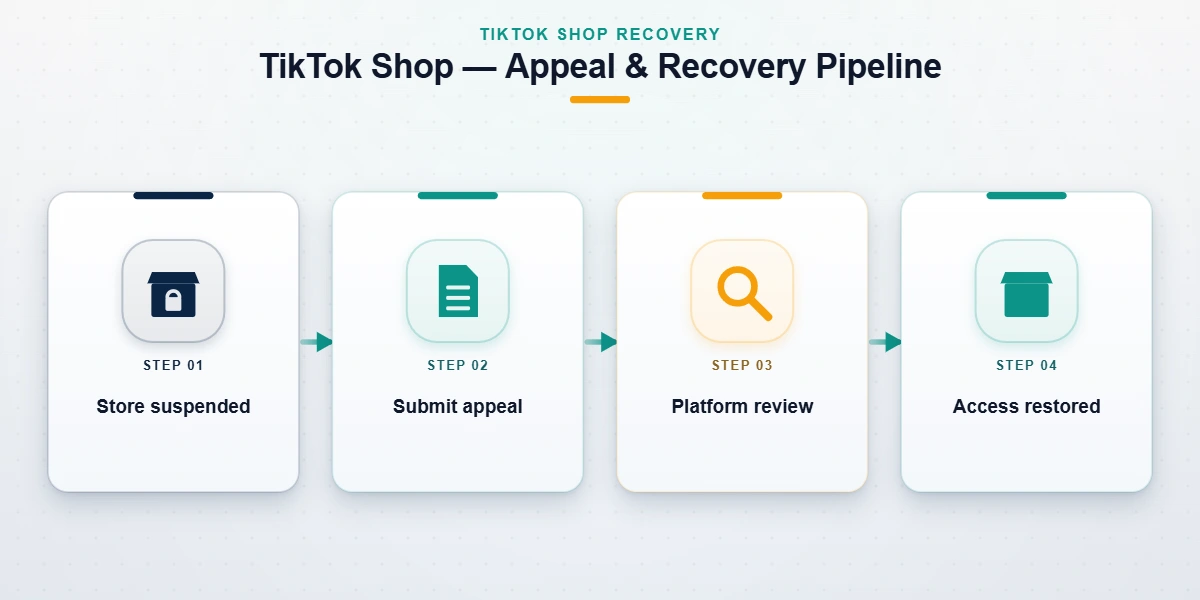
TikTok Shop account recovery is the appeal process for a deactivated or suspended Seller Center account, and it runs on a different policy engine than the rest of TikTok. TikTok Shop uses a points-based penalty system: each confirmed violation adds points to your seller record, and crossing a threshold — or committing a single severe violation — triggers deactivation. The causes we see end businesses most often are intellectual-property infringement strikes (counterfeit or trademark claims), prohibited or restricted products, deceptive or misleading listings, and fulfilment failures that breach the seller agreement.
Whether your case is appealable depends almost entirely on the violation category. From our internal records (n=247 TikTok cases since January 2024, reviewed June 2026), the honest split looks like this. Often appealable: first-time listing or content violations where context was missing, false-positive prohibited-product flags, account-health deactivations built from points you can dispute with evidence, and verification mismatches you can correct with the right documents. Rarely or never appealable: repeated counterfeit or IP strikes after warnings, confirmed fraud or fake-tracking shipping, and severe trust-and-safety breaches. A Shop permanently deactivated after sustained IP infringement carries a very low reversal rate, and no legitimate service can change that.
The appeal itself starts inside Seller Center → Account Health, where the deactivation notice carries the appeal entry; severe cases route into TikTok's Self-Service Account Recovery flow. Your evidence package is what wins or loses it: business registration matching the registered seller name, brand authorization letters or reseller approval for the contested products, supplier invoices proving authentic sourcing, and a tight written statement that names the exact policy cited and explains why it does not apply. Vague "please reinstate me" appeals fail; documented ones get read. The commerce-recovery discipline parallels our Facebook Marketplace ban recovery guide — the platform differs, the evidence standard does not.
TikTok ID suspended account recovery: identity holds vs policy bans
TikTok id suspended account recovery covers a distinct enforcement state that searchers constantly confuse with a content ban: an identity or verification hold, not a Community Guidelines strike. A business account becomes ID suspended when TikTok's verification system cannot confirm the legal entity or person behind it — a business license that does not match the registered seller name, a government ID that fails the document or liveness check, a tax-information mismatch, or a verification that lapsed and was never renewed.
The distinction matters because the recovery paths do not overlap. A policy ban is reversed by arguing the policy; an identity hold is cleared by submitting clean, matching documents. As of June 2026, the identity path runs through the verification module inside Seller Center or Business Center, where TikTok requests the business registration document, a director or authorized-representative ID, and sometimes a proof-of-address or bank-verification step. Outcomes here run higher than policy appeals — clean document resubmissions in our caseload resolve in roughly five to ten business days — precisely because you are correcting a data mismatch rather than contesting a human judgment. The single most common failure is mismatched details: the name on the license, the name on the ID, and the registered seller name must line up exactly, down to the legal-entity suffix.
One frequent trigger is an account takeover that quietly changed the verification details before you noticed. If a bad actor altered your business email, phone, or uploaded documents, treat it as a compromise first: our walkthrough on how to recover a hacked TikTok account covers the credential-recovery sequence that has to happen before any identity resubmission will hold.
TikTok LIVE access appeal: restoring LIVE for sellers and business creators
A TikTok live access appeal is the request to restore LIVE permissions after a feature-level lockout — and for a business running LIVE Shopping, losing LIVE can sting more than a content strike, because it kills your highest-converting sales channel while the rest of the account keeps running. LIVE is governed separately from the public feed. TikTok generally requires an account to meet an eligibility bar (commonly at least 1,000 followers) to unlock LIVE in the first place, and it can revoke that access as a graduated penalty when LIVE-specific rules are broken: regulated-goods promotion, off-platform redirection, repeated viewer-safety violations, or LIVE Shopping policy breaches.
Because a LIVE lockout is a feature penalty and not an account ban, the appeal entry point is different — and using the banned-account flow here is a wasted move. You appeal from the LIVE penalty notice itself, usually reachable under Settings → Account → LIVE access or from the in-app notice that announced the restriction. State which LIVE rule was cited, explain the context the automated system could not see from a clip, and — if you are a seller — point to a legitimate LIVE Shopping history that demonstrates a genuine operating pattern rather than a spam account. From our records, clean first-time LIVE-access appeals resolve faster than full account suspensions, but a second LIVE violation inside a 90-day window roughly halves the odds of reinstatement, because TikTok treats repeat feature abuse as a pattern rather than a mistake.
How to file a TikTok business account suspension appeal
The official appeal path depends on which surface is suspended, and using the wrong one is the most common self-inflicted error in business recovery. As of June 2026, the entry points are:
- TikTok Shop — Seller Center → Account Health → the deactivation notice → Submit appeal, with severe cases routing into the Self-Service Account Recovery flow.
- Ads Manager / ad account — appeal directly from the suspended-account banner; TikTok documents the review criteria on its official suspended ad accounts help page.
- Business Center / TikTok for Business — when the business profile itself is deactivated, the TikTok for Business reactivation flow is the correct starting point.
- Public business handle — appeal from the ban notice on the profile, or via Settings → Report a problem → Account → Banned account.
What an appeal reviewer actually looks for is consistent across every surface. A Trust & Safety or seller-policy associate has roughly 60–90 seconds to read your appeal, check the cited policy against the flagged action, and decide. They reward four things, in order: policy specificity — name the exact rule and explain why it does not apply in two sentences, before anything else; context the automated system missed — the legitimate business reason behind the flagged listing, ad, or stream; account-history quality — clean, verified, consistently operated accounts get the benefit of the doubt that disposable ones never do; and documentation that matches — registration, invoices, and IDs that line up with the registered entity.
Before you submit, assemble the package once and reuse it: business registration or incorporation document, the authorized-representative ID, brand or reseller authorization for any contested products, supplier invoices, and screenshots of the suspension notice with its date and policy reference. Leave out the emotion. Threats, all-caps urgency, and follower- or revenue-name-dropping measurably lower your odds — reviewers decide on policy and proof, not on how much money you say is at stake.
Not sure which surface is actually suspended — or whether your case is appealable at all? Send us the suspension notice and any appeal text you have already submitted, and book a free 60-minute case review. We will tell you upfront which enforcement category you are in and the realistic outcome range, before you spend anything.
TikTok business account recovery scams to avoid
The business-recovery niche is a scam magnet, because suspended Seller Center accounts with held payouts are exactly the high-value, high-panic targets fraudsters hunt for. These are the patterns we see weekly in intake, and the reason this section exists at all:
- The "TikTok insider" who can force a reinstatement. Nobody outside the official appeal pipeline can reverse a business suspension. Anyone claiming a live TikTok Trust & Safety or Seller-Ops contact who will "push it through" for a fee is lying — reviewers cannot reverse decisions outside the queue.
- The upfront-fee guarantee. A seller on Telegram or a freelance marketplace promises guaranteed Shop reinstatement in 24 hours for a flat payment. They are either reselling the free in-app appeal or taking the money and disappearing. Honest pricing scopes the case first — here is what a professional TikTok unban service should actually cost.
- The credential request. Any "recovery agent" who asks for your password, your Business Center master login, a one-time verification code, or your payment details is running a takeover, not a recovery.
- The fraudulent IP-strike scheme. Some operators claim they will file copyright notices or counter-notices to wipe a competitor's listings and restore yours. Filing fraudulent notices is a federal offense under the US Copyright Office DMCA framework, and we won't do it.
What we will never do, on any case: ask for your password or codes, demand payment before scoping the case, or guarantee an outcome before reviewing your suspension notice. Those limits are written into our recovery service disclaimer. And if a phone number or DM claims to be official TikTok support and asks for any of the above, hang up and report it at reportfraud.ftc.gov — TikTok does not operate a recovery hotline that asks for your code.
When professional TikTok business account recovery makes sense
If you have not appealed yet, appeal yourself first — it is free, official, and a meaningful share of clean cases resolve there without anyone's help. Professional TikTok business account recovery earns its fee only in a narrower band. From our internal records (n=247, reviewed June 2026), our success rate on appealable cases is 67%, and we decline roughly 22% of intake on sight because the violation category is non-appealable or the case has already been denied twice — where success drops under 6%.
Bringing in help makes sense when the account drives material revenue and a sloppy second appeal would cost more than the engagement; when the suspension is demonstrably wrongful — a false-positive flag, an account takeover, a mistaken IP claim — and the evidence needs organizing into a reviewer-ready package; or when one trigger cascaded across surfaces, with a Shop deactivation freezing payouts, Business Center locking ad accounts, and LIVE access revoked all at once, so the order of recovery operations actually matters.
It does not make sense when the category is final: confirmed fraud, counterfeit IP infringement sustained after warnings, CSAM, terrorism, or sustained coordinated harassment. No service can reverse those, and the timelines are real — a clean, appealable case still takes 24–72 hours minimum once it is accepted, never the "instant" recovery the scams advertise. The most durable fix, though, is not getting re-suspended in the first place: our guide to avoiding a TikTok ban and the cross-platform hardening in our YouTube channel unban guide both cover the controls that keep a recovered account recovered. For ongoing reading across platforms, the YRS recovery blog library spans TikTok, Instagram, Facebook, X, and YouTube — every case run by a named specialist with verifiable credentials.